Skip to content
Riser & Rail

01 — Standing Desks

The Best Standing Desks With Cable Management

Every desk claims a tidy setup. Only some of them publish what is actually in the box, and only one kind of cable feature survives the desk going up.

By Stephen V.Updated How we research
#ad

We earn a commission when you buy through our Amazon links, at no extra cost to you. It never affects our rankings, and we say so when the cheaper — or the direct-only — product is the better buy. How this works.

Buy the UPLIFT V3 laminate. Its listing names a FlexMount Cable Manager and built-in grommets, it is the only desk on this page whose maker publishes a GREENGUARD Gold document for the desktop line, and it carries a 355 lb rating with a 15-year warranty — so the cable feature comes attached to the best desk here rather than being the only reason to buy it. If you want the plainest possible answer, the Autonomous 48 by 24 puts "cable tray" in its own product title and describes a built-in under-desk tray in its bullets. The budget pick is the SHW 48-inch with drawer, and it is the only desk in our registry that documents both a desktop grommet and an under-desk tray. Before any of that, though: the single best cable fix for a standing desk costs about the price of a takeaway and fits any desk you already own. More on that below, because recommending the cheap thing is the whole point of this site.

Why a sit-stand desk is the only desk with a cable problem

A fixed desk's cables are a cosmetic issue. A sit-stand desk travels something like 18 to 20 inches, several times a day, and every cable on it has to travel too. That turns three separate things into real problems rather than tidiness preferences.

Slack.Each cable needs enough length at the desk's highest position, measured from where it is actually plugged in. Get this wrong and the desk unplugs itself — a monitor that blacks out at standing height is almost always a power cable that ran out of rope, not a fault.

Travel as a bundle. Cables that go up individually snag on the frame, the drawer, the chair arms and the wall. Cables that go up as one bundle do not. This is the single reason an under-desk tray outranks every other cable feature: a tray mounted to the underside of the top makes the whole bundle move with the desk.

Strain at the plug.Repeated pulling works a connector loose and bends the cable at its weakest point, right behind the plug body. OSHA's flexible-cord rules exist for the industrial version of this problem, and the home-office version is the same mechanism on a smaller scale: support the weight somewhere other than the connector.

The four kinds of "cable management", ranked

Desk listings use the phrase for four quite different things. In descending order of how much they actually help a desk that moves:

  1. An under-desk tray or basket.The only feature that solves travel, because the whole bundle and usually the power strip ride with the top. Autonomous and SHW document one; Eureka documents "under-desk organization".
  2. Built-in power or USB. Underrated, and it works by subtraction: a desk with charging ports in the top is a desk with two fewer wall-bound cables. The FlexiSpot Comhar on our under-$300 pageis the registry example, and Eureka's L-shape adds a power-strip holder.
  3. A grommet. A hole with a finished edge through the desktop. It routes cables down through the surface instead of around the back edge, which tidies the desktop and does nothing at all for travel. UPLIFT, SHW and Branch document grommets.
  4. Hooks and a rear notch. The cheapest thing a maker can print on a listing. A hook holds a headset. A notch stops the cable being pinched by the top. Neither bundles anything.

That hierarchy is the whole ranking on this page, and it is why the order here is not the price order.

Who each pick is for

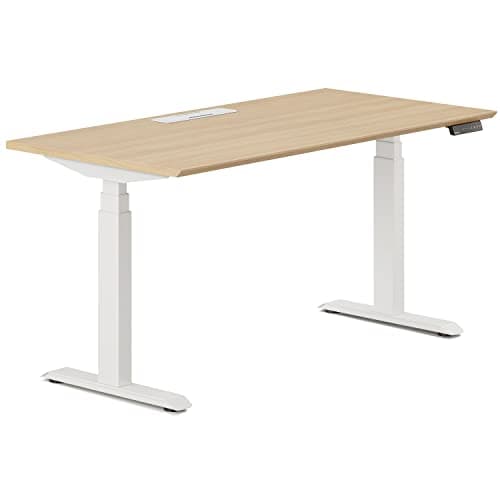
  • UPLIFT Desk V3 laminate (42 by 30) — the best desk on the page, with grommets and a named cable manager, on the desktop line UPLIFT publishes its GREENGUARD Gold document for. Buy it if you want the cable feature on a desk you will not replace.
  • Autonomous 48 by 24 — the plainest built-in tray in the registry, stated in the product title and the bullets. Buy it if the tray is non-negotiable and you are a taller sitter.
  • SHW 48-inch with drawer (budget pick) — a desktop grommet and an under-desk tray, which no other desk we rank documents together, at the cheapest price here by a distance.
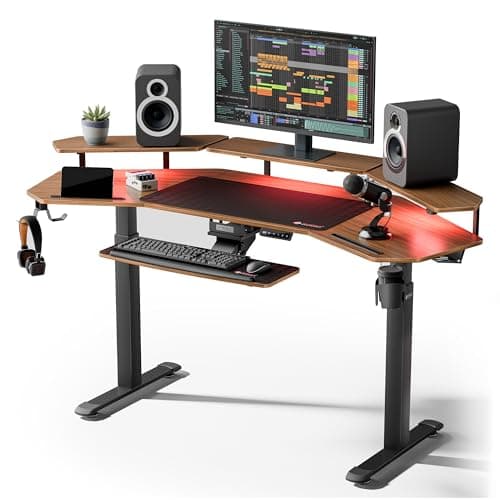
  • EUREKA 72-inch studio workstation — the multi-device desk: a cable system with under-desk organization, plus a keyboard tray and shelves, on six feet of top. Buy it if you are wiring a studio rather than a laptop.
  • Branch Standing Desk (48 by 30) — the cleanest-looking answer: a frameless structure with a brushed grommet for routing, three-stage dual-motor lift and a 10-year warranty. Buy it if the desk is in a living room.

The honest limit on every pick

UPLIFT. It is the most expensive desk on this page and the smallest top of the five, and its cable accessories are a range rather than a single item — confirm which of them is included in the configuration you order rather than assuming the whole catalog ships in the box.

Autonomous.The tray is real; the height range is the problem. Amazon's own detail table gives a 29.4-inch minimum, which is roughly where an ordinary fixed desk already sits — so this desk adds standing without fixing sitting, and it is the wrong desk if you are much under about 5 ft 10. Autonomous also states that products bought from resellers are not warranty-eligible, so buy it from the brand's own storefront. Our full Autonomous review has the three conflicting height figures its own documents publish, and note that the live listing now titles this desk the Desk Core rather than the Desk 5 — same ASIN, same 48 by 24 gray build.

SHW. The cable system is the most complete here per dollar, and the desk under it is a budget single-motor laminate desk with no emissions documentation and one shallow drawer. It is the right answer for a first desk and the wrong one for a heavy multi-monitor setup.

EUREKA. Nothing about the panel is documented — no core material, no emissions certificate — and the published warranty splits 5 years on the frame against 1 year on the electrics, which is the shortest electronics coverage of any desk brand we rank. Six feet of undocumented composite wood is a lot of panel for a site that cares about panels.

Branch.A grommet is a grommet: it routes, it does not bundle. Branch's "meets BIFMA standard for commercial-grade use" is a manufacturer compliance statement rather than a third-party certification mark, and no GREENGUARD certificate is published for the laminated MDF top.

The cheaper fix that beats most of this page

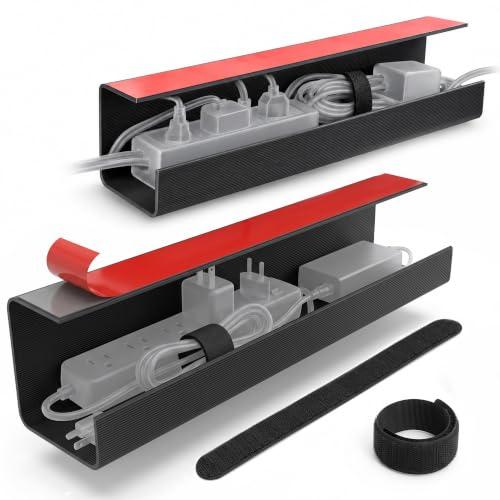
A clamp-on under-desk cable tray costs a small fraction of any desk here, fits a desk you already own, and does the one thing that actually matters: it carries the power strip and every power brick so the whole bundle rides up with the top. If you have a desk you otherwise like, buy the tray and stop reading — that is the honest answer, and it is on our cable-management accessory ranking, which covers trays, sleeves, J-channel raceways and the surge-protected strip that lives in the tray.

Three things make an aftermarket tray better than most built-in ones, and they are worth knowing before you pay a premium for a factory feature. It can be longer than the one the maker includes. It clamps rather than screws, so it works on a rented or a certified top you do not want to drill. And you can site it where your cables actually come in rather than where the design team put it. The case for a built-in system is the opposite one: nothing to install, nothing to clamp, and a finish that matches the desk.

The other half of the cheap fix is not a product at all. Plug everything into one surge- protected strip that lives on the desk or in the tray, so exactly one cable leaves the desk and goes to the wall. One cable needs slack. Eleven cables need a plan. Our standing desk setup guide covers the order to do it in.

Other registry desks with a documented cable feature

These did not make the ranking because their cable line is thinner or their desk is covered better elsewhere, but all of them state something specific on their own listings and that is worth recording:

  • SHW 48-inch and SHW 40-inch — both state a built-in cable tray plus side hooks; the 40-inch adds a drawer. Both are the cheapest route to a tray-equipped desk, and both sit in the budget tier.
  • SHW 55-inch L-shape, left-facing— "Desk Top has the grommets to organize your cords", which is a grommet-only answer on a corner desk. See L-shaped standing desks.
  • EUREKA 61-inch L-shape — cable ties and a power-strip holder, plus a built-in USB port; the power-strip holder is the part that matters.
  • EUREKA 60 by 26 executive — an under-desk cable holder plus three drawers, at the top of the range.
  • Branch Duo— a rear cable notch with a drawer and a cable organizer as optional add-ons, which is the honest version of "cable management included".
  • FlexiSpot Comhar — USB-A and USB-C charging in the desk itself, which removes cables rather than hiding them. It leads our under-$300 ranking.

One more thing worth saying because it changes what you need: a monitor arm moves two to four cables off the desktop entirely and lifts the screen to eye level while it is at it. If your desktop mess is mostly monitor cables, a monitor arm is the cheaper half of the fix and our monitor height guide explains why you probably wanted one anyway.

The short answer

Quick picks

#ProductBest forScorePrice
01
UPLIFT Desk UPLIFT Desk V3 Laminate Standing Desk (42×30)
UPLIFT Desk V3 Laminate Standing Desk (42×30)

The same frame, the same certified desktop line, in the smallest top UPLIFT sells — the cheapest way into this brand.

A small room or a corner setup where a 60-inch top will not fit
8.8
$648.00Amazon
02
Autonomous Autonomous Electric Standing Desk 5 (48×24, Gray)
Autonomous Electric Standing Desk 5 (48×24, Gray)

A well-built steel frame from a brand that makes its own — but its lowest setting is a normal desk height, so it adds standing without fixing sitting.

A taller sitter who wants Autonomous build quality at 48×24
5.8
$299.00Amazon
03
SHW SHW 48-Inch Electric Standing Desk with Drawer (Maple)
SHW 48-Inch Electric Standing Desk with Drawer (Maple)

One shallow drawer, one well-sorted budget desk — the sensible middle for a desk that has to hide a keyboard tray's worth of clutter.

Light storage without compromising the frame
6.4
$135.89Amazon
04
Eureka Ergonomic EUREKA ERGONOMIC 72 in Standing Desk (studio workstation, deep walnut)
EUREKA ERGONOMIC 72 in Standing Desk (studio workstation, deep walnut)

Six feet of surface with the tray and shelf built in — a studio layout almost nobody else sells as one piece.

A music, streaming or multi-device setup that needs 72 inches and a keyboard tray in one desk
6.2
$639.00Amazon
05
Branch Branch Standing Desk, Dual Motor 3-Stage (48×30)
Branch Standing Desk, Dual Motor 3-Stage (48×30)

Branch's bigger desk: three-stage legs, 30 inches of depth and a 26-inch travel range the Duo cannot reach.

Two monitors, or anyone at the tall or short edge of the height range
8.0
Check price →

#ad · Live prices from the Amazon Product API, as of November 23, 2026. Where we have no verified live price, we show none — we would rather leave a gap than print a number that has rotted.

In detail

The picks, in full

01
UPLIFT Desk UPLIFT Desk V3 Laminate Standing Desk (42×30)

A small room or a corner setup where a 60-inch top will not fit

UPLIFT Desk V3 Laminate Standing Desk (42×30)

42×30 in top1 in laminate topUPLIFT rates 355 lb15-year warranty

Certification & materials

Same laminate line and therefore the same published GREENGUARD Gold document as the 60×30, over the same 45 lb density E-1 rated core. UPLIFT does not print a per-SKU certificate number, so verify the current certificate at UL SPOT. The ANSI/BIFMA X5.5-2021 line is UPLIFT's own compliance statement rather than a certification mark.

8.8/10

The same frame, the same certified desktop line, in the smallest top UPLIFT sells — the cheapest way into this brand.

Stability
9
Adjustment
9
Materials & certs
9
Build & motor
9
Value
8

Pros

  • Cheapest entry to the certified desktop line without dropping to an undocumented brand
  • Identical frame, capacity and 15-year warranty as the larger sizes — you lose surface area, not engineering
  • 42×30 fits rooms where the 60-inch tops on this page physically will not

Cons

  • 42 inches is tight for a dual-monitor setup once a keyboard and a laptop are on the desk
  • Still a particleboard core, and still a line-level certificate rather than a SKU-level one

Don't buy this if…

…you run two monitors. Go up to the 60-inch top, or read our two-monitor page first — the depth and width numbers there are the ones that decide this.

$648.00View on Amazon

Price as of November 23, 2026. Prices change — Amazon's is the one that counts.

#ad · we may earn a commission from this link to UPLIFT Desk V3 Laminate Standing Desk (42×30)

02
Autonomous Autonomous Electric Standing Desk 5 (48×24, Gray)

A taller sitter who wants Autonomous build quality at 48×24

Autonomous Electric Standing Desk 5 (48×24, Gray)

48×24 in top29.4 in minimum heightAmazon lists 300 lb3 memory presets

Certification & materials

No GREENGUARD certificate, no GREENGUARD Gold certificate, no third-party BIFMA mark and no certificate number is published for this desk — not on the Amazon listing and not on autonomous.ai. What Autonomous does publish on its own Desk 5 page is a set of unattributed labels: "Eco-certified", a "Green" rating, an HDF top "sealed with Green Standard paint, no off-gassing", and a formaldehyde emission figure of "<0.5 mg/L" with no test standard and no certifier named beside it. TÜV Rheinland IS named on that page, but against the STABILITY measurement ("measured every point"), not against emissions — and no report number or test standard is given. Amazon's own detail table calls the top "Engineered Wood", which is a composite panel: treat it as uncertified on emissions and ventilate it for its first week. Read "no off-gassing" as the marketing claim it is, not a measured result you can look up.

5.8/10

A well-built steel frame from a brand that makes its own — but its lowest setting is a normal desk height, so it adds standing without fixing sitting.

Stability
8
Adjustment
4
Materials & certs
4
Build & motor
7
Value
6

Pros

  • Autonomous builds its own frames — "we cut and weld our own steel, finish our own tops" — and publishes its own stability figures, with TÜV Rheinland named as the measurer
  • Sold and shipped on Amazon by AUTONOMOUSINC., the brand itself, rather than a marketplace reseller
  • C-frame drops the front crossbar, so there is nothing across your knees, and the cable tray is built in rather than an add-on

Cons

  • The minimum height is 29.4 in on Amazon's own detail table — that is a standard fixed-desk height, so the desk barely descends below the desk it replaces
  • Three different height ranges are published for this desk family: the listing bullets hedge "approx. 28\" to 47\" depending on model", the detail table says 29.4 in minimum, and autonomous.ai says 29.5-48.5 in for the Pro
  • The listing never states how many motors it has, and quotes ≤50 dB where autonomous.ai claims <30 dB for the Desk 5
  • Autonomous's warranty policy states that products "purchased from dealers or resellers are not eligible for a warranty", and the Desk 5 is not named anywhere in that policy's term table

Don't buy this if…

…you are under about 5 ft 10, or you need the desk to go genuinely low. A 29.4 in floor is roughly where an ordinary desk already sits — the UPLIFT V3 reaches 22.6 in and the FlexiSpot E6 23.6 in, and for a shorter sitter that difference is the whole point of buying a sit-stand desk.

$299.00View on Amazon

Price as of November 23, 2026. Prices change — Amazon's is the one that counts.

#ad · we may earn a commission from this link to Autonomous Electric Standing Desk 5 (48×24, Gray)

03
SHW SHW 48-Inch Electric Standing Desk with Drawer (Maple)

Light storage without compromising the frame

SHW 48-Inch Electric Standing Desk with Drawer (Maple)

48 in topSingle wide drawerElectric height adjustHeight memory

Certification & materials

Laminate over engineered wood. SHW publishes no CARB Phase 2 or GREENGUARD documentation. The desk is not certified on emissions; the honest handling is ventilation, not a claim.

6.4/10

One shallow drawer, one well-sorted budget desk — the sensible middle for a desk that has to hide a keyboard tray's worth of clutter.

Stability
7
Adjustment
7
Materials & certs
4
Storage
6
Value
8

Pros

  • A single shallow drawer adds far less cantilevered weight than a two-drawer bank
  • SHW's frames have a long, boring, reliable track record in this price band
  • Maple finish reads warmer than the black laminate everything else in the class ships in

Cons

  • One drawer is genuinely shallow — pens, cables and a notebook, not files
  • No emissions documentation published

Don't buy this if…

…you need to file paperwork. This holds desk clutter, not hanging folders.

$135.89View on Amazon

$159.8715% off

Price as of November 23, 2026. Prices change — Amazon's is the one that counts.

#ad · we may earn a commission from this link to SHW 48-Inch Electric Standing Desk with Drawer (Maple)

04
Eureka Ergonomic EUREKA ERGONOMIC 72 in Standing Desk (studio workstation, deep walnut)

A music, streaming or multi-device setup that needs 72 inches and a keyboard tray in one desk

EUREKA ERGONOMIC 72 in Standing Desk (studio workstation, deep walnut)

72 in wide topDual motorKeyboard tray + LED monitor standCable slot design

Certification & materials

Same brand position as every Eureka desk: no GREENGUARD certificate, no third-party BIFMA certification mark, no certificate number and no published substrate for this listing. The 5-year frame / 1-year electrics split in Eureka's published warranty applies here too, with the desktop excluded.

6.2/10

Six feet of surface with the tray and shelf built in — a studio layout almost nobody else sells as one piece.

Stability
7
Adjustment
7
Materials & certs
4
Build & motor
7
Value
6

Pros

  • 72 inches with an integrated keyboard tray and monitor shelf is a genuinely rare configuration — most brands make you bolt those on
  • The cable slot and shelf are designed around a multi-device desk rather than added as an afterthought
  • Dual motors stated on a top this wide, where a single motor would visibly rack

Cons

  • Nothing about the panel is documented — no core material, no emissions certificate, no registry entry
  • One year on the motors and control panel is the shortest electronics coverage of any desk brand on this site
  • A 72-inch laminated surface is the largest slab of undocumented composite wood in this comparison

Don't buy this if…

…you do not actually need the width. A 60-inch desk from a brand that publishes a certificate costs about the same and answers the question this site is built around.

$639.00View on Amazon

$799.0920% off

Price as of November 23, 2026. Prices change — Amazon's is the one that counts.

#ad · we may earn a commission from this link to EUREKA ERGONOMIC 72 in Standing Desk (studio workstation, deep walnut)

05
Branch Branch Standing Desk, Dual Motor 3-Stage (48×30)

Two monitors, or anyone at the tall or short edge of the height range

Branch Standing Desk, Dual Motor 3-Stage (48×30)

48×30 in topBranch states 26–52 in range3-stage dual-motor lift4 memory presets

Certification & materials

Same position as the Duo, and stated in the same words: Branch says this desk "meets BIFMA standard for commercial-grade use", which is a manufacturer compliance statement rather than a third-party certification mark. The top is laminated MDF and no GREENGUARD certificate is published for it. The 10-year warranty applies to Standing Desks purchased after 1 January 2023.

8.0/10

Branch's bigger desk: three-stage legs, 30 inches of depth and a 26-inch travel range the Duo cannot reach.

Stability
9
Adjustment
9
Materials & certs
7
Build & motor
9
Value
6

Pros

  • Three-stage legs and a 26-inch travel range — it reaches both lower and higher than the Duo, which matters at either end of the height chart
  • 30 inches deep, which is the depth two monitors actually need to sit at arm's length
  • Four memory presets rather than the Duo's two
  • Same 10-year warranty and the same published BIFMA line

Cons

  • The most expensive Branch desk here, and still no emissions certificate for the top
  • Laminated MDF again — a bigger panel than the Duo, with the same absence of documentation
  • A three-stage leg has more moving parts than a two-stage one; that is the trade for the extra travel

Don't buy this if…

…you only ever run one screen. The Duo does that job for less money, and the extra travel is wasted if your seated and standing heights sit in the middle of the range.

Check price on Amazon →

No buyable offer at the last price check (November 23, 2026). We show nothing rather than a stale number.

#ad · we may earn a commission from this link to Branch Standing Desk, Dual Motor 3-Stage (48×30)

Before you buy

How to wire a desk that moves

1. Measure slack at the highest position, not the lowest

Raise the desk fully, then measure from each wall socket to where the cable plugs in, and add a hand's width. Every cable that is short at full height will eventually pull itself out.

2. Get to one cable leaving the desk

Everything plugs into one surge-protected strip that rides with the desk. That turns a dozen travel problems into one, and it is the step that does most of the work.

3. Insist on a tray, not a notch

A tray or basket under the top is the only feature that makes the bundle travel. A grommet tidies the surface; hooks hold a headset. If the listing only mentions hooks and a notch, plan on buying a tray.

4. Check whether the cable feature is included or sold separately

Several makers list cable accessories in the marketing copy and sell them as add-ons. Read the configuration you are actually ordering, and if it is not in the parts list, it is not in the box.

5. Do not drill a certified or solid top if you can clamp instead

Clamp-mounted trays exist precisely for this. Drilling a laminate top also opens the raw core edge, which is the part of a composite panel you least want exposed — why that matters.

6. Route the bundle on the side opposite your chair

Cables, casters and chair arms fight. Run the bundle down the leg furthest from where you get in and out, and nothing gets rolled over.

Side by side

Compare the five on the factors that decide it

Every cable claim in this table is quoted or closely paraphrased from the desk's own live Amazon listing, read on November 13, 2026. The second column is the one that decides the ranking.

ChairLumbarAdjustmentsCertificationRated forPrice
42 by 30 in, 1 in laminate topListing names "the FlexMount Cable Manager and built-in grommets" — grommet routing plus a mounted manager; confirm what ships with your configurationThe GREENGUARD Gold document UPLIFT publishes covers this laminate desktop line; verify the current certificate at UL SPOT. The ANSI/BIFMA X5.5-2021 line is UPLIFT's own compliance statementUPLIFT rates 355 lb; 15-year warranty$648.00Check price on Amazon
48 by 24 in on a self-manufactured steel C-frame"A built-in under-desk cable tray keeps wires organized" — a true tray, and the only one named in the product titleLabeled eco-certified with no certifier named; nothing verifiable publishedMaker's own stability figures with TUV Rheinland named as measurer; 29.4 in minimum height on Amazon's detail table$299.00Check price on Amazon
48 in laminate top with one shallow drawer"A desktop cable grommet and an under-desk cable tray" — the only desk we rank that documents bothNo CARB Phase 2 or GREENGUARD documentation published; laminate over engineered woodManufacturer figure only; no third-party test published$135.89Check price on Amazon
72 in wing-shaped top with keyboard tray and LED monitor shelves"A cable management system with under-desk organization", plus device slots, headphone hooks and a cup holderNo GREENGUARD certificate, no third-party BIFMA mark, no published substrate for this listingDual motor stated; warranty splits 5 years frame / 1 year electrics, desktop excluded$639.00Check price on Amazon
48 by 30 in laminated MDF on a frameless structure"Rounded corners and a brushed grommet for precise cable rout[ing]" — grommet only, no tray namedBranch says the desk "meets BIFMA standard for commercial-grade use" — a maker compliance statement, not a certification mark; no GREENGUARD certificate for the topBranch states 26-52 in range; 10-year warranty on desks bought after 1 Jan 2023Check price on Amazon

#ad · we may earn a commission · Live prices from the Amazon Product API, as of November 23, 2026. Where we have no verified live price we show none.

How we picked

We do not run a testing lab

We compiled specs from manufacturer manuals, verified every certification claim in the certifying body's own registry (UL SPOT for GREENGUARD, BIFMA, CARB), did the cost-to-own math, and read the aggregated owner reviews, then scored each product against a published rubric. The scores are judgments from documented research — they are not measurements we took, because we do not have a lab and we are not going to pretend we do.

Small things, same day

Desk-day essentials under $40

None of these will change which desk you should buy. They are the cheap, unglamorous parts that decide whether the desk you do buy is pleasant to use on a Tuesday — and, where the material is the whole point of the thing, we have said what it is and what it is not certified to.

  • YSAGi PU Leather Desk Pad (31.5 × 15.8 in)

    YSAGi PU Leather Desk Pad (31.5 × 15.8 in)

    The cheapest way to stop a laminate top getting scratched, and it gives the mouse one consistent surface at both sitting and standing height.

    Materials YSAGi lists it as PU — polyurethane, the same polymer we prefer over PVC on the mats side, and for the same reason: no plasticizer question. No emissions certificate is published for it, and at this price we would not expect one.

  • Cork Desk Mat, dual-sided (36 × 17 in)

    Cork Desk Mat, dual-sided (36 × 17 in)

    The natural-material option if a polymer sheet on your desk is exactly the thing you are trying to avoid. Wide enough that keyboard and mouse both sit on it.

    Materials Sold as a dual-sided cork mat — cork is bark rather than a polymer sheet, which is the whole reason to pick it here. The seller does not publish what the backing or the second face is made of, and there is no emissions certificate, so treat it as uncertified like the rest of this list.

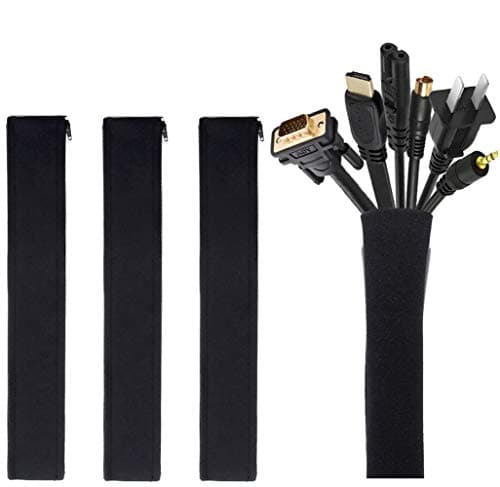
  • JOTO Cable Management Sleeve (4-pack, 19-20 in)

    JOTO Cable Management Sleeve (4-pack, 19-20 in)

    A sit-stand desk drags its entire cable loom up and down twenty times a day. Sleeving the run is the single cheapest thing that stops a cable snagging mid-travel.

    Materials No certification is published, and none would mean anything on a cable wrap. This one is on the list for what it prevents, not for what it is made of.

  • Scanfield No-Screw Under-Desk Cable Tray (17 in, 2-pack)

    Scanfield No-Screw Under-Desk Cable Tray (17 in, 2-pack)

    Gets the power strip and the laptop brick off the floor and onto the underside of the top, so the whole lot travels with the desk instead of tugging at it.

    Materials No certification is published and none applies to a tray. The reason it is this one: the no-screw mount means nothing gets drilled into a desktop you may have chosen precisely because it is intact and certified.

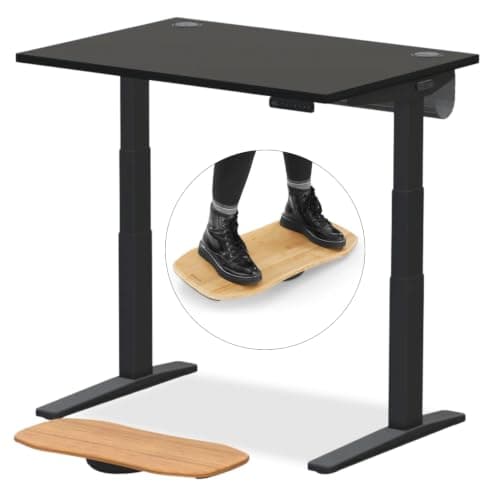
  • Amazer Bamboo 2-in-1 Reversible Rocking Footrest

    Amazer Bamboo 2-in-1 Reversible Rocking Footrest

    Rock it while you sit, flip it to a fixed angle while you stand. Movement is the entire point of alternating, and this is the cheapest way to add some.

    Materials Bamboo. Bamboo panel is normally laminated with an adhesive, and Amazer publishes no formaldehyde or emissions certificate for this model — we are not going to imply it has one.

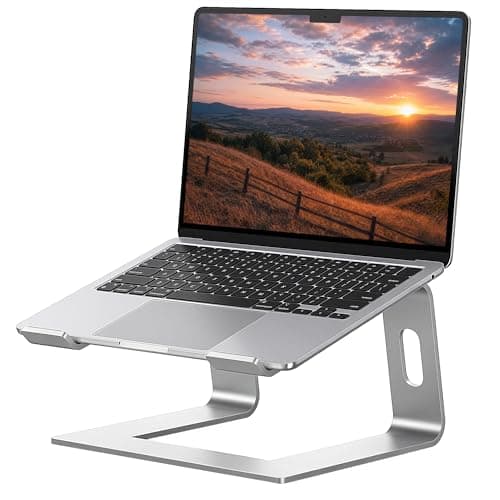
  • SOUNDANCE Aluminum Laptop Stand (10-15.6 in)

    SOUNDANCE Aluminum Laptop Stand (10-15.6 in)

    If you work off a laptop, no amount of desk height fixes a screen sitting in your lap. This lifts it toward eye level for under twenty dollars.

    Materials Solid aluminum — no composite panel, no adhesive, nothing to off-gas. That is the honest appeal of a metal accessory on a site like this, and it needs no certificate to be true.

  • Gorilla Grip Memory Foam Wrist Rest (keyboard + mouse, 2-piece)

    Gorilla Grip Memory Foam Wrist Rest (keyboard + mouse, 2-piece)

    Standing does not fix wrist extension; keeping the wrist neutral does. Two pieces, so the mouse hand gets one as well.

    Materials Memory foam under a fabric cover. No emissions or content certificate is published — memory foam is polyurethane foam, and if that is a hard line for you, skip this one rather than talk yourself into it.

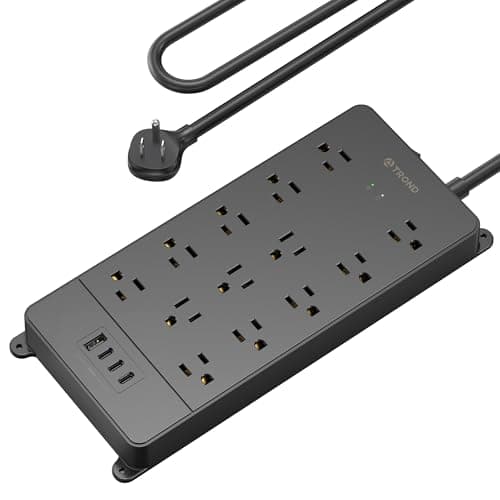
  • TROND Surge Protector Power Strip (4000 J, ETL Listed)

    TROND Surge Protector Power Strip (4000 J, ETL Listed)

    A powered desk, two monitors and a laptop brick all end up on one strip that travels with the top. Worth thirty dollars for that not to be the cheapest part of the setup.

    Materials ETL Listed — a real third-party safety listing from Intertek, and the only genuine certification in this list. You can look it up in Intertek's public directory the same way we tell you to check a GREENGUARD claim at UL SPOT.

Questions

Frequently asked

What is the best standing desk with cable management?
The UPLIFT V3 laminate, because the cable feature arrives attached to the best desk here: its listing names a FlexMount Cable Manager and built-in grommets, UPLIFT publishes a GREENGUARD Gold document for the desktop line, and the desk carries a 355 lb rating and a 15-year warranty. If you want the most explicit tray rather than the best desk, the Autonomous 48 by 24 names a built-in under-desk cable tray in its own product title.
Is a built-in cable tray better than an add-on one?
Usually not, and we would rather say so. A clamp-on aftermarket tray can be longer than the included one, mounts without drilling a top you may not want to drill, and goes where your cables actually enter the room. What a built-in system gives you is nothing to install and a matching finish. If you already own a desk you like, buy the tray — our accessory ranking covers the whole category.
What is the difference between a cable tray and a grommet?
A grommet is a finished hole through the desktop: it routes cables down through the surface and tidies the desktop. A tray is a basket under the top that holds the bundle and usually the power strip, so everything travels with the desk when it rises. On a sit-stand desk the tray is the feature that matters; a grommet alone leaves every cable traveling on its own.
How much cable slack does a standing desk need?
Enough to reach at the desk's highest position, measured from the socket to the plug, plus a hand's width. Most sit-stand desks travel 18 to 20 inches. The reliable way to get it right is to reduce the count first: put everything on one surge-protected strip that rides with the desk, so a single cable has to reach the wall instead of eleven.
Can you add cable management to a standing desk you already own?
Yes, and it is the cheapest useful upgrade in this category. A clamp-on under-desk tray plus a sleeve for the one run going to the wall covers almost every setup for a small fraction of a desk's price, with no drilling. If your desktop clutter is mostly monitor cables, a monitor arm removes them from the surface entirely and raises the screen to eye level while it does it.
Do desks with built-in USB charging help with cables?
More than they get credit for, because they work by subtraction: two devices charging from ports in the desktop are two cables that never run to the wall. The FlexiSpot Comhar is the registry example and it leads our best-under-$300 ranking. The caveat is that the desk's own power cable now carries that load, so it still needs proper slack and a strain-relieved route.

Keep reading

Receipts

Sources

We do not run a testing lab, and we do not pretend to. We verify certifications in the certifying body's own registry, compile specs from manufacturer manuals, and cite health claims to recognized authorities — by name, with a link. Where we could not verify something, we say so on the page rather than quietly leaving it out. Read our full method.