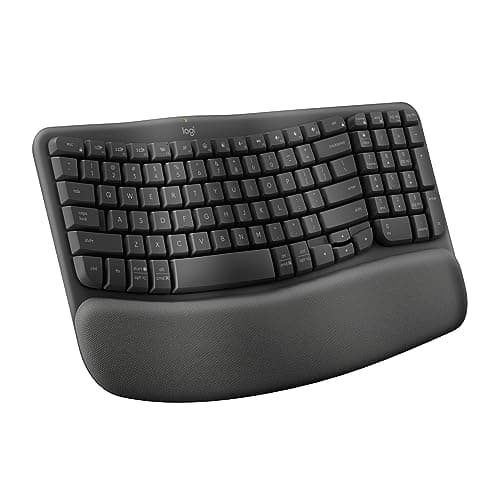
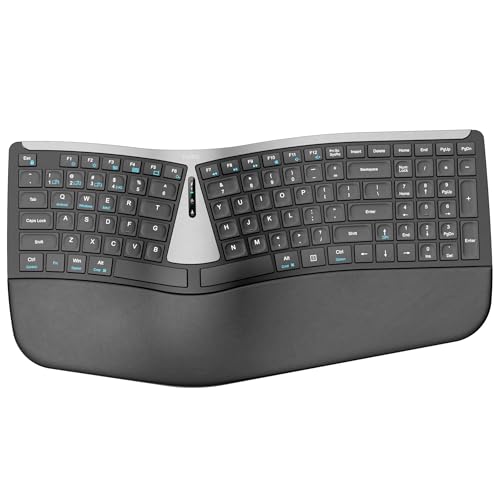
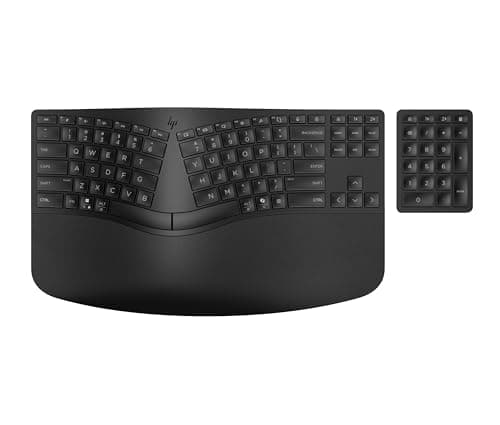
Skip to content
Riser & Rail

04 — Accessories

The Best Wireless Ergonomic Keyboards

Going cordless on an ergonomic keyboard adds three failure modes a wired board does not have — a dead cell, a dropped pairing, and a login screen you cannot type into. Only one board here closes all three.

By Stephen V.Updated How we research
#ad

We earn a commission when you buy through our Amazon links, at no extra cost to you. It never affects our rankings, and we say so when the cheaper — or the direct-only — product is the better buy. How this works.

For most desks, buy the HP 960. Going wireless lets a keyboard do one thing a wired board cannot, and the HP 960 is the only board here that uses it: the numeric keypad is a separate wireless unit you can lift off the desk entirely, which pulls your mouse back toward the center line and shortens the reach that strains a shoulder. It pairs over Bluetooth Swift Pair or HP's own dongle, switches between three paired devices from a key, and adds a split-zone layout, negative tilt and a deep foam wrist rest. If you want more wrist correction than a split zone gives, the Logitech Ergo K860's curved split is the strongest mainstream ergonomic shape and it also carries both radios. On a Mac, buy the Macally — it is the only board here with a wired USB-C fallback that works at the login screen. The budget pick is the Nulea, the cheapest board in our registry that is both split and cordless. Prices are read from the Amazon Creators API with the date they were read.

One clarification before the picks, because it is the main reason this page exists separately from our main ergonomic keyboard ranking: going cordless costsyou something ergonomically. The two most corrective boards we rank — the Kinesis Freestyle2 true split and the Perixx PERIBOARD — are wired, and they are not on this page. If maximum wrist relief is the goal, a cable is not your enemy. This page is for people who have decided the desk must be clear.

What to judge a wireless ergonomic keyboard on

Two radios, not one.Bluetooth is what lets a board talk to a tablet and a phone. A 2.4 GHz dongle is what lets it work in a PC's BIOS, at a Windows login screen and on a machine whose Bluetooth stack has not loaded yet. A board with both covers every case; a Bluetooth-only board will strand you at a password prompt at least once.

Cells or a cable.Disposable AA and CR2032 cells mean nothing to recharge and something to replace — the HP 960 takes two AA in the board and two CR2032 in the numpad. A rechargeable cell means a USB-C cable and a published runtime. Neither is wrong; what is wrong is a listing that does not say which.

How many devices, and how you switch. Three paired devices on a dedicated key is the useful implementation. Re-pairing from a settings menu every time is not, and it is the difference between a keyboard that serves a laptop and a tablet and one that technically can.

And then the ergonomics, which is the actual point. A split zoneis a gap in one fixed board — a moderate correction. A curved split adds a dome and a tilt. A true two-zone split separates the halves. None of these is wireless-specific, and all of them matter more than the radio; the main ranking is organized around them, and wrist rests is the cheaper intervention if your current board is nearly right.

Who each pick is for

  • HP 960 Ergonomic Wireless— the default. A detachable wireless numpad is the real ergonomic feature here, because it is what moves your mouse closer to center. Split-zone layout, negative tilt, high-density foam rest, 20 programmable keys, three paired devices, Bluetooth or HP's dongle. HP also states at least 60% post-consumer recycled materials and FSC-certified packaging, which almost no peripheral does.
  • Logitech Ergo K860— the most correction without a relearning cliff. A curved split layout, a genuinely good integrated wrist rest, negative-tilt legs, Bluetooth and a dongle. Buy it if your wrists, not your shoulders, are the complaint.
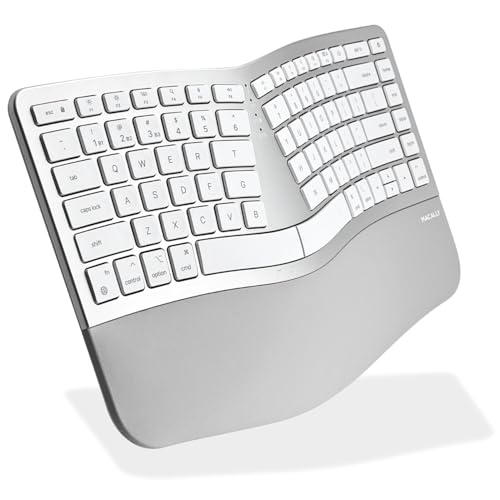
  • Macally Ergonomic Keyboard for Mac— the Mac answer, and the only board here that solves the login-screen problem. A true two-zone split in an 86-key body, Mac-native layout with 15 macOS shortcuts, three-device switching, a 500 mAh rechargeable cell that Macally says charges in about two hours and runs one to two months, and a wired USB-C or USB-A mode that works at the password prompt and while charging.
  • Logitech Wave Keys— the compact one. The K860's comfort ideas in a much smaller footprint, with a soft integrated palm rest, Bluetooth and a dongle. Buy it if your desk is shallow or you travel with the board.
  • Nulea split wireless (budget pick)— the cheapest split-and-cordless board in our registry. Bluetooth plus a 2.4 GHz dongle, USB-C rechargeable with a stated 200-hour runtime, scissor switches, palm rest included. Buy it to find out whether a split layout helps you at all.

The honest trade in each one

The HP 960's split zone is a moderate correction.It is a gap in one fixed board, not a curve or a dome — less than the K860 and far less than a true split. If you have real RSI or forearm pain, this is not enough board and you should accept the relearning week that a bigger correction costs. It also runs on disposable cells in two places.

The K860 needs desk depth. It is a big board with a fixed one-piece curve, so you cannot set the halves shoulder-width apart, and the membrane switches feel soft. On a shallow desk it crowds the mouse, which partly undoes the thing the HP 960 is good at.

The Macally has no number pad and one fixed split angle.Eighty-six keys is a real loss in spreadsheets, there is no tenting or separation adjustment, the Mac-first layout is a drawback if the board is ever shared with Windows, and the scissor switches are shallow — fine if you come from a laptop, disappointing from a mechanical board.

The Wave Keys is the mildest shape here. Not a true split; the wave is a gentle correction and membrane-soft. It is the right board for prevention and the wrong one for an existing injury.

The Nulea publishes almost nothing.No warranty term anywhere in the listing copy, no dimensions, no weight, no key-travel figure — the listing describes the idea rather than the object. The split is attached, so the separation is fixed and modest, and at this price the plastics and keycap legends are where the money was saved.

What we would actually do

If the desk has to be clear, buy the HP 960 and move the numpad off it — that single change does more for a sore shoulder than any amount of keyboard curvature, because it shortens the reach to the mouse. If your wrists are the problem rather than your shoulder, buy the K860. If you are on a Mac, the Macally is the only board here that will let you type your password.

And if you are buying a keyboard because something hurts, buy the cheap diagnostic first. A wrist rest and a corrected keyboard height account for a surprising share of keyboard pain, and both cost less than any board on this page: wrist rests and under-desk keyboard trays are the two to try, and a vertical mouse is often the half of the problem the keyboard was never going to fix. If the budget is the binding constraint, ergonomic keyboards under $100 is the band page, and it includes wired boards this one cannot.

The short answer

Quick picks

#ProductBest forScorePrice
01
HP HP 960 Ergonomic Wireless Keyboard
HP 960 Ergonomic Wireless Keyboard

The split-zone board with a numpad you can move — the layout that pulls your mouse hand back toward center, at a fair price.

Anyone who mouses a lot and wants the numpad out of the way
7.4
$80.99Amazon
02
Logitech Logitech Ergo K860 Split Keyboard
Logitech Ergo K860 Split Keyboard

The best mainstream ergonomic keyboard — a curved split layout and a real wrist rest, with no learning cliff.

Most people wanting a gentler wrist angle
7.4
$113.99Amazon
03
Macally Macally Ergonomic Keyboard for Mac (split, Bluetooth + USB-C)
Macally Ergonomic Keyboard for Mac (split, Bluetooth + USB-C)

A true two-zone split with a Mac layout, in a compact 86-key body, for well under a hundred dollars. If you are on a Mac this is the one that does not make you relearn your modifier keys.

A Mac, iPad or iPhone user who wants a split keyboard without a Windows layout
7.6
$69.99Amazon
04
Logitech Logitech Wave Keys Ergonomic Keyboard
Logitech Wave Keys Ergonomic Keyboard

The compact, affordable wave — the K860's comfort ideas in a smaller, cheaper body.

A smaller ergonomic keyboard on a budget
7.2
$54.99Amazon
05
Nulea Nulea Ergonomic Split Wireless Keyboard with Cushioned Wrist Rest
Nulea Ergonomic Split Wireless Keyboard with Cushioned Wrist Rest

The cheapest wireless split keyboard in this registry by a wide margin, and the only sub-$40 board here that is both split and cordless. It is the budget pick, and the compromises are in the parts nobody photographs.

A first ergonomic keyboard, or a second one for a laptop bag
7.0
$32.29Amazon

#ad · Live prices from the Amazon Product API, as of November 23, 2026. Where we have no verified live price, we show none — we would rather leave a gap than print a number that has rotted.

In detail

The picks, in full

01
HP HP 960 Ergonomic Wireless Keyboard

Anyone who mouses a lot and wants the numpad out of the way

HP 960 Ergonomic Wireless Keyboard

Split-zone layoutSeparate numeric keypadNegative tiltFoam wrist rest

Certification & materials

Not a materials-certification product — judged on wrist posture, typing feel and build, the same as every other keyboard here. HP does make two materials claims on the listing worth recording because so few peripherals make any: the keyboard is "crafted with at least 60% post-consumer recycled materials" and the packaging is FSC certified. Both are manufacturer statements on the listing, not third-party emissions certificates, and we treat them as such.

7.4/10

The split-zone board with a numpad you can move — the layout that pulls your mouse hand back toward center, at a fair price.

Ergonomics
7
Typing feel
7
Adjustability
7
Build
8
Value
8

Pros

  • The separate numeric keypad is the real ergonomic feature — lift it off the desk and your mouse sits closer to center, which shortens the reach that strains the shoulder
  • Split-zone keys plus negative tilt address both the outward wrist bend and the reach over the board, and the high-density foam rest is deep rather than token
  • Bluetooth Swift Pair or HP's dongle, with three paired devices on a switch key — and 20 programmable keys, which is unusual outside gaming boards

Cons

  • A split-ZONE layout is a gap in one fixed board, not a curve or a dome — less correction than the K860 and far less than a true split
  • Still runs on disposable cells: two AA in the keyboard and two CR2032 in the wireless numpad, so there is nothing to recharge but there is something to replace

Don't buy this if…

…you have real RSI or forearm pain. A fixed split zone is a moderate correction; go to the K860's curve or the Kinesis's true split, and accept the relearning week.

$80.99View on Amazon

Price as of November 23, 2026. Prices change — Amazon's is the one that counts.

#ad · we may earn a commission from this link to HP 960 Ergonomic Wireless Keyboard

02
Logitech Logitech Ergo K860 Split Keyboard

Most people wanting a gentler wrist angle

Logitech Ergo K860 Split Keyboard

Curved split layoutIntegrated wrist restNegative-tilt legsBluetooth + dongle

Certification & materials

Not applicable — a keyboard isn't a composite-wood or foam product, so the emissions lens doesn't apply. Judged on wrist posture, typing feel and build.

7.4/10

The best mainstream ergonomic keyboard — a curved split layout and a real wrist rest, with no learning cliff.

Ergonomics
8
Typing feel
7
Adjustability
7
Build
8
Value
7

Pros

  • The gentle split-and-curve reduces wrist deviation without the steep relearning a fully-split board demands
  • The wrist rest and negative-tilt legs are genuinely well designed
  • Multi-device Bluetooth for a clean desk

Cons

  • Big footprint — it needs desk depth
  • Membrane switches, not mechanical, so typing feel is soft

Don't buy this if…

…you want a fully-separable split you can set shoulder-width apart — this is a fixed one-piece curve, not two halves. Look at the Kinesis Freestyle2 for that.

$113.99View on Amazon

$149.9924% off

Price as of November 23, 2026. Prices change — Amazon's is the one that counts.

#ad · we may earn a commission from this link to Logitech Ergo K860 Split Keyboard

03
Macally Macally Ergonomic Keyboard for Mac (split, Bluetooth + USB-C)

A Mac, iPad or iPhone user who wants a split keyboard without a Windows layout

Macally Ergonomic Keyboard for Mac (split, Bluetooth + USB-C)

True 2-zone split, 86-key compact layoutBluetooth + USB-C or USB-A wired dual mode3-device switching with dedicated keys15 macOS shortcut keys; scissor switches

Certification & materials

Not a certification category — no emissions or durability standard applies to a keyboard, and none is claimed. What matters instead is stated: a 500 mAh rechargeable cell that Macally says charges in about two hours and runs one to two months, and a wired mode that works at the login screen. That last detail is the one most wireless Mac keyboards get wrong, and it is a real spec rather than a badge.

7.6/10

A true two-zone split with a Mac layout, in a compact 86-key body, for well under a hundred dollars. If you are on a Mac this is the one that does not make you relearn your modifier keys.

Posture correction
8
Build quality
7
Typing feel
7
Compatibility
7
Value
9

Pros

  • A genuine split with two separated key zones, not a one-piece wave that calls itself ergonomic
  • Mac-native layout and 15 macOS shortcuts including Mission Control and Spotlight, so nothing is remapped
  • Wired USB-C or USB-A mode works at login and while charging — wireless-only Mac keyboards strand you at the password screen
  • Three-device switching from dedicated keys, so a Mac, iPad and iPhone share one keyboard
  • Cushioned palm rest included rather than sold as an accessory

Cons

  • 86 keys means no dedicated numeric pad, which is a real loss if you work in spreadsheets
  • The split angle is fixed — there is no tenting or separation adjustment like the Kinesis offers
  • Mac-first layout is a drawback if the keyboard will ever be shared with a Windows machine
  • Scissor switches are quiet and shallow, which suits laptop typists and disappoints anyone coming from a mechanical board

Don't buy this if…

…you need a number pad or you want to change the split angle. The Kinesis Freestyle2 is the keyboard that lets you set the separation; this one has one shape.

$69.99View on Amazon

Price as of November 23, 2026. Prices change — Amazon's is the one that counts.

#ad · we may earn a commission from this link to Macally Ergonomic Keyboard for Mac (split, Bluetooth + USB-C)

04
Logitech Logitech Wave Keys Ergonomic Keyboard

A smaller ergonomic keyboard on a budget

Logitech Wave Keys Ergonomic Keyboard

Wave key layoutCushioned palm restCompact footprintBluetooth + dongle

Certification & materials

Not applicable — judged on posture, typing feel and build, not materials certification.

7.2/10

The compact, affordable wave — the K860's comfort ideas in a smaller, cheaper body.

Ergonomics
7
Typing feel
7
Adjustability
6
Build
7
Value
9

Pros

  • The wave-shaped rows ease wrist angle in a much smaller footprint than the K860
  • Soft integrated palm rest, and a genuinely low price for an ergonomic board

Cons

  • Not a true split — less relief than the K860's curve or a Kinesis
  • Membrane feel; nothing mechanical here

Don't buy this if…

…you want maximum wrist relief — the gentle wave is a mild correction, and a curved-split K860 or a real split does more.

$54.99View on Amazon

$69.9921% off

Price as of November 23, 2026. Prices change — Amazon's is the one that counts.

#ad · we may earn a commission from this link to Logitech Wave Keys Ergonomic Keyboard

05
Nulea Nulea Ergonomic Split Wireless Keyboard with Cushioned Wrist Rest

A first ergonomic keyboard, or a second one for a laptop bag

Nulea Ergonomic Split Wireless Keyboard with Cushioned Wrist Rest

Split layout with cushioned palm restBluetooth + 2.4 GHz dual modeStated 200-hour battery; USB-C chargingScissor-switch keys

Certification & materials

No certification category applies and none is claimed. The listing's one quantified durability-adjacent figure is the 200-hour battery life, which is a runtime claim rather than a tested standard. Nulea states no warranty term in its feature bullets, which is the gap worth knowing at this price.

7.0/10

The cheapest wireless split keyboard in this registry by a wide margin, and the only sub-$40 board here that is both split and cordless. It is the budget pick, and the compromises are in the parts nobody photographs.

Posture correction
7
Build quality
5
Typing feel
6
Compatibility
8
Value
9

Pros

  • Split layout and wireless at a price where you normally choose one
  • Dual-mode radio: Bluetooth for a tablet, 2.4 GHz dongle for a desktop that has to work at the login screen
  • Rechargeable over USB-C with a stated 200-hour runtime, so no AA habit
  • Scissor switches rather than rubber domes, which is the better of the two cheap switch types for travel consistency
  • Palm rest is part of the board, not an extra

Cons

  • No warranty term stated anywhere in the listing copy
  • No published dimensions, weight or key-travel figure — the listing describes the idea and not the object
  • Split-but-attached, so the separation is fixed and modest
  • At this price the plastics and the keycap legends are where the money was saved; expect it to feel like a $32 keyboard

Don't buy this if…

…the keyboard is the tool you earn a living with eight hours a day. Spend up to the Logitech or the Kinesis — this is the right keyboard for finding out whether a split layout helps you at all.

$32.29View on Amazon

$45.9930% off

Price as of November 23, 2026. Prices change — Amazon's is the one that counts.

#ad · we may earn a commission from this link to Nulea Ergonomic Split Wireless Keyboard with Cushioned Wrist Rest

Before you buy

How to buy a cordless ergonomic keyboard

1. Decide whether you need to type at a login screen

A Bluetooth-only board may not work before the operating system loads. If you ever need a BIOS, a recovery screen or a Windows password prompt, insist on a 2.4 GHz dongle or a wired fallback.

2. Check how the numpad is handled

An integrated numpad pushes your mouse eight to ten inches further right, which is the reach that strains a shoulder. A detachable or absent numpad is an ergonomic feature, not a subtraction — as long as you do not live in spreadsheets.

3. Pick your battery religion and check it is stated

Disposable cells mean no charging cable and an occasional trip to a drawer. A rechargeable cell means USB-C and a runtime figure. A listing that states neither has told you nothing.

4. Match the correction to the complaint

A wave is prevention. A split zone is a moderate correction. A curved split is the strongest mainstream shape. A true two-zone split is the most correction and the steepest relearning. Buy for what hurts, and expect a week of slower typing for anything past a wave.

5. Measure your desk depth before buying a big board

An ergonomic board with an integrated wrist rest can be ten inches deep. On a 24-inch desk that leaves very little room between the board and the screen, which OSHA's workstation guidance wants at roughly arm's length.

6. Set the keyboard height before you blame the keyboard

Elbows at roughly a right angle, wrists flat, shoulders down. A correct board at the wrong height is still the wrong setup, and a tray is usually cheaper than a second keyboard.
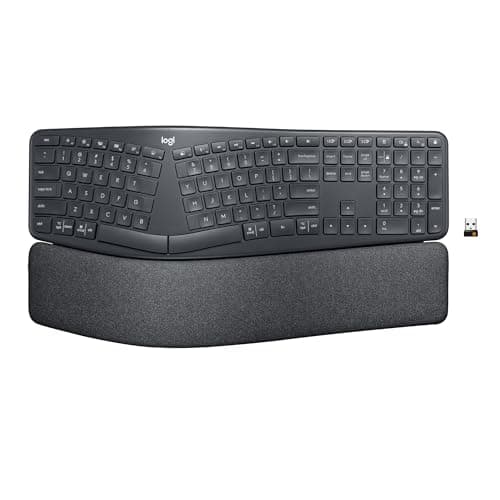
Side by side

Compare the five on the factors that decide it

The wireless questions in the first two columns, the ergonomic shape in the third. No keyboard has a materials certification category — where a maker makes a materials claim anyway, it is recorded as the claim it is.

ChairLumbarAdjustmentsCertificationRated forPrice
Split-zone layout with a separate wireless numeric keypad you can lift off the deskNegative tilt, high-density foam wrist rest, 20 programmable keys; Bluetooth Swift Pair or HP dongle, 3 paired devicesNot a certification category. HP states the keyboard is "crafted with at least 60% post-consumer recycled materials" and that packaging is FSC certified — manufacturer statements on the listing, not third-party emissions certificatesDisposable cells: 2 x AA in the board, 2 x CR2032 in the wireless numpad$80.99Check price on Amazon
Curved split layout — the strongest mainstream ergonomic shape, with no learning cliffIntegrated wrist rest, negative-tilt legs; Bluetooth and dongle, multi-deviceNot applicable — a keyboard is not a composite-wood or foam product. Judged on wrist posture, typing feel and buildBig footprint; needs desk depth. Membrane switches, so typing feel is soft$113.99Check price on Amazon
True two-zone split in an 86-key compact body — a genuine split, not a one-piece wave3-device switching from dedicated keys; 15 macOS shortcut keys; cushioned palm rest includedNo certification category applies. What is stated instead: a 500 mAh rechargeable cell Macally says charges in about two hours and runs one to two months, and a wired mode that works at the login screenBluetooth plus wired USB-C or USB-A dual mode; no numeric pad; split angle is fixed$69.99Check price on Amazon
Wave key rows — a mild correction in a much smaller footprint than the K860Soft integrated palm rest; compact footprint; Bluetooth and dongleNot applicable — judged on posture, typing feel and build, not materials certificationNot a true split, so less relief than a curved split or a real split; membrane feel$54.99Check price on Amazon
Split-but-attached layout with a cushioned palm rest; fixed, modest separationBluetooth plus 2.4 GHz dual mode; USB-C rechargeable; scissor switchesNone applies and none is claimed. The one quantified figure is a 200-hour battery claim, which is a runtime statement rather than a tested standard. No warranty term is stated anywhere in the listingNo published dimensions, weight or key-travel figure — the listing describes the idea, not the object$32.29Check price on Amazon

#ad · we may earn a commission · Live prices from the Amazon Product API, as of November 23, 2026. Where we have no verified live price we show none.

How we picked

We do not run a testing lab

We compiled specs from manufacturer manuals, verified every certification claim in the certifying body's own registry (UL SPOT for GREENGUARD, BIFMA, CARB), did the cost-to-own math, and read the aggregated owner reviews, then scored each product against a published rubric. The scores are judgments from documented research — they are not measurements we took, because we do not have a lab and we are not going to pretend we do.

Questions

Frequently asked

What is the best wireless ergonomic keyboard?
The HP 960, because it is the only board here that uses wireless for something a cable cannot do: the numeric keypad is a separate cordless unit you can take off the desk, which pulls your mouse back toward the center line. If you want more wrist correction than its split zone offers, the Logitech Ergo K860's curved split is the strongest mainstream shape, and on a Mac the Macally is the only pick with a wired fallback for the login screen.
Is a wireless keyboard worse ergonomically than a wired one?
The radio is neutral; the selection is not. The two most corrective boards we rank — the Kinesis Freestyle2 true split and the Perixx PERIBOARD — are wired, so going cordless narrows your options at the corrective end. See the main ergonomic keyboard ranking for the full set including wired boards.
Do wireless keyboards work at the Windows login screen?
A 2.4 GHz dongle generally does, because it presents as a standard USB device before the operating system loads. Bluetooth-only boards often do not. Four of the five boards here ship a dongle or a wired mode; if you ever need a BIOS or a recovery screen, that is the spec to insist on.
Should I get a keyboard with a detachable number pad?
If you do not work in spreadsheets, yes. An integrated numpad pushes your mouse roughly eight to ten inches further right than a tenkeyless board does, and that reach is a common source of shoulder strain. Taking the pad off the desk is a bigger ergonomic win than most key-layout changes — and Mayo Clinic's office ergonomics guidance is explicit that the mouse should sit close to the keyboard at the same height.
Rechargeable or AA batteries for an ergonomic keyboard?
Neither is better; the difference is what you want to manage. Disposable cells mean nothing to plug in and an occasional replacement — the HP 960 takes two AA plus two CR2032 across board and numpad. A rechargeable cell means USB-C and a published runtime, like the Macally's 500 mAh or the Nulea's stated 200 hours. What matters is that the listing tells you which, and some do not.
What is the cheapest wireless split keyboard?
The Nulea, which is the cheapest board in our registry that is both split and cordless, with Bluetooth plus a 2.4 GHz dongle and USB-C charging. Its compromises are in what the listing does not publish: no warranty term, no dimensions, no key-travel figure. It is the right keyboard for finding out whether a split layout helps you, and the wrong one if you type for a living. Ergonomic keyboards under $100 is the broader budget page.

Keep reading

Receipts

Sources

We do not run a testing lab, and we do not pretend to. We verify certifications in the certifying body's own registry, compile specs from manufacturer manuals, and cite health claims to recognized authorities — by name, with a link. Where we could not verify something, we say so on the page rather than quietly leaving it out. Read our full method.