Skip to content
Riser & Rail

07 — Gifts & Deals

The Best Gifts for Someone Who Works From Home

A home office has three predictable problems: the screen is too low, the person never moves, and the cables are a mess. Buy for one of the three and the gift gets used.

By Stephen V.Updated How we research
#ad

We earn a commission when you buy through our Amazon links, at no extra cost to you. It never affects our rankings, and we say so when the cheaper — or the direct-only — product is the better buy. How this works.

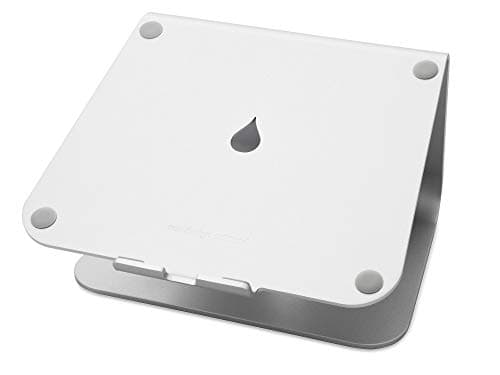
The best gift for someone who works from home on a laptop is the Rain Design mStand — one piece of cast aluminum, no hinges to sag, the fixed-height stand that has been the reference for fifteen years. It raises the screen to where the neck stops complaining, and because it is inert metal there is nothing to air out. If they already have a proper monitor and a standing desk, skip to the walking pad: a home worker's real problem is not posture but the fact that they have not left the chair since breakfast.

Why home offices are easy to buy for

Unlike a corporate desk, a home office is permanent and personal, which means the "installed" gifts — a monitor arm, a cable tray, a mat that lives under one desk — become viable. And home offices fail in the same three ways almost every time: a laptop used at table height with the head bent over it; a day with no movement in it at all; and a tangle of cables and chargers on the floor. Every pick on this page addresses one of the three, and every one is already ranked on its category page — the laptop stands, monitor arms, walking pads, mats, cable management and keyboards rankings. We did not source anything new for a gift list.

Problem one: the screen is too low

  • They work on a laptop: the Rain Design mStand. Cast aluminum, one piece, fixed height, and the tilt puts the screen where a separate monitor would be. It is for a permanent setup with an external keyboard — the point is to raise the screen and leave the hands at desk height. If they are notably tall or short, or move between sitting and standing at the same stand, the adjustable options in our laptop stand ranking are the better buy.
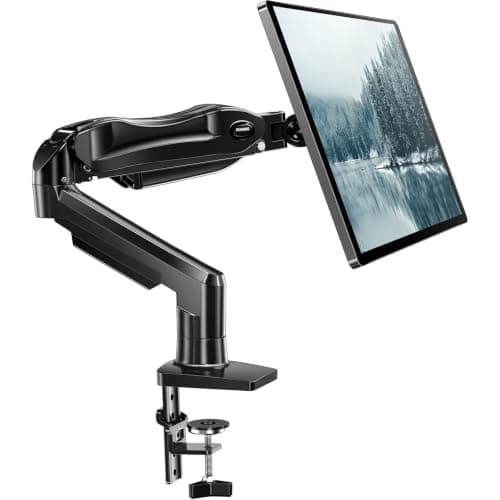
  • They have a monitor sitting on its stand: the HUANUO single arm. The value arm that gets a screen to eye level and frees the desk underneath. This is the one gift on this page that needs two facts before you buy: the thickness of their desk for the clamp, and whether their monitor has a VESA mount pattern on the back (some consumer screens do not). If you can confirm both, it is the most transformative object here. If you cannot, buy the stand and keep the arm for a birthday when you can ask.

Problem two: they never move

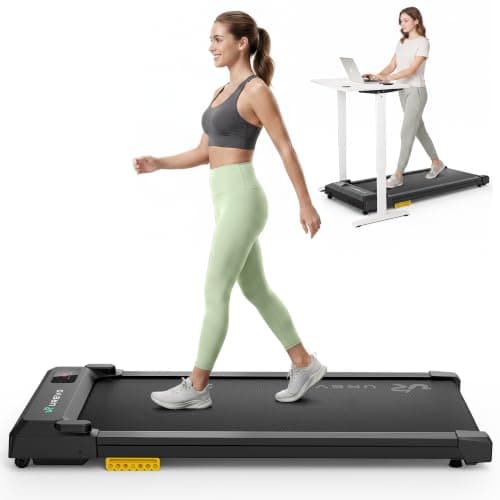
  • They have a standing desk: the UREVO walking pad. The sensible mid-price pad — shock absorption and a quiet motor at a small fraction of a commercial treadmill. It needs a height-adjustable desk, a person-length of clear floor, and a wall outlet; do not run it from a desk power strip. Our walking pad guide is worth ten minutes before you order.
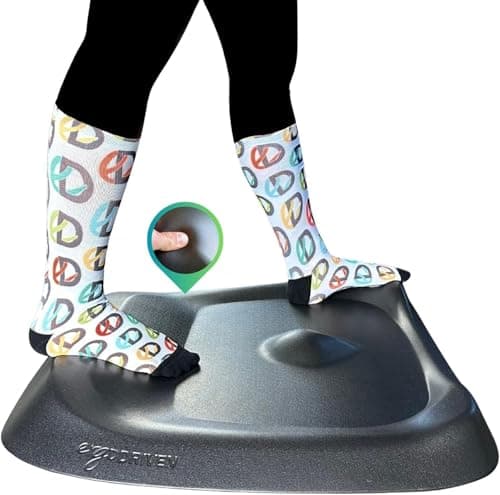
  • They stand but their feet hurt: the full-size Topo. The sculpted mat over a real footprint, with the clearest material disclosure in the category — Ergodriven states the line is made without PVC or PFAS. A disclosure, not a certificate, and our Topo review says so; it is still more than most mat makers publish. A permanent desk is exactly where a full-size mat belongs.

Problem three: cables everywhere

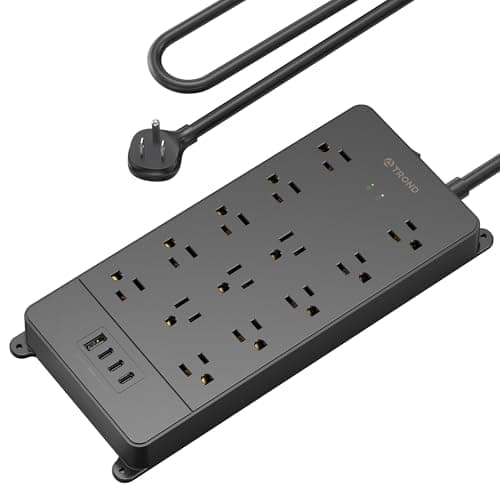
  • The TROND surge protector. Mount it under the desk and the desk carries its own power — one cord to the wall instead of six. It is ETL listed, which is a genuine third-party safety certification for an electrical product, and the one certificate on this page that is a certificate. Verify the ETL mark on the unit, never chain one surge protector into another, and keep the walking pad off it.
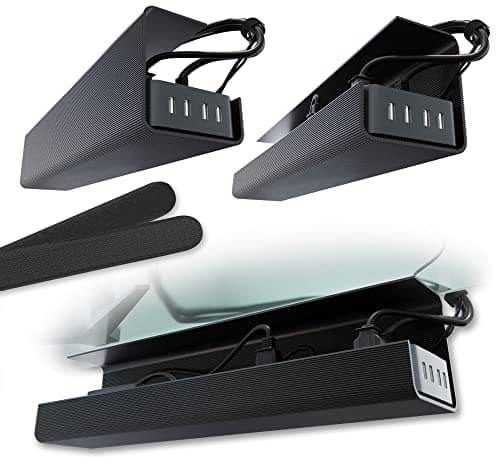
  • The Scanfield cable trays. Two short no-screw trays instead of one long one — the better answer on a desk with a frame rail down the middle, which most standing desks have. If their desk underside is clear, the single long tray on our cable management page is tidier.

The extra: a keyboard they can start using today

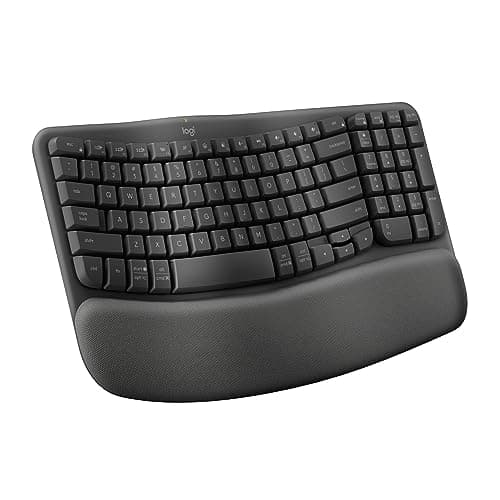
The Logitech Wave Keys is the compact, affordable wave — a gentle correction to the wrist angle in a smaller body, with no relearning. It is a mild fix, not a split keyboard, and that is what makes it giftable. If they type heavily and have complained about wrists, the curved-split K860 in our under-$150 guide does more.

What we left off, and why

A chair or a desk — both need their body or their room; see our no-budget guide for how to give either as a decision rather than a surprise. A webcam, a ring light, a mug warmer — fine gifts, not ergonomics, and outside what this site researches. A desk lamp — we publish nothing on lighting and will not pretend to.

The short answer

Quick picks

#ProductBest forScorePrice
01
Rain Design Rain Design mStand Laptop Stand
Rain Design mStand Laptop Stand

One piece of cast aluminum, no hinges to sag — the fixed-height stand that has been the reference for fifteen years.

A permanent desk setup with an external keyboard
7.6
$39.80Amazon
02
HUANUO HUANUO Single Monitor Mount
HUANUO Single Monitor Mount

The value arm that gets your screen to eye level without the Ergotron price.

Most single-monitor setups on a budget
8.0
$47.99Amazon
03
UREVO UREVO Smart Walking Pad
UREVO Smart Walking Pad

The sensible mid-price pad — shock absorption and a quiet motor at roughly a tenth of a commercial treadmill.

Most people starting to walk at a desk
7.8
$139.99Amazon
04
Ergodriven Topo by Ergodriven Standing Desk Mat (full size)
Topo by Ergodriven Standing Desk Mat (full size)

The full-size not-flat mat: sculpted terrain over a real footprint, and the clearest material disclosure in the category.

Standing-desk users who want movement, not just cushion
8.2
$109.00Amazon
05
TROND TROND Surge Protector Power Strip (ETL listed)
TROND Surge Protector Power Strip (ETL listed)

Mount this on the desk, not the wall — one cord to the outlet, and the desk carries its own power.

Turning many desk cables into one traveling cord
8.2
$29.98Amazon
06
Scanfield Scanfield No-Screw Under-Desk Cable Tray (17″, 2-pack)
Scanfield No-Screw Under-Desk Cable Tray (17″, 2-pack)

Two short trays instead of one long one — the better answer on a desk with a frame rail down the middle.

Desks whose underside will not take one long tray
8.0
$31.95Amazon
07
Logitech Logitech Wave Keys Ergonomic Keyboard
Logitech Wave Keys Ergonomic Keyboard

The compact, affordable wave — the K860's comfort ideas in a smaller, cheaper body.

A smaller ergonomic keyboard on a budget
7.2
$69.99Amazon

#ad · Live prices from the Amazon Product API, as of Sep 14, 2026. Where we have no verified live price, we show none — we would rather leave a gap than print a number that has rotted.

In detail

The picks, in full

01
Rain Design Rain Design mStand Laptop Stand

A permanent desk setup with an external keyboard

Rain Design mStand Laptop Stand

Single-piece cast aluminumFixed ~6 in riseCable channelFits most 13–17 in laptops

Certification & materials

Solid anodized aluminum with a rubber pad. There is no foam, laminate or composite in it, so there is nothing to off-gas — a genuinely inert desk object, which is rare enough to be worth saying.

7.6/10

One piece of cast aluminum, no hinges to sag — the fixed-height stand that has been the reference for fifteen years.

Posture benefit
8
Adjustability
3
Materials & certs
10
Build
10
Value
7

Pros

  • No hinges, no adjustment, nothing to loosen — it is the same height in year ten
  • Aluminum sinks heat away from the laptop base instead of trapping it
  • The rise lands close to eye level for most seated users of average height

Cons

  • Fixed height: if it is wrong for you, it stays wrong
  • Costs several times what a folding aluminum riser costs

Don't buy this if…

you are notably tall or short, or you use the same stand at a sitting and a standing height. Buy the adjustable one.

$39.80View on Amazon

Price as of Sep 14, 2026. Prices change — Amazon's is the one that counts.

#ad · we may earn a commission from this link to Rain Design mStand Laptop Stand

02
HUANUO HUANUO Single Monitor Mount

Most single-monitor setups on a budget

HUANUO Single Monitor Mount

Fits 13–32"Gas-spring liftFull articulationC-clamp + grommet

Certification & materials

Not applicable — judged on stability, range and build, not materials certification.

8.0/10

The value arm that gets your screen to eye level without the Ergotron price.

Stability
8
Adjustment range
8
Build
7
Ease of install
8
Value
9

Pros

  • Does the important job — screen to eye level — for a fraction of the premium arms
  • Gas-spring lift is smooth and holds position well for the price

Cons

  • The lift can need re-tensioning over time, unlike the Ergotron's constant-force system
  • Shorter warranty and less refined motion

Don't buy this if…

you'll reposition the screen constantly all day for years — the Ergotron's motion holds up better under heavy long-term use.

$47.99View on Amazon

Price as of Sep 14, 2026. Prices change — Amazon's is the one that counts.

#ad · we may earn a commission from this link to HUANUO Single Monitor Mount

03
UREVO UREVO Smart Walking Pad

Most people starting to walk at a desk

UREVO Smart Walking Pad

Cushioned deckQuiet motorRemote controlNo handrail

Certification & materials

Not a materials-certification product. Judged on deck cushioning, noise and stated speed range.

7.8/10

The sensible mid-price pad — shock absorption and a quiet motor at roughly a tenth of a commercial treadmill.

Duty rating
7
Noise
8
Deck & stability
7
Portability
8
Value
9

Pros

  • Deck cushioning takes the joint load out of hours of slow walking
  • Quiet enough for calls in most rooms
  • The price at which trying this is a low-stakes decision

Cons

  • Consumer-duty motor — daily multi-hour use will wear it faster than a LifeSpan
  • No handrail, so it is walking only, never jogging

Don't buy this if…

you want to run on it. These are walking pads; treat the top speed as a number, not an invitation.

$139.99View on Amazon

$169.9818% off

Price as of Sep 14, 2026. Prices change — Amazon's is the one that counts.

#ad · we may earn a commission from this link to UREVO Smart Walking Pad

04
Ergodriven Topo by Ergodriven Standing Desk Mat (full size)

Standing-desk users who want movement, not just cushion

Topo by Ergodriven Standing Desk Mat (full size)

Ergodriven lists 29 in wide × 26.25 in deep2.7 in at its highest point0.85 in thick in the neutral areaErgodriven lists 8 lb

Certification & materials

Ergodriven states the Topo is PVC-free, and markets the line as containing no PFAS or PVC. That is a material disclosure, not a third-party certificate — no GREENGUARD or comparable registration is published for it. Polyurethane foam is nonetheless the lower-concern class here, because the plasticizer and chlorine chemistry criticized in vinyl mats belongs to PVC.

8.2/10

The full-size not-flat mat: sculpted terrain over a real footprint, and the clearest material disclosure in the category.

Cushioning
8
Edge & safety
8
Materials
9
Durability
9
Value
7

Pros

  • The calculated terrain gives your feet somewhere to go, which is the actual mechanism behind reduced standing fatigue
  • PVC-free and PFAS-free as stated by the maker — a rare, specific claim in a category full of vague ones
  • Firm foam that holds its shape instead of bottoming out like cheap gel

Cons

  • No third-party certificate backs the material claims — it is the brand's own disclosure
  • Ergodriven notes performance is optimized up to around 240 lb of user weight

Don't buy this if…

you want a flat surface you can roll a chair across. The Topo's whole point is that it is not flat.

$109.00View on Amazon

Price as of Sep 14, 2026. Prices change — Amazon's is the one that counts.

#ad · we may earn a commission from this link to Topo by Ergodriven Standing Desk Mat (full size)

05
TROND TROND Surge Protector Power Strip (ETL listed)

Turning many desk cables into one traveling cord

TROND Surge Protector Power Strip (ETL listed)

Surge protectionETL listedUSB charging portsFlat plug and long cord

Certification & materials

ETL listing is a genuine third-party safety certification for the electrical product — the one certification in this cluster that is a certification. Verify the ETL mark on the unit you receive, and never chain one surge protector into another.

8.2/10

Mount this on the desk, not the wall — one cord to the outlet, and the desk carries its own power.

Capacity
8
Mounting
8
Build
8
Tidiness
9
Value
8

Pros

  • ETL listed, which is the safety credential to insist on for anything you mount to a moving desk
  • Mounting the strip to the desk means the desk travels with one cord instead of six
  • USB ports remove two more wall bricks from the equation

Cons

  • Surge protectors age — the protection degrades after a large event, and there is no obvious warning
  • A long cord left slack on the floor is a trip hazard; measure the full travel before fixing it

Don't buy this if…

you plan to plug a treadmill or a heater into it. High-draw motors belong in a wall outlet, not on a desk strip.

$29.98View on Amazon

Price as of Sep 14, 2026. Prices change — Amazon's is the one that counts.

#ad · we may earn a commission from this link to TROND Surge Protector Power Strip (ETL listed)

06
Scanfield Scanfield No-Screw Under-Desk Cable Tray (17″, 2-pack)

Desks whose underside will not take one long tray

Scanfield No-Screw Under-Desk Cable Tray (17″, 2-pack)

17 in eachTwo per packNo-screw mountSteel construction

Certification & materials

Not a materials-certification product. Judged on mounting flexibility and load.

8.0/10

Two short trays instead of one long one — the better answer on a desk with a frame rail down the middle.

Capacity
7
Mounting
9
Build
8
Tidiness
8
Value
8

Pros

  • Two shorter trays route around the crossbar that blocks a single 36-inch tray
  • Lets you separate power from data cables, which is good practice and keeps noise down

Cons

  • Less total capacity than one long tray
  • Two mounts to get level instead of one

Don't buy this if…

your desk underside is clear. One long tray is tidier and quicker to fit.

$31.95View on Amazon

Price as of Sep 14, 2026. Prices change — Amazon's is the one that counts.

#ad · we may earn a commission from this link to Scanfield No-Screw Under-Desk Cable Tray (17″, 2-pack)

07
Logitech Logitech Wave Keys Ergonomic Keyboard

A smaller ergonomic keyboard on a budget

Logitech Wave Keys Ergonomic Keyboard

Wave key layoutCushioned palm restCompact footprintBluetooth + dongle

Certification & materials

Not applicable — judged on posture, typing feel and build, not materials certification.

7.2/10

The compact, affordable wave — the K860's comfort ideas in a smaller, cheaper body.

Ergonomics
7
Typing feel
7
Adjustability
6
Build
7
Value
9

Pros

  • The wave-shaped rows ease wrist angle in a much smaller footprint than the K860
  • Soft integrated palm rest, and a genuinely low price for an ergonomic board

Cons

  • Not a true split — less relief than the K860's curve or a Kinesis
  • Membrane feel; nothing mechanical here

Don't buy this if…

you want maximum wrist relief — the gentle wave is a mild correction, and a curved-split K860 or a real split does more.

$69.99View on Amazon

Price as of Sep 14, 2026. Prices change — Amazon's is the one that counts.

#ad · we may earn a commission from this link to Logitech Wave Keys Ergonomic Keyboard

How to choose a gift for someone who works from home

Find out which of the three problems they have

Laptop at table height, no movement, or cables. One question — "what does your desk look like?" — usually answers it.

Installed gifts are fine here

A home desk is permanent, so an arm, a tray or a full-size mat will actually be fitted. That is not true of a hot desk.

Confirm the two monitor-arm facts

Desk thickness for the clamp; VESA pattern on the monitor. Otherwise buy the stand.

A walking pad is a floor-space and outlet question

Height-adjustable desk, a person-length of floor, and a wall outlet. Never a desk power strip.

Prefer the object that needs nothing else

The stand needs an external keyboard; the arm needs a VESA monitor. The power strip and the trays need nothing. When in doubt, buy the thing with no dependency.

How we picked

We do not run a testing lab

We compiled specs from manufacturer manuals, verified every certification claim in the certifying body's own registry (UL SPOT for GREENGUARD, BIFMA, CARB), did the cost-to-own math, and read the aggregated owner reviews, then scored each product against a published rubric. The scores are judgments from documented research — they are not measurements we took, because we do not have a lab and we are not going to pretend we do.
Questions

Frequently asked

What is the best gift for someone who works from home?
For a laptop user, a solid-aluminum laptop stand — it fixes the most common home-office problem, a screen too low, and needs no measuring. For someone with a standing desk already, a walking pad is the highest-impact gift, provided they have the floor space.
Is a monitor arm a good work-from-home gift?
It is the most transformative object on this page, but it needs two facts first: the thickness of their desk for the clamp and whether their monitor has a VESA mount. If you cannot confirm both, buy the laptop stand instead.
Can I plug a walking pad into the power strip?
No. A walking pad motor belongs in a wall outlet. The desk power strip is for the monitor, laptop charger and lamp — and never chain one surge protector into another.
Why no chair or desk on this list?
A chair needs their body and a desk needs their room; both are the ergonomic purchases most likely to be returned when given as a surprise. Our no-budget guide explains how to give either as a shared decision.

Keep reading

Receipts

Sources

We do not run a testing lab, and we do not pretend to. We verify certifications in the certifying body's own registry, compile specs from manufacturer manuals, and cite health claims to recognized authorities — by name, with a link. Where we could not verify something, we say so on the page rather than quietly leaving it out. Read our full method.