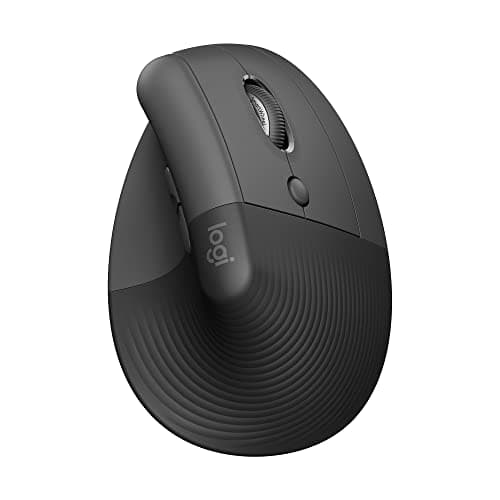
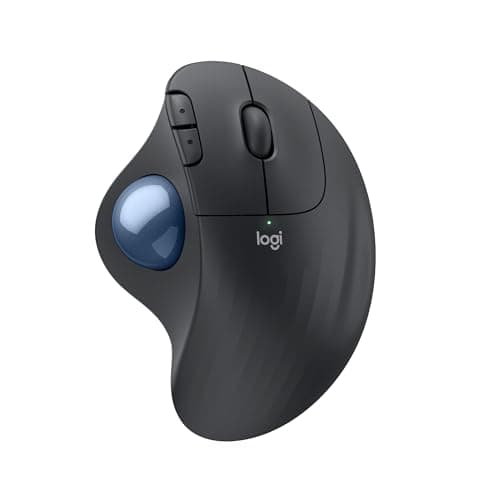
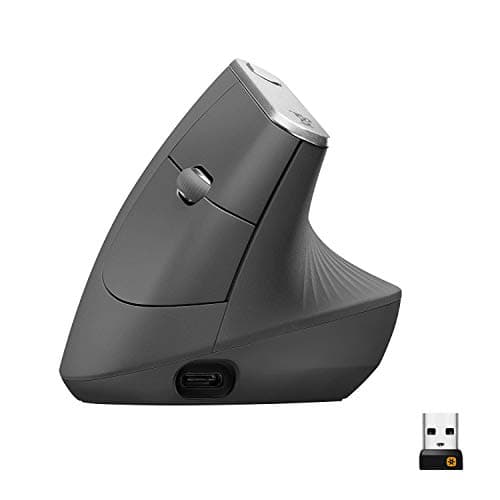
Buy the Logitech MX Vertical if your hand is medium or large, and the Logitech Lift if it is small or medium. Both hold your forearm in a handshake position instead of rotating it flat, which is the specific posture change that takes the strain off the outside of the wrist and forearm. If the pain is in your shoulder or elbow rather than your wrist, a vertical mouse is the wrong purchase — the Logitech ERGO M575 Trackball is.
What a flat mouse actually does to your arm
Hold your arm out with your thumb up, the way you would to shake hands. That is your forearm in a neutral rotation. Now rotate your palm down to grip a conventional mouse: you have just pronated the forearm through roughly 90 degrees and you are going to hold it there for eight hours, making thousands of small movements from that position.
Two things follow. The forearm muscles that hold the rotation are under continuous low-grade load, which is a classic sustained-static-loading pattern of the kind NIOSH's ergonomics material identifies as a musculoskeletal risk factor. And because a mouse sits on a flat desk, the wrist tends to extend upward and deviate outward toward the mouse, which narrows the space the median nerve travels through. OrthoInfo's carpal tunnel material describes exactly that anatomy — sustained pressure and awkward wrist positions in a narrow tunnel.
A vertical mouse un-rotates the forearm. That is its entire mechanism, and it is a real one. It is not a treatment, it does not cure anything, and if you have numbness or tingling in your fingers you should see a clinician rather than buy a mouse.
Match the mouse to where it actually hurts
This is the part most roundups skip, and it is why people buy a vertical mouse and stay uncomfortable.
- Outside of the wrist, or the back of the forearm. Classic pronation load. A vertical mouse is the direct answer. Start with the MX Vertical at 57 degrees, or the Lift if the MX is too big for your hand — an oversized vertical mouse makes people claw-grip, which trades one problem for another.
- Inside of the wrist, or numbness in the first three fingers. This is the carpal tunnel presentation, and the biggest single change is not the mouse — it is stopping your wrist resting on the desk edge while you move it. Lower the mousing surface to elbow height, keep the wrist straight and floating, and move the mouse from the elbow.
- Thumb. Thumb pain from mousing usually comes from gripping to lift and reposition the mouse. The fix is a lower DPI so you move it less, or a trackball so you never lift it at all. A vertical mouse does not address this.
- Shoulder or outer elbow. This is a reach problem, not a wrist problem — the mouse is too far away, usually because a full-size keyboard with a number pad pushes it out. A trackball fixes it by removing the arm movement entirely; a tenkeyless keyboard fixes it by bringing the mouse back in. Both beat any vertical mouse for this pain.
The changes to make before you spend anything
Roughly half the mousing pain we see described is a positioning problem that a new mouse will not fix, and every item here is free.
- Get the surface to elbow height.A desk at standard 29 to 30 inches is higher than most people's seated elbow height, which forces the wrist to extend upward to reach it. Lower the desk if it adjusts, raise the chair and add a footrest if it does not, or fit a keyboard tray. The number for your body is in the height calculator.
- Bring the mouse next to the keyboard. If you have a number pad you do not use, a tenkeyless keyboard moves the mouse three to four inches closer to your midline and takes the whole reach out of your shoulder. This is the single most effective free change for shoulder and elbow pain.
- Stop anchoring the wrist. Resting the wrist on the desk and pivoting the hand concentrates every movement in the wrist joint and presses on the underside where the carpal tunnel is. Move the whole forearm instead. A wrist rest is for the gaps between typing and mousing, not for during — the same point we make in our wrist rest picks.
- Turn the DPI up. Higher sensitivity means less physical movement for the same cursor travel. Most people run far lower DPI than they need out of habit and make thousands of unnecessary arm movements a day because of it.
- Switch hands occasionally. Awkward for a week, then surprisingly workable, and it halves the dose on the affected side. Nothing else on this list has that effect size.
Vertical or trackball?
A vertical mouse changes the rotation of your forearm but you still move your whole arm to move the cursor. A trackball removes the movement instead — the device stays put and your thumb or fingers do the work. That makes them good at different problems.
Take a vertical mouse for forearm and outer-wrist pain, or if you simply want a better default posture. Take a trackball if the pain is in the shoulder or elbow, if your desk is too small to move a mouse properly, or if a standing desk means your mousing surface changes height through the day and you would rather not re-learn the movement each time. The honest cost of a trackball is fine precision: it is a poor tool for pixel-accurate design work and for fast games, and anyone who tells you otherwise has not done either.
Adjustment takes about two weeks
Any of these changes your muscle recruitment, and for the first few days you will be slower and your hand will feel odd. That is normal and it passes in one to two weeks. What is not normal is new pain in a different place — if a vertical mouse gives you a sore thumb or a cramping forearm, the device is too large or too small for your hand, and the answer is a different size rather than persistence.
Get the rest of the workstation in line at the same time. A perfect mouse under a desk that is too high still leaves you reaching up, and screens too low still pull your neck forward — the whole sequence is in the home-office ergonomic self-assessment.
How to choose an ergonomic mouse for pain
1. Measure your hand before you choose a size
Wrist crease to the tip of your middle finger. Under about 6.7 inches, take the smaller body — the Lift. Above it, the MX Vertical. Hand size is the most common reason a vertical mouse fails, and it is the easiest thing to get right.
2. Decide between rotation and movement
Vertical mice fix forearm rotation. Trackballs fix arm movement. Buy for the one that matches where you hurt, not for the one with better reviews.
3. Try cheap before you commit, if you are unsure
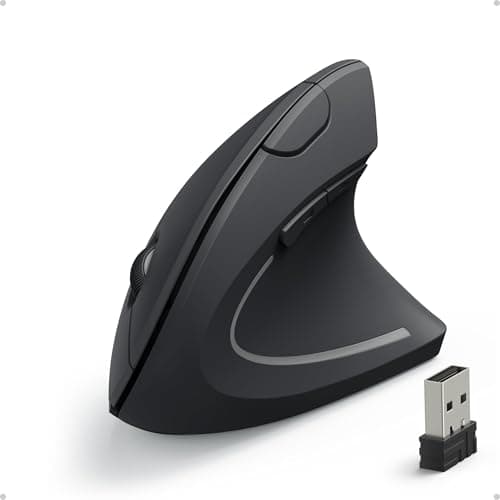
A vertical mouse is a genuinely different tool and not everyone gets on with one. The Anker Vertical Ergonomic Mouse exists for exactly this — most of the posture benefit for a fraction of the money, so you can find out before spending properly.
4. Check the connection against your setup
Bluetooth saves a USB port and can be flaky waking from sleep; a dongle is more reliable and costs you a port. If you switch between a laptop and a desktop, multi-device pairing is worth more than any other feature on the box.
5. Do not buy a wrist rest at the same time
If you are moving to a vertical mouse or a trackball, a flat wrist rest often gets in the way of the new hand position. Change one thing, give it two weeks, then decide.