Skip to content
Riser & Rail

04 — Accessories

The Best Triple Monitor Arms and Desk Mounts

Three screens on one clamp is an arithmetic problem, not a shopping problem - and the number you need is missing from two of the five mounts in this group.

By Stephen V.Updated How we research
#ad

We earn a commission when you buy through our Amazon links, at no extra cost to you. It never affects our rankings, and we say so when the cheaper — or the direct-only — product is the better buy. How this works.

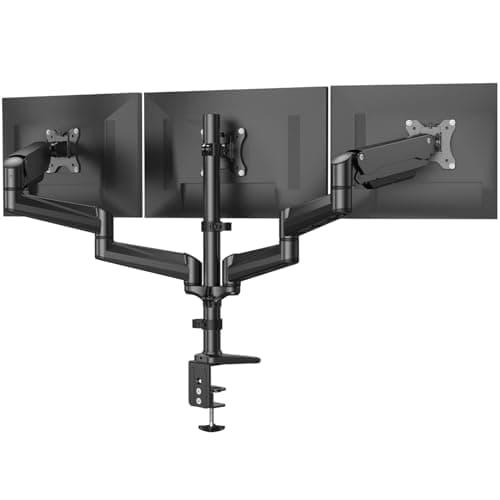
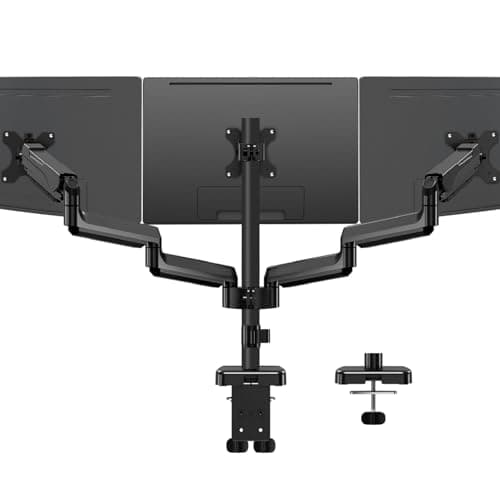
Buy the WALI GSDM003. It is not the most adjustable mount here and it has the worst tilt range of the five - 45 degrees against 90 on three of its rivals - but it is the one that prints the number the whole decision turns on: up to 19.8 lb per arm, for 13 to 32 in screens, on VESA 75 or 100 mm. You can weigh your three monitors, check them against that, and know before you order. Two of the five mounts in this group, including both $119.99 options, publish no per-arm weight figure at all - not in the listing title and not in Amazon's detail table. That is a strange thing to be missing on a product whose only job is holding weight off a desk edge, and it is the reason this page is organized around published load rather than around features.

Why three screens is a different problem from two

A dual mount has two arms pulling in opposite directions from a center post, which is close to balanced. A triple mount puts a third screen out to one side or hangs all three off one clamp on one desk edge, and three things change at once:

  • Total static load roughly doubles.Three 27 in monitors are commonly 12 to 18 lb each with their VESA brackets, so you are asking one clamp to hold 36 to 54 lb, plus the mount's own 10 to 17.6 lb. That is a meaningful load on a 1 in desktop.
  • The failure mode is slow. An arm that is 2 lb over its rating does not drop your monitor. It sags a degree a month until your outer screens are visibly tilted and the gas spring or friction joint no longer holds. By then the return window is long gone, which is why the published figure matters more here than in almost any accessory category.
  • Width becomes a real constraint. Three 27 in panels side by side are about 72 in of screen. A 48 in desk cannot present that flat, so a triple setup is normally curved inward - which means the outer arms need genuine swivel range, not just tilt.

If you are actually running two screens, our dual monitor arms page is the better one - the balance problem is easier and the choice is wider. If one of your three is a 34 in or wider ultrawide, read monitor arms for ultrawide screens first, because a single heavy panel breaks the per-arm arithmetic in a different way.

Do the weighing. It takes four minutes.

Every monitor's spec sheet publishes a weight, usually as two numbers: with stand and without. Use the without-stand figure - the stand is the part you are removing. The difference is often 3 to 5 lb per screen, which is enough to move a setup from inside a 19.8 lb limit to outside it if you use the wrong number.

Then check three things in this order:

  1. Heaviest screen against the per-arm limit. Not the average. One arm carries one screen, so the heaviest panel sets the requirement.
  2. VESA pattern on each monitor. Both WALI mounts print 75 x 75 and 100 x 100 mm support; the VIVO, HUANUO and MOUNTUP listings do not print a pattern in the title at all, so confirm it before ordering. Most 24 to 32 in monitors are 100 mm, many small or budget panels are 75 mm, and some thin designs need the adapter plate the manufacturer sells separately.
  3. Your desk's thickness and its rated capacity.A C-clamp needs a usable rear lip and a flat edge; a grommet mount needs a hole. And on a sit-stand desk, the mount and screens come out of the desk's rating - FlexiSpot publishes 220 lb for the E6, Vari 200 lb for the Classic. A 17.6 lb mount plus 50 lb of monitors is a quarter of that before anything else goes on the desk. Our standing desk weight capacity guide has the published figures per desk.

What each of the five actually publishes

The two that print a per-arm number

WALI GSDM003- up to 19.8 lb per arm, 13 to 32 in screens, VESA 75 and 100 mm. The widest screen range in the group paired with a published limit, which is why it is ranked first. Its catch is in Amazon's detail table rather than its title: a maximum tilt angle of 45 degrees, where the VIVO, HUANUO and MOUNTUP all publish 90. If you tilt screens steeply - which people do when they raise a desk to standing height - that is a real ceiling.

WALI M003S - 22 lb per arm, the highest published figure here, but only for 13 to 27 in screens. It is also the lightest assembly at 10 lb, which matters on a sit-stand desk where every pound is spent from a published rating. If all three of your screens are 24 in, this is the cheapest correct answer on the page. If any is 32 in, it is simply the wrong mount - the published limit is the limit.

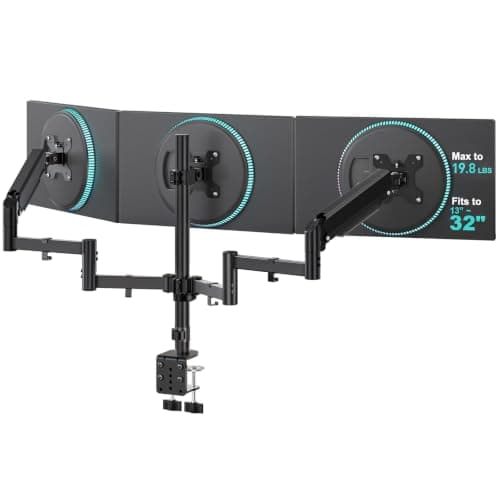
MOUNTUP sits between them: 4.4 to 19.8 lb per arm, 17 to 32 in, clamp and grommet both included, 90 degree tilt. Note that it publishes a range rather than a ceiling, and the 4.4 lb floor is a genuine spec - a gas-assisted arm needs a minimum load to hold position, so a featherweight portable panel can drift upward on it.

The two that do not

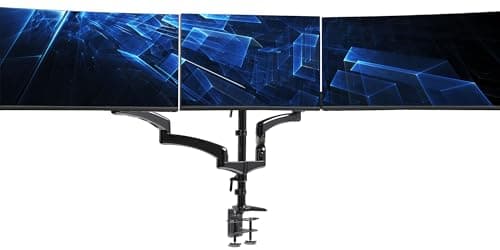
VIVO STAND-V300G is the most capable mount here on mechanism: it is the only pneumatic, gas-spring design in the group, so a screen repositions under hand pressure and stays put, with a 90 degree tilt ceiling and 32 in screen support. And VIVO publishes no per-arm weight capacity on the listing title or in the detail table. For a pneumatic arm that is worse than for a bolt-tensioned one, because a gas spring has to be tensioned to the screen weight - so you are being asked to set a tension against a limit nobody told you.

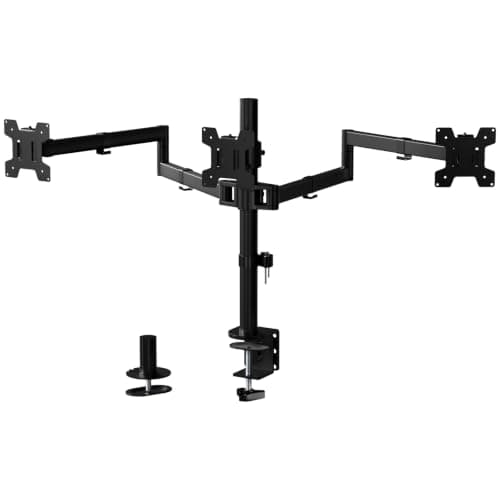
HUANUO HNTS3 has the same gap at the same price. What it does publish is its own 17.6 lb assembly weight, the heaviest here, and both mounting bases in the box. It is plainly a well-built mount. It just will not tell you what it holds.

We have not downgraded either product for being badly made, because neither is. We have downgraded them on published specs, which is a scored category on this site, and on a three-screen install it is the category that decides whether your outer monitors are still level in a year.

Mount style: clamp, grommet, or free-standing

All five of these are tabletop mounts in Amazon's classification. The practical split:

  • C-clamp - grips the back edge. Fastest, reversible, needs a flat accessible rear lip and no obstruction under it. This is what most sit-stand desks want, and it is what the VIVO uses.
  • Grommet - bolts through an existing hole or one you drill. Stronger and tidier, permanent, and the only option on a desk with a rear modesty panel or a cable channel in the way. The HUANUO, MOUNTUP and both WALI mounts include a grommet base.
  • Free-standing stand - sits on the desktop, no clamping at all. Worth knowing this exists if you rent and cannot modify the desk, but it eats desk depth and is less stable with three screens. None of the five here is this type.

On a glass or very thin desktop, be careful with a clamp regardless of the mount's rating: the clamp's own pressure is concentrated on a small footprint, and the limit is the desk, not the arm.

Getting three screens to the right height, which is the point

The reason to mount rather than stack is position, not tidiness. Monitor heighthas the target - the top of the usable screen at or slightly below eye level, roughly an arm's length away - and with three screens there are two extra rules:

  • One screen is primary. Center it. Put the screen you read most directly in front of you, not off to one side, or you will spend the day with your neck rotated. The other two are glanceable, not primary.
  • Curve the outer two inward, matched. Equal swivel on both sides keeps the viewing distance roughly constant across the array. That is what the swivel range is for, and it is why a 45 degree tilt ceiling matters less than swivel on a triple.

If the strain you are trying to fix turns out to be in your shoulders and elbows rather than your neck, the mount is the wrong purchase — reaching across a wide array all day is an arm problem, and chair arms are what answer it. That is the whole argument on Steelcase Leap vs Gesture, where one chair's arms move through 360 degrees and the other's through four directions.

If your third screen is really a vertical reference panel, the WALI mounts' 13 in lower bound is the one that allows a genuinely small one - the HUANUO and MOUNTUP both start at 17 in. Our dual monitor ergonomics guide covers the primary-screen rule in more depth, and it applies unchanged to three.

On a sit-stand desk, two things get worse

Three screens on a lift column amplify both of the desk's weaknesses. The load sits further from the frame than a laptop does, so wobble at full extension is more noticeable; and the mount is clamped to the edge that flexes most. A dual-motor three-stage frame handles it better than a single-motor two-stage one - single vs dual motor explains why - and if you are buying the desk at the same time, desks for two monitors and L-shaped desks are the two formats with enough width to present three panels without stacking them.

If a walking pad is also going under that desk, read standing desks for a walking pad before you buy either: the pad raises you four to nine inches, which takes the desk to the top of its travel - the least rigid point - with 50 lb of monitors clamped to the edge.

The certification answer, since this is a certification-first site

There is no emissions certificate to look for on a monitor arm, and we are not going to invent a reason to want one. These are powder-coated steel assemblies - Amazon lists alloy steel for the VIVO, HUANUO and MOUNTUP, and metal for both WALI mounts. A steel arm is not a composite panel and not a foam cushion, so the formaldehyde question that applies to desktops does not apply here, and none of these makers claims otherwise. The relevant published standard in this part of a workstation is ANSI/BIFMA X5.5, and it applies to the desk carrying the load rather than to the arm.

What that means practically: on this page the spec to be sceptical about is the weight figure, not the material claim. Every one of our scores below rewards publishing a number and penalises leaving it blank.

Most of these mounts are also the headline act in a price band, because three screens on one base is the thing a sub-$50 arm cannot do at all. Monitor arms under $100is that page, and it is where the per-arm load figures — including which maker publishes none — decide the order.

The short answer

Quick picks

#ProductBest forScorePrice
01
WALI WALI Triple Monitor Mount, 13-32 in (GSDM003)
WALI Triple Monitor Mount, 13-32 in (GSDM003)

The one to buy if you want to do the arithmetic before you order: it publishes a per-arm limit, a VESA pattern and a screen range on the listing itself.

Anyone who wants the load question answered in writing
8.4
$59.99Amazon
02
VIVO VIVO Triple Pneumatic Monitor Mount (STAND-V300G)
VIVO Triple Pneumatic Monitor Mount (STAND-V300G)

The only gas-spring arm in this group, which is the difference between repositioning three screens with one hand and loosening a bolt three times.

A triple setup you actually move — sit-stand, or sharing the desk
7.6
$99.99Amazon
03
MOUNTUP MOUNTUP Triple Monitor Mount, 17-32 in
MOUNTUP Triple Monitor Mount, 17-32 in

The middle option: it publishes a per-arm range, takes 32 in screens, and gives you both mounting bases.

A 27 in triple setup on a desk you would rather not drill
7.8
$79.99Amazon
04
HUANUO HUANUO Triple Monitor Mount (HNTS3)
HUANUO Triple Monitor Mount (HNTS3)

A heavy, well-built triple with both mounting options in the box — and the same missing number as the VIVO.

A desk where you are not sure yet whether you want a clamp or a grommet
7.2
$113.69Amazon
05
WALI WALI Adjustable Triple Monitor Mount, 13-27 in (M003S)
WALI Adjustable Triple Monitor Mount, 13-27 in (M003S)

The cheapest way to get three screens off the desk, and the highest published per-arm figure in the group — as long as none of them is bigger than 27 in.

Three 24 in screens on a budget
7.4
$74.99Amazon

#ad · Live prices from the Amazon Product API, as of November 23, 2026. Where we have no verified live price, we show none — we would rather leave a gap than print a number that has rotted.

In detail

The picks, in full

01
WALI WALI Triple Monitor Mount, 13-32 in (GSDM003)

Anyone who wants the load question answered in writing

WALI Triple Monitor Mount, 13-32 in (GSDM003)

Up to 19.8 lb per arm (WALI)13 to 32 in screens (WALI)VESA 75x75 and 100x100 mm45 degree maximum tilt (Amazon detail table)

Certification & materials

No certification published and none applicable to a steel arm. The detail table lists the material simply as metal. We assert nothing beyond what WALI prints on the listing.

8.4/10

The one to buy if you want to do the arithmetic before you order: it publishes a per-arm limit, a VESA pattern and a screen range on the listing itself.

Adjustability
7
Published specs
9
Build
8
Screen range
9
Value
9

Pros

  • Publishes the number the category runs on: up to 19.8 lb per arm, so you can weigh your monitors and know before you buy
  • Also prints the VESA patterns it accepts, 75x75 and 100x100 mm, which saves a second search
  • 13 in lower bound, so a small vertical third screen is actually in scope

Cons

  • Amazon's detail table gives a 45 degree maximum tilt, half the 90 degrees the VIVO, HUANUO and MOUNTUP publish — if you tilt screens hard for a standing position, that is a real limit
  • Bolt-tensioned rather than gas-sprung, so repositioning is a two-handed job with a tool
  • 19.8 lb per arm is comfortable for three 24 in panels and tight for three 32 in ones — do the weighing, do not assume

Don't buy this if…

…you reposition your screens daily or tilt them steeply. A pneumatic arm with a 90 degree tilt ceiling is the better tool, and the VIVO is that arm.

$59.99View on Amazon

$79.9925% off

Price as of November 23, 2026. Prices change — Amazon's is the one that counts.

#ad · we may earn a commission from this link to WALI Triple Monitor Mount, 13-32 in (GSDM003)

02
VIVO VIVO Triple Pneumatic Monitor Mount (STAND-V300G)

A triple setup you actually move — sit-stand, or sharing the desk

VIVO Triple Pneumatic Monitor Mount (STAND-V300G)

Up to 32 in per screen (VIVO)Pneumatic (gas-spring) armsC-clamp, tabletop mount90 degree maximum tilt (Amazon detail table)

Certification & materials

No third-party certification applies to a steel monitor arm and VIVO publishes none; the detail table gives the material as alloy steel. There is no indoor-air question here the way there is with a composite desktop or a foam seat. Nothing to verify, and nothing claimed.

7.6/10

The only gas-spring arm in this group, which is the difference between repositioning three screens with one hand and loosening a bolt three times.

Adjustability
9
Published specs
5
Build
8
Screen range
9
Value
7

Pros

  • Gas-spring height adjustment on all three arms, so a screen moves under hand pressure and stays where you leave it
  • Rated by VIVO for screens up to 32 in, which covers the size most triple setups actually use
  • 90 degree maximum tilt in Amazon's detail table — the widest in this group alongside the HUANUO and MOUNTUP

Cons

  • VIVO publishes NO per-arm weight capacity in the listing title or in Amazon's detail table, which is the single number a triple install turns on
  • A C-clamp on a sit-stand desk puts the whole load on one desk edge; check your desk's rated capacity before you add three screens
  • Pneumatic arms have to be tensioned to the screen weight, and with no published capacity you are tensioning blind

Don't buy this if…

…your monitors are heavy and you need to know the number before you buy. Take the WALI GSDM003 or the M003S instead — both print a per-arm figure.

$99.99View on Amazon

$119.9917% off

Price as of November 23, 2026. Prices change — Amazon's is the one that counts.

#ad · we may earn a commission from this link to VIVO Triple Pneumatic Monitor Mount (STAND-V300G)

03
MOUNTUP MOUNTUP Triple Monitor Mount, 17-32 in

A 27 in triple setup on a desk you would rather not drill

MOUNTUP Triple Monitor Mount, 17-32 in

4.4-19.8 lb per arm (MOUNTUP)17 to 32 in screens (MOUNTUP)Clamp and grommet mounting90 degree maximum tilt (Amazon detail table)

Certification & materials

Nothing published and nothing applicable; alloy steel per the detail table. No claim made.

7.8/10

The middle option: it publishes a per-arm range, takes 32 in screens, and gives you both mounting bases.

Adjustability
8
Published specs
8
Build
8
Screen range
7
Value
8

Pros

  • Publishes a per-arm range rather than a single ceiling — 4.4 to 19.8 lb, which also tells you the arms need a minimum load to hold position
  • Full motion with a 90 degree tilt ceiling, and both clamp and grommet bases in the box
  • Accepts 32 in panels, so it does not force a smaller third screen

Cons

  • That 4.4 lb MINIMUM is a real constraint: a very light 17 in panel may not be heavy enough to keep an arm from drifting up
  • 17 in lower bound rules out the small vertical third screen the WALI arms allow
  • No VESA pattern printed in the title, so confirm 75 or 100 mm on your own monitors first

Don't buy this if…

…one of your three screens is a featherweight portable panel. Check it against the 4.4 lb floor before ordering.

$79.99View on Amazon

$139.9943% off

Price as of November 23, 2026. Prices change — Amazon's is the one that counts.

#ad · we may earn a commission from this link to MOUNTUP Triple Monitor Mount, 17-32 in

04
HUANUO HUANUO Triple Monitor Mount (HNTS3)

A desk where you are not sure yet whether you want a clamp or a grommet

HUANUO Triple Monitor Mount (HNTS3)

17 to 32 in screens (HUANUO)Clamp and grommet kit included17.6 lb assembly weight (Amazon detail table)90 degree maximum tilt (Amazon detail table)

Certification & materials

None published and none applicable — a steel monitor arm raises no indoor-air question. The detail table lists alloy steel construction. No claim is made here, which is the honest position for this product class.

7.2/10

A heavy, well-built triple with both mounting options in the box — and the same missing number as the VIVO.

Adjustability
8
Published specs
5
Build
9
Screen range
7
Value
7

Pros

  • Both a C-clamp and a grommet kit are included, so a desk with no usable rear lip is still an option
  • 17.6 lb of steel in the assembly itself, the heaviest in this group, which is what keeps three arms from drooping
  • Swivel, tilt and rotation on each arm, with the same 90 degree tilt ceiling as the VIVO

Cons

  • No per-arm weight capacity published in the title or in Amazon's detail table — the same gap as the VIVO, at the same price
  • The 17 in lower bound rules out a small third screen; the WALI arms start at 13 in
  • Its own 17.6 lb goes onto the desk before any monitor does, which matters on a sit-stand desk rated at 200-220 lb

Don't buy this if…

…you are mounting three large or curved panels. Buy an arm that publishes its per-arm limit so you can check it against your monitors' actual weights.

$113.69View on Amazon

$149.9924% off

Price as of November 23, 2026. Prices change — Amazon's is the one that counts.

#ad · we may earn a commission from this link to HUANUO Triple Monitor Mount (HNTS3)

05
WALI WALI Adjustable Triple Monitor Mount, 13-27 in (M003S)

Three 24 in screens on a budget

WALI Adjustable Triple Monitor Mount, 13-27 in (M003S)

22 lb per arm (WALI)13 to 27 in screens (WALI)VESA 75x75 and 100x100 mm10 lb assembly weight (Amazon detail table)

Certification & materials

No certification published and none applicable to a powder-coated steel arm. Material listed as metal. Nothing asserted.

7.4/10

The cheapest way to get three screens off the desk, and the highest published per-arm figure in the group — as long as none of them is bigger than 27 in.

Adjustability
6
Published specs
9
Build
7
Screen range
5
Value
10

Pros

  • 22 lb per arm is the highest published figure here, and it is printed on the listing rather than left blank
  • Lightest assembly in the group at 10 lb, so less of your desk's rating is spent before the monitors go on
  • VESA 75 and 100 mm both printed, and a C-clamp plus grommet base included

Cons

  • 27 in ceiling per screen — this is the one arm here that cannot take a 32 in panel
  • Bolt-tensioned, like the GSDM003: repositioning means a tool
  • The cheapest arm in a group whose failure mode is a screen sagging over months, so weigh your monitors rather than trusting the headline figure

Don't buy this if…

…any of your three monitors is larger than 27 in. The published limit is the limit, and a 32 in panel on a 27 in arm is a sag waiting to happen.

$74.99View on Amazon

Price as of November 23, 2026. Prices change — Amazon's is the one that counts.

#ad · we may earn a commission from this link to WALI Adjustable Triple Monitor Mount, 13-27 in (M003S)

How we picked, and how to check our work

Published per-arm capacity, weighted hardest

A triple mount's job is holding three screens level for years. A maker that will not print what one arm holds has left the buyer to guess at the only number that matters, so the two mounts that publish it rank above the two that do not, even where the unpublished ones have better mechanisms.

Screen size range, from both ends

The upper bound decides whether a 32 in panel is allowed. The lower bound decides whether a small vertical third screen is - and 13 in versus 17 in is the difference between a usable reference panel and a mount that cannot grip it.

VESA patterns, printed or not

75 x 75 and 100 x 100 mm cover almost every desktop monitor. Both WALI listings print the patterns; the other three do not, which means one more check on your side before ordering.

Tilt and swivel, from the detail table rather than the marketing

Amazon's Maximum Tilt Angle field is the honest version of "full motion": 90 degrees on the VIVO, HUANUO and MOUNTUP, 45 on the WALI GSDM003. We print the figure instead of repeating the phrase.

Assembly weight, because it comes out of your desk's rating

10 lb for the WALI M003S, 17.6 lb for the HUANUO. On a 200 lb-rated desk that is the difference between 5% and 9% of your capacity spent before a single monitor is attached.

What we did not do

We did not hang monitors from these arms, time an installation, or measure sag. We read the listings - titles and structured detail tables, separately, for each of the five - and we rank on what the makers publish. Where a figure is absent, the row says it is absent. Our methodology says all of this in more detail, and it is the same standard we hold every page on this site to.
Side by side

Compare the five on the factors that decide it

The same four questions asked of all five mounts. 'Certification' is deliberately empty here - nothing third-party applies to a steel arm, and the spec to interrogate is the load figure instead.

ChairLumbarAdjustmentsCertificationRated forPrice
Up to 19.8 lb per arm - publishedSwivel, tilt, rotation; 45 degree maximum tilt (detail table)None published and none applicable to a steel arm; material listed as metal13 to 32 in screens, VESA 75 and 100 mm$59.99Check price on Amazon
NOT PUBLISHED - no per-arm figure in the title or the detail tablePneumatic gas-spring arms, articulating; 90 degree maximum tiltNone published and none applicable; alloy steelUp to 32 in screens; VESA pattern not printed in the title$99.99Check price on Amazon
4.4 to 19.8 lb per arm - published as a range, with a real minimumFull motion, clamp and grommet bases; 90 degree maximum tiltNone published and none applicable; alloy steel17 to 32 in screens; VESA pattern not printed in the title$79.99Check price on Amazon
NOT PUBLISHED - no per-arm figure in the title or the detail tableSwivel, tilt, rotation, clamp and grommet kit; 90 degree maximum tiltNone published and none applicable; alloy steel17 to 32 in screens; 17.6 lb assembly weight$113.69Check price on Amazon
22 lb per arm - the highest published figure hereFull motion with tilt, swivel, rotation; 90 degree maximum tiltNone published and none applicable; material listed as metal13 to 27 in screens only, VESA 75 and 100 mm; 10 lb assembly$74.99Check price on Amazon

#ad · we may earn a commission · Live prices from the Amazon Product API, as of November 23, 2026. Where we have no verified live price we show none.

How we picked

We do not run a testing lab

We compiled specs from manufacturer manuals, verified every certification claim in the certifying body's own registry (UL SPOT for GREENGUARD, BIFMA, CARB), did the cost-to-own math, and read the aggregated owner reviews, then scored each product against a published rubric. The scores are judgments from documented research — they are not measurements we took, because we do not have a lab and we are not going to pretend we do.

Questions

Frequently asked

What is the best triple monitor arm?
The WALI GSDM003, on published specs: up to 19.8 lb per arm for 13 to 32 in screens, with VESA 75 and 100 mm both printed on the listing. It is the widest screen range in this group attached to a published load figure, which is what a three-screen install actually turns on. Its weakness is a 45 degree maximum tilt where three of its rivals publish 90.
How much weight can a triple monitor mount hold per arm?
Where it is published: 22 lb per arm on the WALI M003S, up to 19.8 lb on the WALI GSDM003, and 4.4 to 19.8 lb on the MOUNTUP. The VIVO STAND-V300G and the HUANUO HNTS3 publish no per-arm figure at all - not in the listing title and not in Amazon's detail table. Use your monitors' without-stand weights, not their with-stand weights, and check the heaviest screen rather than the average.
Will a triple monitor arm work on a standing desk?
Yes, with two cautions. The mount and the screens count against the desk's published rating - 220 lb for the FlexiSpot E6, 200 lb for the Vari Classic - and a 17.6 lb mount plus three 27 in monitors can be a quarter of that. And a load clamped to the desk edge makes wobble at full extension more noticeable, so a dual-motor three-stage frame is the better pairing.
Do I need VESA 75 or 100 mm for three monitors?
Whichever your monitors use - and they can differ across three screens, especially if one is older or smaller. Most 24 to 32 in desktop monitors are 100 x 100 mm; many small and budget panels are 75 x 75 mm. Both WALI mounts print support for both patterns. The VIVO, HUANUO and MOUNTUP listings do not print a pattern in the title, so check each of your monitors before ordering those.
Is a triple monitor stand better than three separate arms?
A single triple mount is cheaper, uses one clamp point and keeps the array aligned. Three independent single arms give far more positioning freedom and let you match each arm to each screen's weight - but they need three clamp points and usually more desk width than a 48 in desk has. For most people a single triple is the right answer; see our single monitor arms page if you want to compare the independent-arm route.
Can I mount a 32 inch monitor on a triple arm?
On four of these five, yes: the VIVO, HUANUO, MOUNTUP and WALI GSDM003 all publish support up to 32 in. The WALI M003S publishes 13 to 27 in and should not be used with a 32 in panel. Separately, check the weight: a 32 in monitor without its stand is frequently close to the 19.8 lb per-arm limits in this group.
Why do my monitors sag over time?
Almost always because an arm is at or over its rated load. A joint that is marginally overloaded holds at first and then creeps, a degree at a time, over months - which is why the published per-arm figure is the spec we weight hardest, and why we will not estimate one for the two mounts here that leave it blank.
Does a monitor arm need any safety certification?
No, and none of these makers claims one. A powder-coated steel arm raises none of the indoor-air questions a composite desktop or a foam seat does, so there is no GREENGUARD or emissions certificate to look up. The published standard relevant to the load is ANSI/BIFMA X5.5, and it applies to the desk, not the arm.

Keep reading

Receipts

Sources

We do not run a testing lab, and we do not pretend to. We verify certifications in the certifying body's own registry, compile specs from manufacturer manuals, and cite health claims to recognized authorities — by name, with a link. Where we could not verify something, we say so on the page rather than quietly leaving it out. Read our full method.