Skip to content
Riser & Rail

06 — Guides

How High Should Your Monitor Be?

There are three published numbers and they interact: height, angle and distance. Most desks can deliver two of them, which is why necks hurt.

By Stephen V.Updated How we research
#ad

We earn a commission when you buy through our Amazon links, at no extra cost to you. It never affects our rankings, and we say so when the cheaper — or the direct-only — product is the better buy. How this works.

Set the screen so your eyes are level with a point two to three inches below the top of the casing, with the center of the panel roughly 17 to 18 degrees below horizontal and the screen about an arm's length away. Those are Cornell's published seated-workstation figures, and they are not three separate rules — they describe one position. Set your chair first, because every one of those numbers is measured from your seated eye height, not from the desk. If you take one thing: the top of the screen should be at or slightly below eye level, never above it.

The three numbers, and why they interact

Height: eyes level with 2-3 inches below the top of the casing

This is the figure that gets quoted as "top of the screen at eye level", which is close but slightly high. Cornell's guidance puts your eye line a couple of inches below the top edge of the casing, which means you look very slightly downward at the whole panel. OSHA's monitor guidance says the same thing in different words: the top of the screen at or slightly below eye level.

Looking slightly down is the natural resting position of the eyes and head. Looking up at a screen extends your neck, holds it there for hours, and is the single most common cause of the ache people blame on their chair — it is the mechanism behind our standing-desk neck pain page and chairs for neck pain.

Angle: screen center 17-18 degrees below horizontal

Same position, stated as an angle instead of a landmark, and this is the version that scales to screen size. A 27-inch panel is about 13 inches tall; a 32-inch panel is about 15.5. If you set the top edge correctly on a big screen, the center lands lower and farther below your eye line, which is why big monitors want to sit further back rather than lower.

Distance: about an arm's length

Mayo Clinic's ergonomics guide and Cornell both land on roughly an arm's length — far enough that your eyes relax, close enough that you are not leaning in. This is the number a desk most often cannot deliver, because a 24-inch-deep desk loses four to six inches to the monitor's own foot before the panel even starts. That is the whole argument in our desk size guide: depth is the ergonomics half of the decision.

Set it in this order

StepWhat you are settingThe check
1Chair and desk heightForearms level with the desk, shoulders down, feet flat or on a footrest
2Your seated eye heightSit back, look straight ahead, note where your eye line lands on the screen
3Monitor heightRaise or lower until your eye line is 2-3 in below the top of the casing
4DistancePush the screen back to roughly an arm's length; increase it for a larger panel
5TiltTilt the top back a few degrees so the panel faces your eyes squarely
6GlareScreen perpendicular to windows, not facing or backing onto them

Steps one and two are the ones people skip, and skipping them is why monitor height advice so often does not work: the correct height depends entirely on your seated eye height, which depends on your chair. Our chair adjustment guide is the step before this page, and the whole-workstation version is our self-assessment.

Why a stack of books usually fails

It is free, so try it — but there are three reasons it tends not to last. It sets one height, and if you have a sit-stand desk you need the same eye relationship at two desk heights. It cannot move the screen back, which is the other half of the problem on a shallow desk. And it takes up the desk area in front of the screen, which is where your keyboard wants to be.

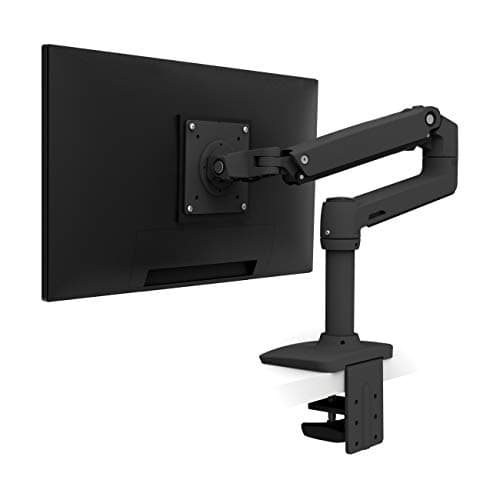
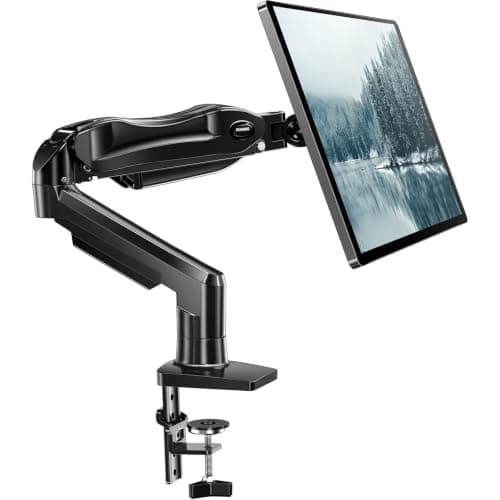
A gas-spring or constant-force monitor arm solves all three at once: it sets height, it cantilevers the panel back to a real viewing distance, and it clears the desk surface underneath entirely. The Ergotron LX is the one we buy once — Ergotron rates it for screens to 34 inches and 25 lb, with a constant-force lift and a 10-year warranty. The HUANUO is the same job at a fraction of the price for a 13 to 32-inch screen, with a gas-spring lift that may need re-tensioning over the years.

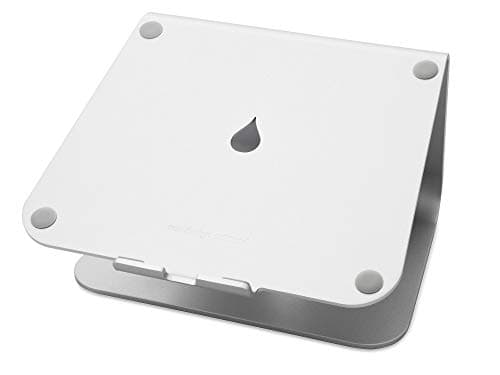
Two conditions where an arm is the wrong buy. If your monitor has no VESA 75×75 or 100×100 mounting pattern, an arm physically cannot attach — check the back of the panel before ordering anything. And if the screen in question is a laptop, the correct fix is a stand plus an external keyboard, not an arm: the mStand is a single piece of cast aluminum with a fixed rise of about 6 inches, which lands close to eye level for most seated users of average height. We work through the arm-versus-riser decision in full in monitor arm vs monitor stand.

Special cases worth getting right

A sit-stand desk. Your eye height changes by roughly the difference between your seated and standing eye heights — commonly 10 to 14 inches — and the desk only moves the whole assembly together, so the relationship is preserved if the monitor is on the desk. Where it breaks is if you sit on a stool at a raised desk, or if you use a laptop riser sized for sitting.

Bifocals or progressive lenses. Lower than standard. If you read the screen through the bottom segment of the lens, a screen at textbook height forces you to tip your head back to find the reading zone, which is the exact neck posture the guidance is trying to prevent. Drop the screen until you can read it with your head level.

Two screens. Both at the same height, with the primary one square in front of you — the layout question has its own page in dual-monitor ergonomics, and the hardware in dual monitor arms.

An ultrawide or a 32-inch-plus panel. Further back rather than lower. A very large screen set at the right top-edge height puts its bottom third well below your comfortable gaze, so distance is what rescues it — which is a depth requirement, and often a monitor arm requirement.

One last thing height cannot fix: eye strain from staring. The American Academy of Ophthalmology's guidance on computer use is about breaks and blinking as much as geometry — the 20-20-20 habit of looking 20 feet away for 20 seconds every 20 minutes. A perfectly positioned screen stared at for three hours straight is still three hours straight.

The short answer

Quick picks

#ProductBest forScorePrice
01
Ergotron Ergotron LX Single Monitor Arm
Ergotron LX Single Monitor Arm

The one that just works and keeps working — the arm every other arm is measured against.

Anyone who wants to buy one arm, once
8.8
$209.99Amazon
02
HUANUO HUANUO Single Monitor Mount
HUANUO Single Monitor Mount

The value arm that gets your screen to eye level without the Ergotron price.

Most single-monitor setups on a budget
8.0
$36.99Amazon
03
Rain Design Rain Design mStand Laptop Stand
Rain Design mStand Laptop Stand

One piece of cast aluminum, no hinges to sag — the fixed-height stand that has been the reference for fifteen years.

A permanent desk setup with an external keyboard
7.6
$39.90Amazon

#ad · Live prices from the Amazon Product API, as of October 22, 2026. Where we have no verified live price, we show none — we would rather leave a gap than print a number that has rotted.

In detail

The picks, in full

01
Ergotron Ergotron LX Single Monitor Arm

Anyone who wants to buy one arm, once

Ergotron LX Single Monitor Arm

Ergotron rates 34"/25 lbConstant-force liftFull tilt/pan/rotate10-year warranty

Certification & materials

Not applicable — an aluminum arm has no emissions certification to check. Judged on stability, range and warranty.

8.8/10

The one that just works and keeps working — the arm every other arm is measured against.

Stability
10
Adjustment range
9
Build
10
Ease of install
8
Value
7

Pros

  • The constant-force lift holds position perfectly and moves with one finger — no drift, no sag
  • A 10-year warranty on hardware you'll adjust thousands of times
  • Getting the monitor to eye level is the single biggest fix for standing-desk neck strain

Cons

  • Costs several times what a basic arm does
  • Heavier monitors need you to check the weight range before buying

Don't buy this if…

…you have a light monitor and a tight budget — a cheaper arm will hold it fine, and you'd be paying for headroom you won't use.

$209.99View on Amazon

Price as of October 22, 2026. Prices change — Amazon's is the one that counts.

#ad · we may earn a commission from this link to Ergotron LX Single Monitor Arm

02
HUANUO HUANUO Single Monitor Mount

Most single-monitor setups on a budget

HUANUO Single Monitor Mount

Fits 13–32"Gas-spring liftFull articulationC-clamp + grommet

Certification & materials

Not applicable — judged on stability, range and build, not materials certification.

8.0/10

The value arm that gets your screen to eye level without the Ergotron price.

Stability
8
Adjustment range
8
Build
7
Ease of install
8
Value
9

Pros

  • Does the important job — screen to eye level — for a fraction of the premium arms
  • Gas-spring lift is smooth and holds position well for the price

Cons

  • The lift can need re-tensioning over time, unlike the Ergotron's constant-force system
  • Shorter warranty and less refined motion

Don't buy this if…

…you'll reposition the screen constantly all day for years — the Ergotron's motion holds up better under heavy long-term use.

$36.99View on Amazon

$47.9923% off

Price as of October 22, 2026. Prices change — Amazon's is the one that counts.

#ad · we may earn a commission from this link to HUANUO Single Monitor Mount

03
Rain Design Rain Design mStand Laptop Stand

A permanent desk setup with an external keyboard

Rain Design mStand Laptop Stand

Single-piece cast aluminumFixed ~6 in riseCable channelFits most 13–17 in laptops

Certification & materials

Solid anodized aluminum with a rubber pad. There is no foam, laminate or composite in it, so there is nothing to off-gas — a genuinely inert desk object, which is rare enough to be worth saying.

7.6/10

One piece of cast aluminum, no hinges to sag — the fixed-height stand that has been the reference for fifteen years.

Posture benefit
8
Adjustability
3
Materials & certs
10
Build
10
Value
7

Pros

  • No hinges, no adjustment, nothing to loosen — it is the same height in year ten
  • Aluminum sinks heat away from the laptop base instead of trapping it
  • The rise lands close to eye level for most seated users of average height

Cons

  • Fixed height: if it is wrong for you, it stays wrong
  • Costs several times what a folding aluminum riser costs

Don't buy this if…

…you are notably tall or short, or you use the same stand at a sitting and a standing height. Buy the adjustable one.

$39.90View on Amazon

Price as of October 22, 2026. Prices change — Amazon's is the one that counts.

#ad · we may earn a commission from this link to Rain Design mStand Laptop Stand

What to buy, once the free fixes run out

1. Check for a VESA pattern first

Four screw holes in a 75 mm or 100 mm square on the back of the panel. No pattern means no arm — and a riser or a different screen is the only route.

2. Buy an arm if the desk is shallow or the desk raises

An arm is the only thing here that fixes height and distance at the same time, and the only thing that clears the desk surface under the screen.

3. Check the arm's rated screen size and weight before the price

Ergotron rates the LX to 34 inches and 25 lb; the HUANUO is rated for 13 to 32 inches. An arm running at the top of its range sags, which is the failure people blame on the brand.

4. For a laptop, buy a stand and an external keyboard

A laptop screen and keyboard are attached, so you cannot fix both at once without separating them. The stand is the cheap half of the fix; the keyboard is the half that makes it work.
How we picked

We do not run a testing lab

We compiled specs from manufacturer manuals, verified every certification claim in the certifying body's own registry (UL SPOT for GREENGUARD, BIFMA, CARB), did the cost-to-own math, and read the aggregated owner reviews, then scored each product against a published rubric. The scores are judgments from documented research — they are not measurements we took, because we do not have a lab and we are not going to pretend we do.

Questions

Frequently asked

How high should my monitor be?
High enough that your eyes are level with a point two to three inches below the top of the casing, which puts the top of the screen at or slightly below eye level. Measure from your seated eye height after the chair is set, not from the desk.
Should the top of my monitor be at eye level?
At or slightly below. Cornell's guidance puts your eye line two to three inches below the top edge of the casing, so you look very slightly downward at the panel. Above eye level extends your neck and holds it there.
How far should a monitor be from your eyes?
Roughly an arm's length, and further for a larger panel. A 24-inch-deep desk struggles to deliver it once the monitor's own foot takes four to six inches, which is why a monitor arm or a deeper desk is often the real answer.
What is the correct monitor viewing angle?
The center of the screen about 17 to 18 degrees below horizontal, per Cornell's published seated-workstation guidance. That is the same position as the height rule, expressed in a way that scales to bigger screens.
Should my monitor be lower if I wear bifocals?
Yes. If you read the screen through the lower segment of the lens, a textbook-height screen makes you tip your head back to find the reading zone. Lower the screen until you can read it with your head level.
Does monitor height cause neck pain?
A screen above eye level is one of the most common desk causes of it, because it holds the neck extended for hours. Our standing-desk neck pain page covers the mechanism and the fixes, including the ones that are free.

Keep reading

Receipts

Sources

We do not run a testing lab, and we do not pretend to. We verify certifications in the certifying body's own registry, compile specs from manufacturer manuals, and cite health claims to recognized authorities — by name, with a link. Where we could not verify something, we say so on the page rather than quietly leaving it out. Read our full method.