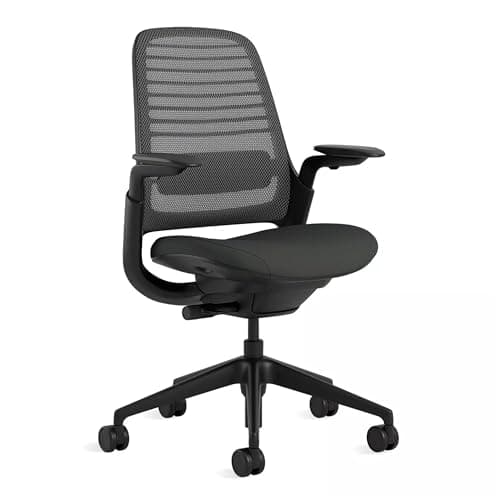
Buy the Steelcase Series 1. It is the only chair here that publishes the number this decision turns on — a 19.5-inch flat seat width, with 16.5 to 21.5 inches of seat height — and its 4D arms move in width and pivot as well as height, so they get out of the way of a folded knee instead of caging it. If you want the arms gone entirely for the least money, the Hbada's armrests flip fully up. If you cross your legs because you cannot sit still, a wobble stool with no arms and no back is the honest answer. Almost nobody publishes a seat width, which is why this page starts with what the chair has to let you do rather than with a spec sheet.
Is sitting cross-legged in a chair bad for you?
It is not the posture crime it gets called. Crossing a leg changes your pelvis position, your hip rotation and where your weight sits — which, held for hours, is a problem, and which, as one of several positions you move between, is roughly the opposite of a problem. The thing every ergonomics source agrees on is that the worst posture is the one you hold all day: OSHA's computer-workstation guidance and Mayo Clinic's ergonomics guide both frame changing position as the intervention, rather than naming a single correct pose.
Two caveats worth stating honestly. Sitting cross-legged on the same side for long stretches loads one side of the pelvis more than the other, so alternate which leg goes on top. And if you fold up because your feet do not comfortably reach the floor, the real fix is seat height plus a footrest, or a chair sized for a shorter stature — our chairs for short people page covers that case properly.
The three things the chair has to allow
1. Armrests that move out of the way
This is the whole decision and nobody shops on it. A folded knee needs the space the armrest is occupying. There are three ways out, in order of how well they work:
- Arms that adjust in width and pivot— Steelcase's 4D arms move up, down, in, out and swivel, so you can push them outboard and leave them there.
- Arms that flip up— the Hbada's flip fully vertical, which removes them from the problem completely, on a chair that costs less than a monitor arm.
- Arms that only go up and down— the Flash Furniture's adjust in height (its listing states 7.75 to 10.25 inches above the seat), so you can drop them below knee level. Better than welded, worse than removable.
2. A flat pan with no side bolsters
You cannot fold a leg onto a bucket seat. Raised side bolsters — standard on gaming chairs, which is one reason we steer cross-legged sitters away from them in gaming chair vs office chair — physically block the position. What you want is a flat, square-ish pan. Steelcase publishes 19.5 inches of seat width; most other makers publish no width at all, so the test is visual: look at the chair from the front and check that the seat edges are flat rather than raised.
3. Seat height to spare
Folding a leg up raises your hips an inch or two relative to the pan, which puts your elbows above the desk unless the seat can come down. A chair with a wide height range absorbs that; a chair already at the bottom of its range does not. If your chair is at its lowest and still too high, the constraint is the desk, not the chair — see our height calculator.
What the four picks give you
| Chair | Armrest escape | Published pan | Height range |
|---|
| Steelcase Series 1 | 4D arms: height, width, depth, pivot | 19.5 in wide, flat; 15.5-17.75 in depth | 16.5-21.5 in |
| Hbada mesh (adjustable lumbar) | Armrests flip fully up | Not published | Not published |
| Flash Furniture mid-back mesh | Height-adjustable arms, 7.75-10.25 in above seat | Contoured padded seat; width not published | Not published |
| Uncaged wobble stool | No arms at all, by design | Padded seat; width not published | Height adjustable, covers a raised desk |
That table is also a fair picture of the category: one chair publishes its dimensions and three do not. We are not going to invent the missing numbers, so for the other three the armrest mechanism is the thing we are actually recommending on.
The stool answer, and when it is the right one
If you cross your legs because you fidget rather than because you are short, a backless stool is a better match than any task chair: nothing to fold a knee around, a seat you can sit on in any orientation, and a base that moves with you. The cost is real — no back support, and if you have an existing back problem that is the wrong trade, which is why the stool is ranked last here rather than first. Our stools page covers the full range, including the leaning and sit-stand-lean designs.
One more option people forget: a chair you can sit on cross-legged is often just a chair with the arms taken off. Many task chairs ship with bolt-on arms, and removing them is a five-minute job that costs nothing — worth checking before buying anything.
Four checks before you buy
1. Look at the armrest spec, not the chair
Flip-up, removable, or 4D with width adjustment. If the listing says only "adjustable armrests", assume height-only until proven otherwise.
2. Look at the seat from the front
Flat edges, not raised bolsters. A bucket pan cannot be sat on cross-legged no matter what the chair costs.
3. Check the bottom of the height range
Folding a leg up effectively raises you. You want room to come back down, not a chair already at its lowest setting.
4. Decide whether you want a back at all
If the answer is "not really, I lean forward anyway", a stool solves this problem completely and costs less. If you have back pain, it does not — buy the task chair.