Buy roughly 36 inches wide by 24 inches deep. That covers a shoulder-width stance with room to shift your weight sideways and enough depth that your heels are still on foam when you step back from the desk — which is the failure case nobody plans for. Go narrower only if the desk is in an alcove; go wider only if you genuinely pace while you work. The number that decides this is depth, and it is the one most manufacturers do not print.
Why the desk width is the wrong starting point
The instinct is to match the mat to the desk: 48-inch desk, 48-inch mat. It is the wrong model, because you do not stand across the whole desk. You stand in one place, directly in front of the keyboard, and you shift within an area roughly the size of a doormat. A 48-inch mat under a 48-inch desk means two feet of foam nobody ever steps on, two extra feet of bevelled edge to catch a chair caster, and more money.
What you are actually sizing is your working footprint: the area your feet occupy across a standing session, including the involuntary shifts that are the entire point of a mat. The evidence base here is about comfort and perceived fatigue rather than about curing anything — Dick and Waters' 2015 review names floor mats among the interventions with supporting evidence for prolonged standing, and Bao and Howard's work is the peer-reviewed study we lean on — and a mat only delivers that if your feet are on it when they move.
Measure your footprint in two minutes
Raise your desk to standing height and work for a minute. Then look down without moving your feet.
- Width: measure the outside of one shoe to the outside of the other, then add about 12 inches. That is your sideways shift allowance. Most adults land between 30 and 36 inches.
- Depth: measure from your toes to your heels, then add room for one step backwards — the step you take to reach a drawer, a printer or a mug. That is where 24 inches comes from, and it is why a 20-inch-deep mat has you standing with your heels on a bevel.
- Clearance:check what the mat does to your chair. If you alternate sitting and standing, a mat your casters half-climb is worse than no mat. Either size it to sit forward of the chair's travel or plan to slide it.
Then raise your desk height, because the mat lifts you. Every inch of mat raises you an inch relative to the desk, which un-does the height you carefully set — set the desk while standing on the mat, because the figure from our height calculator assumes your feet are on the floor. The companion figure to this page is thickness, which we cover in how thick should an anti-fatigue mat be.
What the manufacturers actually publish
Here is the published footprint for every mat we rank, which is a more useful table than any recommendation:
| Mat | Published footprint | Published thickness | Shape |
|---|
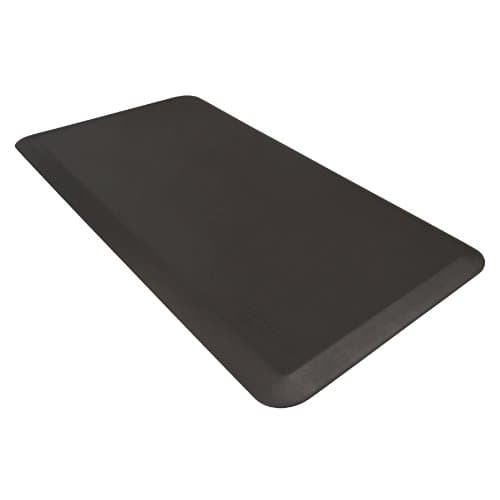
| WellnessMats Original | 36 × 24 in | 3/4 in | Flat, single-piece polyurethane |
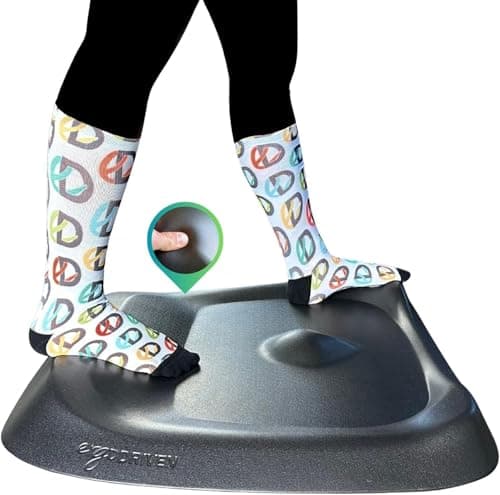
| Ergodriven Topo (full size) | 29 in wide × 26.25 in deep | 0.85 in neutral area, 2.7 in at its highest point | Sculpted terrain |
| NewLife by GelPro Eco-Pro | 20 × 48 in | 3/4 in | Flat, long and narrow |
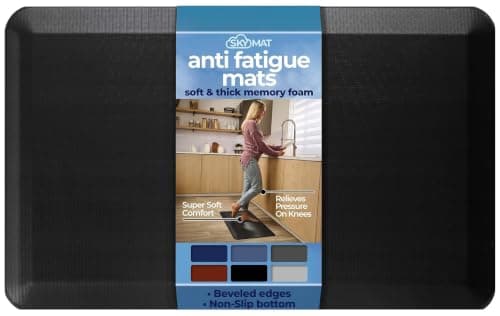
| Sky Solutions | Multiple sizes listed | 3/4 in | Flat |
| FEATOL | Not published | Listed at 9/10 in | Flat |
| Gorilla Grip | Not published | Not published ("thick cushion") | Flat, high-grip base |
Two things stand out. First, only two brands here publish a width and a depth you can plan a room around — WellnessMats and Ergodriven. Second, the most common mat shape in the category is wrong for a desk: 20 by 48 inches is a kitchen-counter footprint, designed to run along a work surface you move sideways in front of, not to stand at one spot. It is a genuinely good mat and a questionable shape for a standing desk unless your desk sits in a narrow alcove.
The 20 × 48 trap, and when it is actually right
A long narrow mat has a specific virtue: 48 inches of width means you can take a real sideways step without leaving the foam, and 20 inches of depth keeps the mat clear of a chair's casters entirely. If you work standing at a wall-length desk and move between two positions — a keyboard at one end and a notebook at the other — it is the better buy, and it is the format most people who pace end up preferring.
What it is not is a mat you can step backwards on. At 20 inches deep your heels are at the bevel the moment you lean back, and standing with your heels dropping off an edge is both less comfortable and a genuine trip risk. Depth, not width, is the dimension to protect.
Sculpted mats size differently
The Topo is 29 inches wide by 26.25 inches deep, which is narrower than our 36-inch recommendation and deeper than the usual 24. That is deliberate rather than arbitrary: it has defined features at its edges — calf mounds, a raised perimeter — so the design assumes you will put a foot on something rather than shift freely. The depth exists to give you somewhere to put a heel; the width is restrained because every feature needs to be within reach.
That makes footprint and mechanism inseparable on a not-flat mat. You are not sizing a cushion, you are buying a set of positions, which is why the Topo is the pick on our hip pain page and why we compare the two sculpted options directly in Topo vs Cumulus. If your problem is standing rigidly in one spot, the smaller sculpted footprint beats a bigger flat one.
Sizing for the room, not just the feet
Three practical constraints that override the measurement above.
A hard slick floor changes the priority. On tile, laminate or sealed concrete, a mat that slides is worse than no mat, and base grip outranks a few extra inches — a certified high-traction base, like the NFSI certification on the GelPro, is worth more than width. Mats for a hard-floor case specifically are covered in mats for concrete floors.
Carpet changes the answer entirely. On carpet, grip is a non-issue and so is most of the case for a mat — we work through that honestly in standing desks on carpet and in do you need an anti-fatigue mat, where the answer is sometimes no.
A footrest or a balance board occupies the same square footage. If you already use a balance board, a large mat and a board compete for the same floor, and the board wants to sit on a hard surface rather than on foam. Pick one as the primary surface.
One last point on what size cannot buy you. A bigger mat does not extend how long you can stand — that is a function of alternating positions, which we cover in how long should you stand. OSHA's computer-workstation guidance treats changing posture as the intervention; the mat makes the standing half tolerable, it does not make it unlimited.
Choosing a size in four checks
1. Default to about 36 × 24 inches
Shoulder-width stance plus a foot of sideways shift, with enough depth that one step backwards keeps your heels on foam. It is the size that fits almost every standing desk in a normal room.
2. Protect the depth before the width
24 inches minimum. A 20-inch mat puts your heels on the bevel every time you lean back, which is both uncomfortable and the most common way people trip over their own mat.
3. Check it against your chair's travel
If you alternate sitting and standing, make sure the casters are not half-climbing an edge. Either keep the mat forward of the chair or accept that you will slide it twice a day.
4. Re-set your desk height once it arrives
The mat raises you, inch for inch. Set the desk while standing on it, not before it turns up.