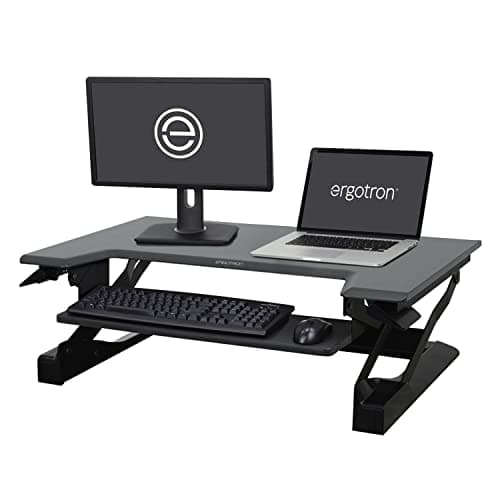
Buy the Ergotron WorkFit-T. Its constant-force lift is the only mechanism here that stays exactly where you leave it with two monitors loaded on the deck, and carrying real screen weight steadily is the entire reason it costs what a budget sit-stand desk costs. If that is too much money, the VIVO 42-inch converter gives you a genuinely wide top tier and a separate keyboard tier for a fraction of the price, and it is the right buy if your desk is deep enough to lose 42 inches of it. Before you buy either, read the section on monitor arms, because for a lot of people the cheapest working answer is a narrower converter plus an arm clamped to the desk behind it.
Two monitors is a load problem, not a width problem
Every converter listing in this category says "dual monitor". What decides whether it is true is not the width of the deck — it is what the lift does when you put 30 or 40 pounds of screen on it and then try to raise it with one hand.
There are three mechanisms in this category and they behave differently under load:
- Constant-force spring (the WorkFit-T): holds by spring geometry. It stays where you put it and moves with one hand whether it is loaded or empty. This is the mechanism that does not care about two monitors.
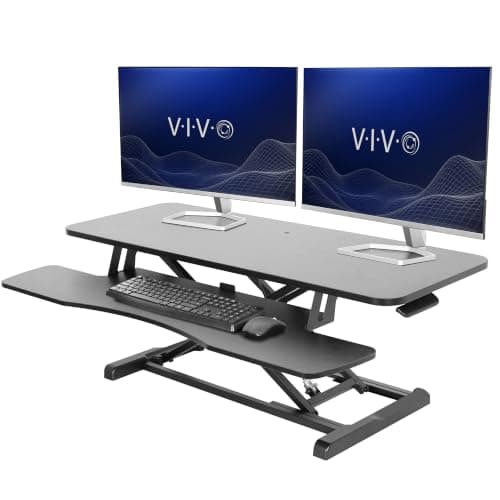
- Gas spring (the VIVO 42): smooth, cheap, and loses tension slowly over years — faster near the top of its range. The symptom is a deck that creeps down.
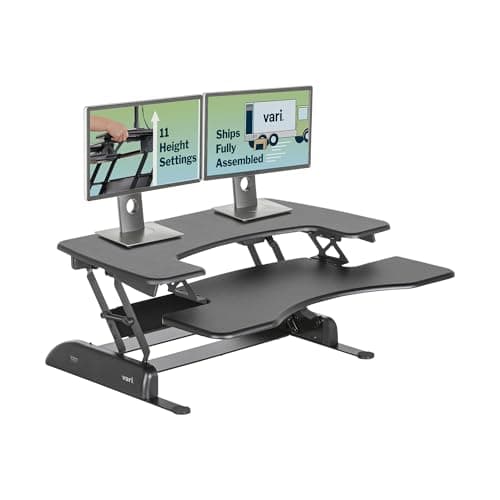
- Spring-assisted or pneumatic step lifts (the Vari Pro Plus, the X-Elite): excellent for a laptop and one screen, and progressively less pleasant as weight goes up.
The second thing that decides it is the tier layout. A two-tier converter puts the keyboard below the screens, which is the posture you want — OSHA's workstation guidance has the screen slightly below eye level and the keyboard at elbow height, and those are two different heights. A single-surface converter like the X-Elite puts both on one deck, which suits a laptop and makes two monitors with stands awkward. That is not a defect; it is a different product, and we rank it here so you can tell them apart.
Side by side, on what each maker publishes
| Converter | Deck | Lift | Two screens? | Certification |
|---|
| Ergotron WorkFit-T | Two-tier, ships assembled | Constant-force spring | Yes — dual-monitor capable, and the lift holds it | No GREENGUARD registration found; judged on lift and stability |
| VIVO 42 in | 42 in wide, separate keyboard tier | Gas spring | Yes, on width — the wide top tier takes two without crowding | None published; composite deck |
| Vari VariDesk Pro Plus 36 | 36 in wide, 11 height settings, ships assembled | Spring-assisted | Tight — 36 in is two small screens at best | ANSI/BIFMA certification on Vari's table; no GREENGUARD row |
| Stand Steady X-Elite Pro | Single-tier surface | Pneumatic, squeeze handle | No — one surface, built for a laptop and one screen | None published; composite deck |
One honest note on the Vari row, because this site cares about it: the VariDesk Pro Plus 36 appears on Vari's own certification table with ANSI/BIFMA certification and no GREENGUARD row against it. It is a structurally certified product, not a documented low-emission one. That distinction is exactly the kind we refuse to blur, and it is the reason this is the only converter in the category with a third-party structural mark and still not the pick for a reader shopping on emissions.
The cheaper answer: get the screens off the deck
Here is the argument that should come before the shopping. A converter raises a surface. Monitors do not need a surface — they need a height, and a monitor arm clamped to the desk behind the converter delivers that height for less money, takes the screens' weight off the lift entirely, and gives you back the deck space the stands were using.
That combination — a modest two-tier converter for the keyboard and mouse, plus one or two arms on the desk behind it — is cheaper than the WorkFit-T, steadier than any wide deck, and it is what we would actually set up. The catch is clamping: an arm needs an accessible rear desk edge or a grommet hole, the panels need a VESA pattern, and you have to check both before you commit. If your desk is glass or has a full-width rear panel, the arm route is out and a wide deck is the answer after all.
And if you can replace the desk rather than sit something on it, do that instead. A converter eats the depth of the desk you already paid for, and a full sit-stand desk sized for two monitors is steadier and cheaper per square inch. The desk versus converter comparison has the full case on both sides; the short version is that converters are for renters, shared offices and desks you cannot replace.
Measure these three things first
Desk depth
This is where dual-monitor converter purchases go wrong. A 42-inch converter on a 24-inch-deep desk leaves nowhere for anything else, and the keyboard tier projects toward you when it rises. Measure the depth, not just the width.
Screen weight, with the stands on
Two 27-inch panels on their factory stands is a surprising amount of mass, and the stands have footprints that fight each other on a narrow deck. If the total is high, that is the argument for the constant-force lift or for arms.
How far the deck travels toward you
An arc-lift converter like the X-Elite brings the surface toward you as it rises, so you need room to step back. On a converter that is also carrying two screens, that movement is the part people forget to plan for.
Before you buy
The decision, in five steps
1. Can you replace the desk instead?
If yes, do that. A converter is the answer when the desk is not yours to change.
2. Can you clamp a monitor arm to the desk?
Accessible rear edge or grommet hole, plus a VESA pattern on the screens. If yes, a narrow converter plus arms beats a wide deck on price, stability and desk space.
3. Two tiers, not one
Screens and keyboard want different heights. A single-surface converter is a laptop product.
4. Weigh the screens, then pick the lift
Heavy load, constant-force spring. Light load, a gas spring is fine and much cheaper.
5. Measure desk depth before width
A wide converter on a shallow desk is the most common regret in this category.