Skip to content
Riser & Rail

06 — Guides

Standing Desk Hip Pain

One-sided hip ache at a standing desk is almost always a weight-shifting habit, not a hip problem. Here is the mechanism, and the fixes in order of cost.

By Stephen V.Updated How we research
#ad

We earn a commission when you buy through our Amazon links, at no extra cost to you. It never affects our rankings, and we say so when the cheaper — or the direct-only — product is the better buy. How this works.

If one hip aches and the other does not, you are standing on one leg. Almost everyone does it — hip cocked, weight parked on one side, the other foot resting — and held for hours it loads one hip joint and one set of stabilizing muscles continuously while the other side does nothing. The fix is not a chair or a mat. It is alternating, deliberately, until even weight-bearing stops feeling like effort.

The mechanism, and why it lands on the hip

Standing still is not rest. As the Yonsei Medical Journal analysis of the Fifth Korean Working Conditions Survey puts it, to maintain a standing position "continuous muscle contraction needs to be maintained in the lower extremities, hips, and spine". Your hip stabilizers — the gluteus medius group in particular — are working the whole time to keep your pelvis level. That is fine when the load alternates. It stops being fine when it does not.

That study is worth being precise about, because it is the best-powered evidence available and it is not about desk workers. It covered 32,970 full-time Korean workers across sales, service, manufacturing and skilled trades — 48.7 per cent of whom stood for more than half their working hours. Lower-extremity muscle pain affected 17.1 per cent of the sample, and after adjustment for age, education, income, occupation, business size and weekly hours, those standing for almost all their working hours had notably higher odds of it: an adjusted odds ratio of 1.72 for men and 2.25 for women against workers who rarely stood. The authors are explicit that a cross-sectional survey cannot establish causation, and that they did not investigate whether interventions like floor mats were in use.

So: this is retail-and-factory standing, not eight hours at a sit-stand desk, and the transferable part is the mechanism rather than the numbers. Sustained one-sided loading of the hip and lower limb is a documented route to lower-limb pain, and a standing desk used badly reproduces exactly that loading pattern. NIOSH names sustained awkward and unnatural postures among the risk factors for work-related musculoskeletal disorders for the same reason.

The four free fixes, in the order they usually work

  1. Stop parking on one hip. Set a recurring reminder for a week. Feet roughly hip-width, weight through both heels, pelvis level. It will feel like work at first because the muscles that should be sharing the load have been idle.
  2. Unlock your knees. Locked knees push your pelvis forward and increase the lumbar curve, which tips the load into the hip flexors and the front of the joint. Soft knees, not bent knees. Same fix as the one that leads our knee pain guide.
  3. Check the desk height. A desk an inch or two too high makes you shrug and arch; too low and you lean. Either way the pelvis compensates and the hip pays for it. Get your number from the height calculator and confirm it with the elbow test.
  4. Alternate more often, for shorter stretches. The same study found that workers who could rest when they wanted reported substantially less lower-extremity pain than those who could not, at the same standing exposure — among women standing almost all their hours, an odds ratio of 2.18 with ready access to rest against 4.65 with little or none. You control your own desk. Use it: the ratio guidance is in how long to stand.

Those four cost nothing and resolve most of what reaches us as "standing desk hip pain". Work through them for two weeks before spending anything.

What to look for if you are going to buy something

The criterion is narrow, and it is not cushioning. What helps a hip is anything that makes you change position more often, or that gives you a third position between sitting and standing. Judge a purchase on that and most of the category falls away:

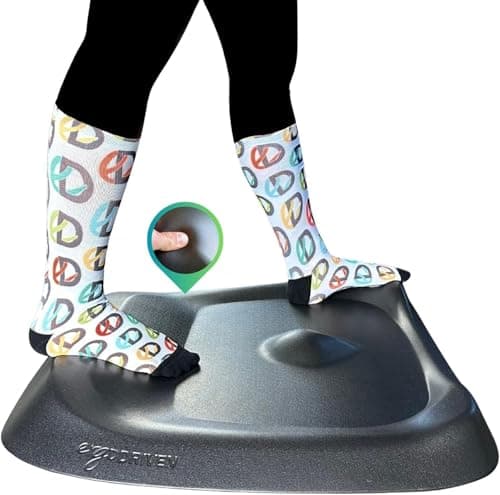
  • Varied terrain beats soft foam. A flat cushioned mat lets you stand still more comfortably, which is the wrong goal — it removes the discomfort that was prompting you to shift. A sculpted surface with defined features gives you somewhere to put a foot, so position changes happen without you thinking about it.
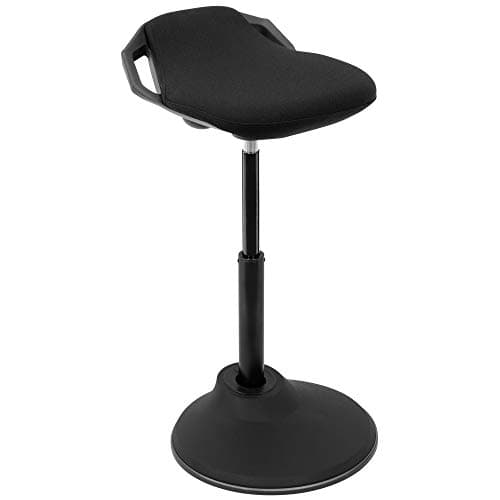
  • A perch is the third position.A leaning or sit-stand stool holds you at an open hip angle, which unloads the joint without collapsing you into a chair. This is the "standing aid" approach the occupational-health literature keeps returning to.
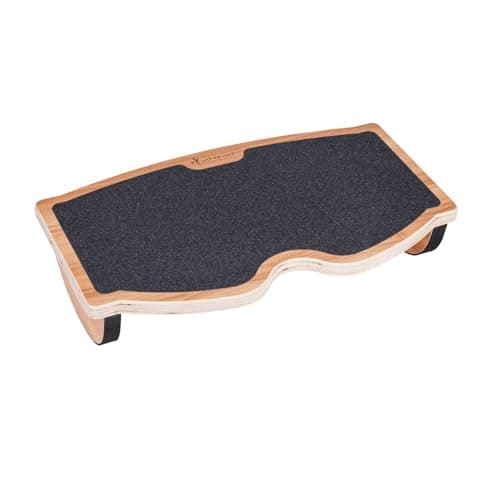
  • A foot platform buys you asymmetry on purpose. Putting one foot up on a raised surface for a few minutes at a time is the oldest trick in standing work — it rotates the pelvis slightly and unloads the weight-bearing hip. The point is that you swap feet, deliberately, rather than defaulting to one.
  • Skip anything with a posture claim. Braces, corrective belts and hip-alignment gadgets are not what the evidence supports, and we do not rank them.

The three picks below map onto those three mechanisms in that order. None is a treatment, and the first one is still the cheapest: change position more often.

When it is not the desk

Hip pain that wakes you at night, that radiates down the leg, that comes with numbness, tingling or weakness, or that follows a fall or a specific injury is not a workstation problem. Neither is pain that is unchanged after two weeks of even weight-bearing and regular position changes. Existing hip arthritis also changes the calculus — prolonged standing is one of the situations our honest look at the downsides flags as warranting caution. See a clinician rather than buying more furniture.
The short answer

Quick picks

#ProductBest forScorePrice
01
Ergodriven Topo by Ergodriven Standing Desk Mat (full size)
Topo by Ergodriven Standing Desk Mat (full size)

The full-size not-flat mat: sculpted terrain over a real footprint, and the clearest material disclosure in the category.

Standing-desk users who want movement, not just cushion
8.2
$109.00Amazon
02
Mount-It! Mount-It! Ergonomic Sit-Stand Leaning Stool
Mount-It! Ergonomic Sit-Stand Leaning Stool

The leaning perch — not a chair and not standing, which is exactly the third position a sit-stand day is missing.

The half-standing position between sitting and standing
6.8
$199.99Amazon
03
StrongTek StrongTek Wooden Rocking Under-Desk Footrest
StrongTek Wooden Rocking Under-Desk Footrest

The one that moves: a rocking wooden platform that keeps your ankles working through a seated afternoon.

Adding movement to seated work
7.2
$39.99Amazon

#ad · Live prices from the Amazon Product API, as of Sep 17, 2026. Where we have no verified live price, we show none — we would rather leave a gap than print a number that has rotted.

In detail

The picks, in full

01
Ergodriven Topo by Ergodriven Standing Desk Mat (full size)

Standing-desk users who want movement, not just cushion

Topo by Ergodriven Standing Desk Mat (full size)

Ergodriven lists 29 in wide × 26.25 in deep2.7 in at its highest point0.85 in thick in the neutral areaErgodriven lists 8 lb

Certification & materials

Ergodriven states the Topo is PVC-free, and markets the line as containing no PFAS or PVC. That is a material disclosure, not a third-party certificate — no GREENGUARD or comparable registration is published for it. Polyurethane foam is nonetheless the lower-concern class here, because the plasticizer and chlorine chemistry criticized in vinyl mats belongs to PVC.

8.2/10

The full-size not-flat mat: sculpted terrain over a real footprint, and the clearest material disclosure in the category.

Cushioning
8
Edge & safety
8
Materials
9
Durability
9
Value
7

Pros

  • The calculated terrain gives your feet somewhere to go, which is the actual mechanism behind reduced standing fatigue
  • PVC-free and PFAS-free as stated by the maker — a rare, specific claim in a category full of vague ones
  • Firm foam that holds its shape instead of bottoming out like cheap gel

Cons

  • No third-party certificate backs the material claims — it is the brand's own disclosure
  • Ergodriven notes performance is optimized up to around 240 lb of user weight

Don't buy this if…

you want a flat surface you can roll a chair across. The Topo's whole point is that it is not flat.

$109.00View on Amazon

Price as of Sep 17, 2026. Prices change — Amazon's is the one that counts.

#ad · we may earn a commission from this link to Topo by Ergodriven Standing Desk Mat (full size)

02
Mount-It! Mount-It! Ergonomic Sit-Stand Leaning Stool

The half-standing position between sitting and standing

Mount-It! Ergonomic Sit-Stand Leaning Stool

Height adjustable360° tiltAnti-slip basePerch-angle seat

Certification & materials

No BIFMA or emissions certification published for this model. Judged on tilt behavior, base grip and range.

6.8/10

The leaning perch — not a chair and not standing, which is exactly the third position a sit-stand day is missing.

Support
7
Adjustability
8
Materials & certs
5
Build
7
Value
7

Pros

  • The perch angle opens your hip and keeps the pelvis upright, which flat seats fight against
  • Takes real weight off your feet without putting you back into a full sit
  • Base grips hard floors, which is the failure point of most cheap leaning stools

Cons

  • The seat is firm — this is a perch, not a place to spend three hours
  • No back support, and it is not intended to have any

Don't buy this if…

you want a chair you can settle into. Leaning stools are a deliberate third position, not a replacement seat.

$199.99View on Amazon

Price as of Sep 17, 2026. Prices change — Amazon's is the one that counts.

#ad · we may earn a commission from this link to Mount-It! Ergonomic Sit-Stand Leaning Stool

03
StrongTek StrongTek Wooden Rocking Under-Desk Footrest

Adding movement to seated work

StrongTek Wooden Rocking Under-Desk Footrest

Laminated wood platformRocking motionAnti-slip surfaceStrongTek rates 350 lb

Certification & materials

Laminated wood with a clear finish. Plywood is an adhesive-bonded panel and StrongTek publishes no CARB or emissions documentation for it — a small panel, but not a zero one.

7.2/10

The one that moves: a rocking wooden platform that keeps your ankles working through a seated afternoon.

Posture benefit
8
Adjustability
4
Materials & certs
6
Build
9
Value
9

Pros

  • Continuous gentle ankle movement is the closest a seated person gets to the calf-pump benefit of standing
  • Wood construction that will outlast every foam footrest here
  • High load rating means you can push off it properly

Cons

  • No height adjustment — it is one angle range and that is it
  • Hard surface; in socks it is less pleasant than foam

Don't buy this if…

you need a specific fixed height to fix a dangling-feet problem. That is a job for an adjustable foam or plastic rest.

$39.99View on Amazon

Price as of Sep 17, 2026. Prices change — Amazon's is the one that counts.

#ad · we may earn a commission from this link to StrongTek Wooden Rocking Under-Desk Footrest

How we picked

We do not run a testing lab

We compiled specs from manufacturer manuals, verified every certification claim in the certifying body's own registry (UL SPOT for GREENGUARD, BIFMA, CARB), did the cost-to-own math, and read the aggregated owner reviews, then scored each product against a published rubric. The scores are judgments from documented research — they are not measurements we took, because we do not have a lab and we are not going to pretend we do.

Not medical advice

This page is general information, not medical advice, and does not replace a clinician. If you have persistent or severe pain — or a specific condition like a herniated disc or sciatica — talk to a doctor or physical therapist before changing how you work.

Questions

Frequently asked

Why does my hip hurt at a standing desk?
Most often because you are standing on one leg. Holding a standing position requires continuous contraction in the lower limbs, hips and spine, and parking your weight on one hip for hours loads one joint and one set of stabilizers while the other side rests. Even weight-bearing and regular position changes are the fix.
Does a standing desk help or cause hip pain?
Both, depending on use. Alternating between sitting and standing is better for you than either extreme; standing still for hours in one position is a documented route to lower-limb discomfort. The desk is a tool for changing position — it only helps if you actually change.
Should I use an anti-fatigue mat for hip pain?
A sculpted or active mat, perhaps; a plain soft one, probably not. Flat cushioning makes standing still more comfortable, which removes the prompt to shift. Varied terrain encourages the position changes that actually unload the joint.
Is a stool or perch better than a chair for hip pain?
For a third position, yes. A leaning stool holds an open hip angle and unloads the joint without putting you back into a full sitting posture. It complements a proper chair rather than replacing it — you still need the seated option.
How long should I stand before my hips start to complain?
There is no single threshold, and anyone quoting one precisely is overstating the evidence. What the occupational research consistently supports is that longer unbroken standing carries more lower-limb symptoms, and that being able to break it up reduces them. Alternate in shorter stretches rather than chasing a target.

Keep reading

Receipts

Sources

We do not run a testing lab, and we do not pretend to. We verify certifications in the certifying body's own registry, compile specs from manufacturer manuals, and cite health claims to recognized authorities — by name, with a link. Where we could not verify something, we say so on the page rather than quietly leaving it out. Read our full method.