Skip to content
Riser & Rail

06 — Guides

Why a Standing Desk Makes Your Knees Hurt

Standing still is not the same activity as walking, and your knees know the difference. Three causes account for nearly all of it, and two are free to fix.

By Stephen V.Updated How we research
#ad

We earn a commission when you buy through our Amazon links, at no extra cost to you. It never affects our rankings, and we say so when the cheaper — or the direct-only — product is the better buy. How this works.

Most standing-desk knee pain comes from three things, in this order: locking your knees straight while you stand, standing on a hard floor with no cushioning, and standing for too many consecutive hours. Unlock your knees, put something compliant underfoot, and cut your standing blocks to 30 to 45 minutes — in that order, before you buy anything.

Locked knees is the big one

When you concentrate on a screen your body stops managing itself, and the default posture is to push your knees back into full extension and hang on the joint. It is efficient — the ligaments and joint structures take the load instead of your quadriceps, so it costs no muscular effort — and it is exactly the wrong thing to do for hours.

Standing with locked knees puts continuous compressive load through the joint in one fixed position and takes the surrounding muscles out of the job of supporting you. It also pools blood in your lower legs, which is the same mechanism behind the light-headedness people occasionally get after a long stretch at a standing desk.

The fix costs nothing: keep a soft bend in the knee, a few degrees, so the quadriceps stay gently engaged. It feels like almost nothing and it changes which structures are carrying you. The problem is that you will forget within four minutes, which is why the rest of this page is about building in reasons to move rather than about willpower.

The floor is doing nothing for you

The second cause is the surface. A hard floor returns none of the energy of standing, so each micro-shift is absorbed by your feet, ankles and knees. This is the reason anti-fatigue matting became standard practice in hard-floor workplaces, and NIOSH's material on prolonged standing at work covers the occupational side of exactly this problem.

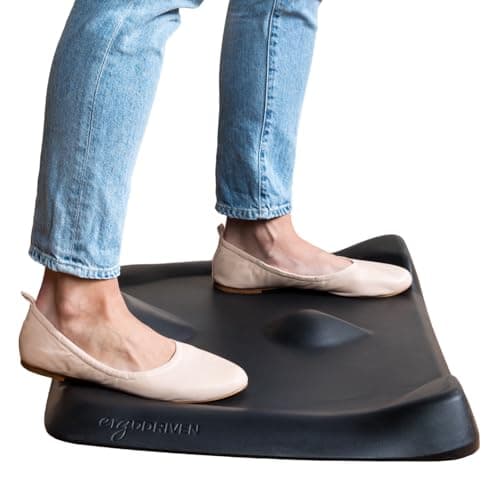
A mat helps in two ways: it cushions, and — if it is a sculpted rather than a flat one — it gives your feet somewhere to go, which produces the small position changes that keep the joint from loading identically minute after minute. That second effect matters more for knees than raw softness does. If your floor is concrete, this is not optional; see mats for concrete floors.

The third position nobody uses

A sit-stand day is usually treated as two positions. There is a third — perching, with the seat high and your weight split between the seat and your feet — and it is the one that takes load off the knees without putting you back into a chair.

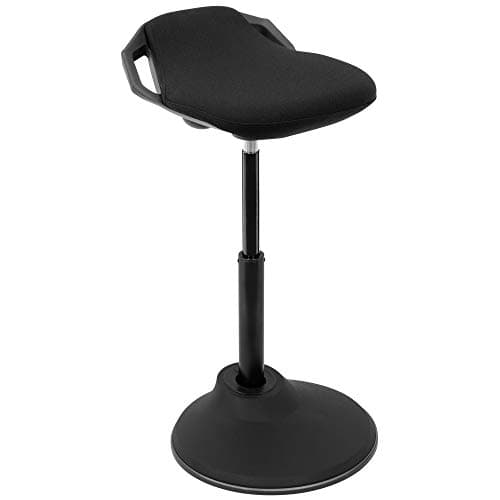
Perching keeps your hips open, keeps some weight through your legs, and lets your knees stay soft rather than locked. It is genuinely useful for the hour when standing has become uncomfortable but sitting feels like giving up. A leaning stool or a height-adjustable stool at a raised desk gives you that position for less than most people spend on a chair mat, and the full comparison is at standing desk stools.

Fix the height before you blame the standing

A desk that is too high makes you reach up and rise slightly onto the balls of your feet, which changes the alignment of the whole leg. A desk that is too low makes you lean, which shifts weight forward onto the front of the knee. Either will produce knee ache that reads as "the standing desk hurts".

Set the desk to your elbows first — the height calculatorgives you a starting number, and the elbow test confirms it. Then check your feet: hip width apart, weight through the middle of the foot rather than the toes, knees soft. Mayo Clinic's office-ergonomics guidance and OSHA's workstation eTool both work from the same principle, which is that the workstation is set to the body rather than the reverse.

Dose, and the honest bit about time

Standing all day is not the goal and never was. The evidence that supports standing desks is about breaking up sustained sitting, not about maximizing standing hours — the Cleveland Clinic summary is direct about the limits, and prolonged standing has its own well-documented occupational costs including lower-limb and knee discomfort.

Practically: 30 to 45 minutes of standing at a time, alternating with sitting, is the pattern most people can sustain without knee complaints. Ramp up over weeks rather than days if you are new to it — most knee pain in the first fortnight of owning a standing desk is a dose problem rather than a setup problem. The ratios are in how long to stand.

What to change, in order

  1. Unlock your knees. Free. Set a recurring reminder for the first week if you need to.
  2. Shorten the blocks. Free. Use a preset on the desk so switching takes two seconds, because a switch that takes effort does not happen.
  3. Shift your weight deliberately. Free. Put one foot on a low rail, box or bar-height footrest for a few minutes at a time and swap — the bar-rail trick, and it works for the same reason bars have rails.
  4. Add a mat. Cheap. A sculpted mat gives your feet somewhere to go as well as cushioning them.
  5. Add a board or a perch. More money, and worth it if the first four have helped but not enough — motion under the feet, or a genuine third position.

When it is not the desk

Knee pain that is sharp rather than achy, that swells, that clicks or gives way, or that keeps you awake, is not a workstation problem and no mat will fix it. Persistent pain that does not improve when you change the things above is worth a clinician. OrthoInfo is a reasonable starting point for understanding what a doctor will be looking for, but it is not a substitute for one.
The short answer

Quick picks

#ProductBest forScorePrice
01
Ergodriven Ergodriven Topo Mini Anti-Fatigue Mat
Ergodriven Topo Mini Anti-Fatigue Mat

The one that's actually designed for a desk — sculpted terrain that keeps your feet moving, not a flat kitchen pad.

Most standing-desk users
8.0
$79.00Amazon
02
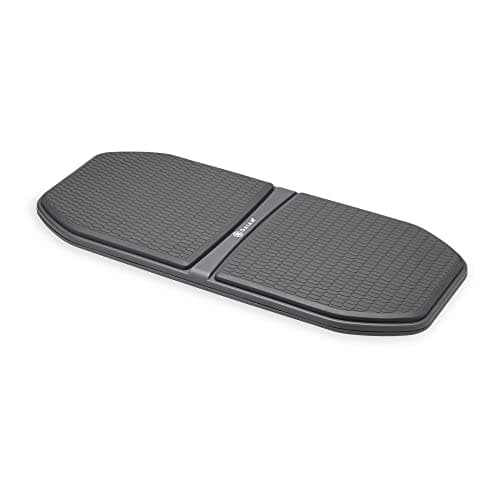
Gaiam Gaiam Evolve Balance Board for Standing Desk
Gaiam Evolve Balance Board for Standing Desk

The desk-first balance board: enough motion to keep your legs working, damped enough that you can still type.

Most people adding motion to a standing desk
7.4
$61.20Amazon
03
Mount-It! Mount-It! Ergonomic Sit-Stand Leaning Stool
Mount-It! Ergonomic Sit-Stand Leaning Stool

The leaning perch — not a chair and not standing, which is exactly the third position a sit-stand day is missing.

The half-standing position between sitting and standing
6.8
$199.99Amazon

#ad · Live prices from the Amazon Product API, as of Sep 6, 2026. Where we have no verified live price, we show none — we would rather leave a gap than print a number that has rotted.

In detail

The picks, in full

01
Ergodriven Ergodriven Topo Mini Anti-Fatigue Mat

Most standing-desk users

Ergodriven Topo Mini Anti-Fatigue Mat

Sculpted terrainPolyurethane foamNot-flat designBeveled edges

Certification & materials

Polyurethane (PU) foam, not PVC — PU avoids the plasticizers and chlorine chemistry PVC is criticized for. Ergodriven markets it as non-toxic; no formal third-party certificate is published, but the PU material is the lower-concern choice for a mat.

8.0/10

The one that's actually designed for a desk — sculpted terrain that keeps your feet moving, not a flat kitchen pad.

Cushioning
8
Edge & safety
8
Materials
9
Durability
8
Value
7

Pros

  • The raised contours prompt small posture changes, which is the actual mechanism behind reduced standing fatigue
  • Firm PU foam holds its shape instead of bottoming out like cheap gel
  • Purpose-built for a desk footprint rather than a kitchen

Cons

  • The sculpted surface is love-it-or-hate-it — some people want a plain flat cushion
  • Costs more than a basic rectangular mat

Don't buy this if…

you want a large flat surface to shift a chair around on. The Topo's whole point is the terrain, and a flat mat is better for a roll-around setup.

$79.00View on Amazon

Price as of Sep 6, 2026. Prices change — Amazon's is the one that counts.

#ad · we may earn a commission from this link to Ergodriven Topo Mini Anti-Fatigue Mat

02
Gaiam Gaiam Evolve Balance Board for Standing Desk

Most people adding motion to a standing desk

Gaiam Evolve Balance Board for Standing Desk

Rocker-style motionTextured deckDesk-height designNon-slip base

Certification & materials

Plastic deck with a rubberized surface. No third-party material or emissions certification is published, and none is standard in this category. There is no foam and no composite wood in it, so it is a low-concern object on materials regardless.

7.4/10

The desk-first balance board: enough motion to keep your legs working, damped enough that you can still type.

Motion quality
8
Stability & safety
8
Materials
6
Durability
7
Value
8

Pros

  • Motion range is tuned for working, not for training — you can rock and still hit keys accurately
  • Wide enough deck to stand on with both feet at a natural stance
  • Rubberized top means you can use it barefoot or in socks without slipping

Cons

  • Hard deck: it adds movement, not cushioning, so it does not replace a mat
  • Plastic construction feels cheaper than the wooden boards at similar money

Don't buy this if…

your problem is sore heels. That is a cushioning problem and a good anti-fatigue mat solves it; a board does not.

$61.20View on Amazon

$79.9823% off

Price as of Sep 6, 2026. Prices change — Amazon's is the one that counts.

#ad · we may earn a commission from this link to Gaiam Evolve Balance Board for Standing Desk

03
Mount-It! Mount-It! Ergonomic Sit-Stand Leaning Stool

The half-standing position between sitting and standing

Mount-It! Ergonomic Sit-Stand Leaning Stool

Height adjustable360° tiltAnti-slip basePerch-angle seat

Certification & materials

No BIFMA or emissions certification published for this model. Judged on tilt behavior, base grip and range.

6.8/10

The leaning perch — not a chair and not standing, which is exactly the third position a sit-stand day is missing.

Support
7
Adjustability
8
Materials & certs
5
Build
7
Value
7

Pros

  • The perch angle opens your hip and keeps the pelvis upright, which flat seats fight against
  • Takes real weight off your feet without putting you back into a full sit
  • Base grips hard floors, which is the failure point of most cheap leaning stools

Cons

  • The seat is firm — this is a perch, not a place to spend three hours
  • No back support, and it is not intended to have any

Don't buy this if…

you want a chair you can settle into. Leaning stools are a deliberate third position, not a replacement seat.

$199.99View on Amazon

Price as of Sep 6, 2026. Prices change — Amazon's is the one that counts.

#ad · we may earn a commission from this link to Mount-It! Ergonomic Sit-Stand Leaning Stool

How we picked

We do not run a testing lab

We compiled specs from manufacturer manuals, verified every certification claim in the certifying body's own registry (UL SPOT for GREENGUARD, BIFMA, CARB), did the cost-to-own math, and read the aggregated owner reviews, then scored each product against a published rubric. The scores are judgments from documented research — they are not measurements we took, because we do not have a lab and we are not going to pretend we do.

Not medical advice

This page is general information, not medical advice, and does not replace a clinician. If you have persistent or severe pain — or a specific condition like a herniated disc or sciatica — talk to a doctor or physical therapist before changing how you work.

Questions

Frequently asked

Why do my knees hurt at a standing desk?
Most often because you are locking them straight, which loads the joint and its ligaments rather than the muscles around it. After that: a hard floor with no cushioning, and standing for too many consecutive hours. Try a soft bend in the knee first — it costs nothing.
Is standing bad for your knees?
Standing still for long periods has real documented costs, including lower-limb discomfort — it is not automatically better than sitting. Alternating between the two is the pattern with support behind it, not maximizing either one.
Does an anti-fatigue mat help knee pain?
It helps two ways: cushioning the impact a hard floor does not absorb, and — with a sculpted mat — giving your feet somewhere to move, which stops the joint loading identically for an hour. It is the cheapest hardware fix and the one we would try first.
How long should I stand before my knees start to complain?
Thirty to forty-five minutes at a stretch suits most people, alternating with sitting. If you are new to a standing desk, build up over weeks — knee pain in the first fortnight is usually a dose problem rather than a setup problem.
Should I use a stool instead of standing?
Perching is a genuinely useful third position: hips open, some weight through the legs, knees soft rather than locked. It is not a replacement for either sitting or standing — it is the option that lets you stay at a raised desk when standing has become uncomfortable.

Keep reading

Receipts

Sources

We do not run a testing lab, and we do not pretend to. We verify certifications in the certifying body's own registry, compile specs from manufacturer manuals, and cite health claims to recognized authorities — by name, with a link. Where we could not verify something, we say so on the page rather than quietly leaving it out. Read our full method.