Skip to content
Riser & Rail

04 — Accessories

The Best Monitor Arms for Ultrawide and Heavy Monitors

A 34-inch ultrawide is not a big monitor, it is a heavy one on a long lever. The spec that decides this purchase is the published weight rating — and most of this category does not have one.

By Stephen V.Updated How we research
#ad

We earn a commission when you buy through our Amazon links, at no extra cost to you. It never affects our rankings, and we say so when the cheaper — or the direct-only — product is the better buy. How this works.

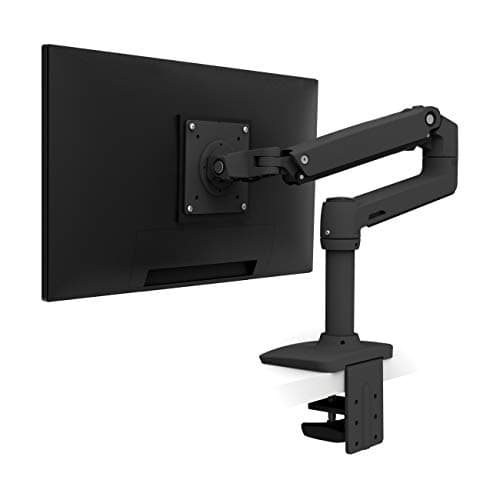
Buy the Ergotron LX single arm. It is the only arm on this site that publishes both halves of the rating that matters for a big screen — Ergotron states 34 inches and 25 lb — and it backs it for ten years with a constant-force lift that does not sag as the months pass. If the price is the problem, the VIVO single arm is the only budget arm here whose published range reaches 38 inches instead of stopping at 32, and it is the right buy for a 34-inch ultrawide you will set once and leave. Everything else in this category tops out at 32 inches or publishes no number at all, and that is the whole story of this page.

The number that decides it is pounds, not inches

Ultrawide buyers shop by diagonal, because that is how monitors are sold. An arm does not care about the diagonal; it cares about mass and about how far that mass sits from the mount. A 34-inch ultrawide panel is wide, which means its center of mass sits further out on the arm than a 27-inch panel of the same weight, and the load on the clamp and the spring is a function of both.

That is why a published size range on its own is not enough. An arm that says "fits 13 to 38 inches" and prints no weight figure is telling you the bracket will reach the holes, not that the spring will hold the panel at the height you set. Of the arms we rank, exactly one publishes both: Ergotron states 34 in and 25 lb for the LX. Hold that up against the rest of the category and the gap is obvious rather than subtle.

ArmPublished size limitPublished weight limitLift typeWarranty
Ergotron LX single34 in (Ergotron)25 lb (Ergotron)Constant-force mechanical spring10 years
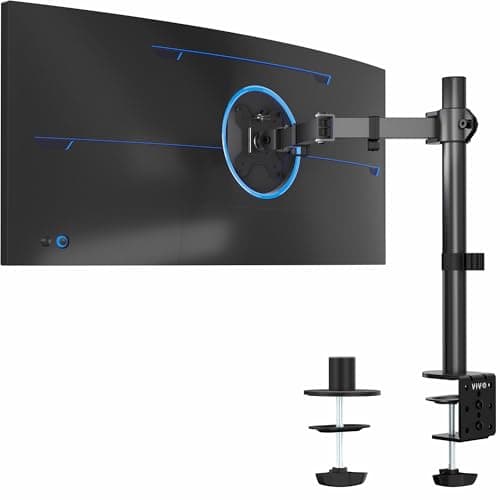
VIVO single arm13 to 38 inNot publishedBolt-set height, manualNot published
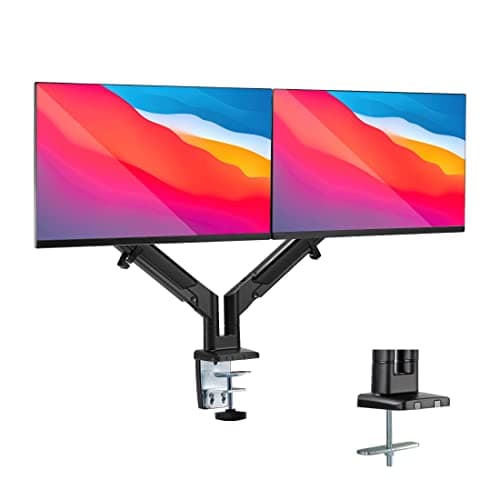
Mount-It! low-profile dual17 to 32 in per screen (Mount-It!)Manufacturer figure only, no third-party testingGas springNot published
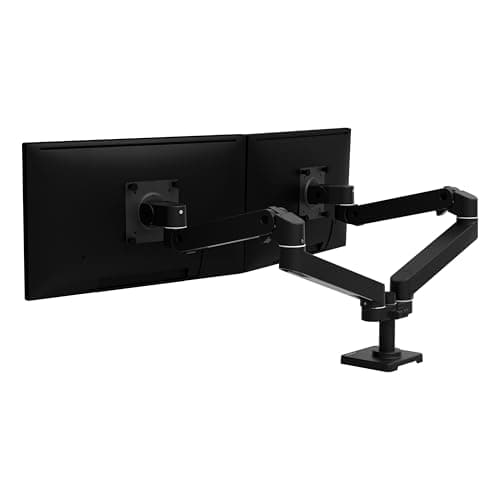
Ergotron LX Pro dualUp to 27 in per screen (Ergotron)4 to 20 lb per arm (Ergotron)Constant-force mechanical spring10 years

Read the dual rows carefully, because they are the ones that catch people out. The Ergotron LX Pro dual is a better-built arm than the Mount-It!, and it is not the arm for a 34-inch ultrawide: Ergotron states up to 27 inches per screen. If your plan is "one ultrawide plus a vertical secondary", you want a single arm for the ultrawide and a second single arm beside it, not a dual arm rated for two 27-inch panels.

Where a gas spring and a mechanical spring differ over time

At the top of a load range this stops being a preference and becomes the failure mode. A gas spring holds position by gas pressure, and gas springs lose tension slowly over years; a heavily loaded one loses it sooner. The symptom is a screen that drifts down overnight and then needs re-tensioning, and at a sit-stand desk where you move the screen several times a day, that is the part you notice.

A constant-force mechanical spring — what Ergotron uses — holds by spring geometry rather than pressure, which is the engineering reason the LX is the reference arm in this category and the reason it carries a ten-year warranty rather than a one-year one. For a light 24-inch panel the difference is academic and a cheap arm is the right call. For a 25 lb ultrawide it is the difference between an arm and a slow disappointment.

Three measurements to take before you buy

An ultrawide fails a mount for reasons that have nothing to do with the arm's rating, so measure these first.

The VESA pattern, and whether it is centered

Four threaded holes in a 75 by 75 or 100 by 100 mm square is the consumer standard; some larger panels use 200 by 100. No pattern means no arm, and a brand-specific adapter plate is sometimes the only route. Curved ultrawides also mount further forward than flat panels of the same diagonal, which eats into the arm's reach.

The desk edge

A C-clamp needs an accessible rear edge with clearance behind it; a grommet mount needs a hole. A full-width rear panel, a deep apron or a glass top is where clamp mounting goes wrong, and glass needs the desk maker's approval first. A heavy panel makes this worse, not better — the clamp is carrying more leverage.

The depth behind the screen

An arm pushes the screen back as it lifts, and a 34-inch panel wants to sit further away than a 27-inch one for the same field of view. OSHA's workstation guidance and the American Optometric Association both put the screen slightly below eye level at roughly arm's length, and Cornell adds the part people miss: if you recline, the screen has to come up with you. On a 24-inch-deep desk against a wall, a big panel on an arm can run out of room before it runs out of rating. Our monitor height guide has the exact targets.

The honest alternative: do not mount it at all

If your ultrawide is heavier than any published rating you can find, the correct answer is the stand it shipped with, raised on something solid, and a desk set to the right height instead. An unrated arm holding a panel it was not designed for is the one failure in this category that takes the monitor with it. We say the same thing the other way round on monitor arm versus monitor stand: the arm wins for most people, and "most" is doing real work in that sentence.

And if what you actually have is two ordinary screens rather than one ultrawide, this is the wrong page — go to dual monitor arms, where the picks are rated for the job, or the general monitor arm ranking if your panel is 32 inches or under.

The short answer

Quick picks

#ProductBest forScorePrice
01
Ergotron Ergotron LX Single Monitor Arm
Ergotron LX Single Monitor Arm

The one that just works and keeps working — the arm every other arm is measured against.

Anyone who wants to buy one arm, once
8.8
$209.99Amazon
02
VIVO VIVO Single Monitor Arm (13–38")
VIVO Single Monitor Arm (13–38")

The ultrawide-friendly budget arm — it reaches to 38 inches where most cheap arms stop at 32.

Ultrawide monitors on a budget
7.6
$34.99Amazon
03
Mount-It! Mount-It! Low-Profile Gas-Spring Dual Monitor Arm
Mount-It! Low-Profile Gas-Spring Dual Monitor Arm

Gas-spring smoothness at a third of the Ergotron's price — the sensible middle of this category.

Two screens you actually reposition between sitting and standing
8.4
$137.99Amazon
04
Ergotron Ergotron LX Pro Dual Monitor Arm (side-by-side)
Ergotron LX Pro Dual Monitor Arm (side-by-side)

The one that still holds position in year eight — Ergotron's constant-force coil spring is the reason this category has a reference product.

A permanent two-screen setup you will not touch again
8.8
$419.99Amazon

#ad · Live prices from the Amazon Product API, as of October 21, 2026. Where we have no verified live price, we show none — we would rather leave a gap than print a number that has rotted.

In detail

The picks, in full

01
Ergotron Ergotron LX Single Monitor Arm

Anyone who wants to buy one arm, once

Ergotron LX Single Monitor Arm

Ergotron rates 34"/25 lbConstant-force liftFull tilt/pan/rotate10-year warranty

Certification & materials

Not applicable — an aluminum arm has no emissions certification to check. Judged on stability, range and warranty.

8.8/10

The one that just works and keeps working — the arm every other arm is measured against.

Stability
10
Adjustment range
9
Build
10
Ease of install
8
Value
7

Pros

  • The constant-force lift holds position perfectly and moves with one finger — no drift, no sag
  • A 10-year warranty on hardware you'll adjust thousands of times
  • Getting the monitor to eye level is the single biggest fix for standing-desk neck strain

Cons

  • Costs several times what a basic arm does
  • Heavier monitors need you to check the weight range before buying

Don't buy this if…

…you have a light monitor and a tight budget — a cheaper arm will hold it fine, and you'd be paying for headroom you won't use.

$209.99View on Amazon

Price as of October 21, 2026. Prices change — Amazon's is the one that counts.

#ad · we may earn a commission from this link to Ergotron LX Single Monitor Arm

02
VIVO VIVO Single Monitor Arm (13–38")

Ultrawide monitors on a budget

VIVO Single Monitor Arm (13–38")

Fits 13–38"Height/tilt/swivelC-clamp + grommetCable management

Certification & materials

Not applicable — judged on stability, range and build, not materials certification.

7.6/10

The ultrawide-friendly budget arm — it reaches to 38 inches where most cheap arms stop at 32.

Stability
8
Adjustment range
7
Build
7
Ease of install
7
Value
9

Pros

  • Handles ultrawide panels that many budget arms can't
  • Cheap and widely compatible

Cons

  • Manual bolt-set height, not a smooth gas spring
  • Basic motion and build

Don't buy this if…

…you want to raise and lower the screen frequently — a bolt-set height arm is set-and-forget, not fluid like a gas-spring or Ergotron.

$34.99View on Amazon

Price as of October 21, 2026. Prices change — Amazon's is the one that counts.

#ad · we may earn a commission from this link to VIVO Single Monitor Arm (13–38")

03
Mount-It! Mount-It! Low-Profile Gas-Spring Dual Monitor Arm

Two screens you actually reposition between sitting and standing

Mount-It! Low-Profile Gas-Spring Dual Monitor Arm

Mount-It! states 17–32 in screensGas-spring liftLow-profile mountClamp and grommet mounting

Certification & materials

Steel and aluminum with a powder-coat finish; no foam, no composite, nothing to emit. No third-party load certification is published, so the capacity figure is the manufacturer's own.

8.4/10

Gas-spring smoothness at a third of the Ergotron's price — the sensible middle of this category.

Screen positioning
9
Stability
8
Build
8
Desk compatibility
9
Value
8

Pros

  • Gas springs move smoothly one-handed, which is what makes you actually adjust the screens
  • Takes larger panels than the Ergotron LX's 27-inch limit
  • Low-profile base keeps the desk edge usable

Cons

  • Gas springs at this price do slowly lose tension over years
  • No published testing behind the load rating

Don't buy this if…

…you never move the monitors. A mechanical arm holds a fixed position just as well for much less.

$137.99View on Amazon

Price as of October 21, 2026. Prices change — Amazon's is the one that counts.

#ad · we may earn a commission from this link to Mount-It! Low-Profile Gas-Spring Dual Monitor Arm

04
Ergotron Ergotron LX Pro Dual Monitor Arm (side-by-side)

A permanent two-screen setup you will not touch again

Ergotron LX Pro Dual Monitor Arm (side-by-side)

Ergotron states up to 27 in per screenErgotron rates 4–20 lb per armConstant-force lift10-year warranty

Certification & materials

Aluminum and steel construction. Ergotron publishes a 10-year warranty rather than a furniture certification; there is no composite or foam content, so there is no emissions question here at all.

8.8/10

The one that still holds position in year eight — Ergotron's constant-force coil spring is the reason this category has a reference product.

Screen positioning
10
Stability
10
Build
10
Desk compatibility
8
Value
6

Pros

  • The lift mechanism does not sag, which is the single failure mode that ends cheap arms
  • Ten-year warranty from a manufacturer that honors it
  • Wide independent adjustment on each arm, including proper height travel for a standing desk

Cons

  • Costs more than many of the desks on this site
  • Overkill for two light 24-inch panels that never move

Don't buy this if…

…your monitors are light and static. A mechanical-spring arm at a fifth of the price does that job.

$419.99View on Amazon

Price as of October 21, 2026. Prices change — Amazon's is the one that counts.

#ad · we may earn a commission from this link to Ergotron LX Pro Dual Monitor Arm (side-by-side)

Before you buy

The checklist, in order

1. Find your monitor's weight on the spec sheet

Panel weight without the stand, not shipping weight. This is the number to compare against the arm, and it is the one most listings bury.

2. Buy headroom, not a match

An arm at the very top of its rating sags sooner. If your panel is 22 lb, a 25 lb rating is close; look for more margin or accept you will re-tension a gas spring.

3. Confirm the VESA pattern and check for a curve

75 by 75, 100 by 100 or 200 by 100, centered, with no recess an arm cannot reach into. A curved panel sits further forward than a flat one.

4. Check the desk edge before anything else is ordered

Clampable rear edge, or a grommet hole. Glass only with the desk maker's approval.

5. One arm per screen, when the screens are big

Published dual-arm ratings in this category are per-arm and lower than single-arm ratings — the Ergotron LX Pro dual states up to 27 in per screen. Two singles cost more and fit more.

6. Then lower the keyboard

Screen up, keyboard down. Doing only the first half moves the problem from your neck to your wrists — the fix is a keyboard tray or a lower desk.
How we picked

We do not run a testing lab

We compiled specs from manufacturer manuals, verified every certification claim in the certifying body's own registry (UL SPOT for GREENGUARD, BIFMA, CARB), did the cost-to-own math, and read the aggregated owner reviews, then scored each product against a published rubric. The scores are judgments from documented research — they are not measurements we took, because we do not have a lab and we are not going to pretend we do.

Questions

Frequently asked

What is the best monitor arm for a 34-inch ultrawide?
The Ergotron LX single arm, because Ergotron publishes both halves of the rating — 34 inches and 25 lb — and uses a constant-force mechanical spring that does not lose tension the way a gas spring does. If the budget will not stretch, the VIVO single arm is the only cheap arm here whose published range goes to 38 inches, with the trade-off that its height is bolt-set rather than freely adjustable.
Will any monitor arm hold an ultrawide?
No. Most arms in this category publish a ceiling of 32 inches or less, and many publish no weight rating at all. A 34-inch ultrawide is both wider and usually heavier than the panels those arms were designed around, and the extra width puts the mass further out on the arm. Check the published size limit and the published weight limit; if an arm states only one of them, treat the missing one as unknown.
What weight limit do I need for an ultrawide monitor?
Find the panel weight without its stand on the monitor's own spec sheet, then buy an arm rated above it with margin. A 34-inch ultrawide commonly lands in the high teens to mid twenties of pounds, which is why the Ergotron LX's stated 25 lb is the relevant figure and why arms with no published rating are a gamble at this size.
Can I put a 49-inch ultrawide on a desk arm?
Not on any arm we rank. The published ceilings here stop at 34 to 38 inches, and a 49-inch super-ultrawide is heavier and much wider than that. The honest answer for a panel that size is a heavy-duty mount rated specifically for it, or the stand it came with on a desk set to the right height.
Is a dual arm better than two single arms?
Not for large screens. Published dual-arm ratings in this category are per-arm and lower than the same maker's single-arm ratings — Ergotron states up to 27 in per screen for the LX Pro dual. Two single arms cost more, take more desk edge and fit bigger panels. A dual arm is the better buy for two mid-size screens that rarely move.
Does a monitor arm work on a standing desk?
Yes, and that is where it earns its money: a sit-stand desk needs two correct screen heights and a fixed riser can only give you one. Clamp to the desktop rather than to anything that stays still, so the screen travels with the desk.

Keep reading

Receipts

Sources

We do not run a testing lab, and we do not pretend to. We verify certifications in the certifying body's own registry, compile specs from manufacturer manuals, and cite health claims to recognized authorities — by name, with a link. Where we could not verify something, we say so on the page rather than quietly leaving it out. Read our full method.