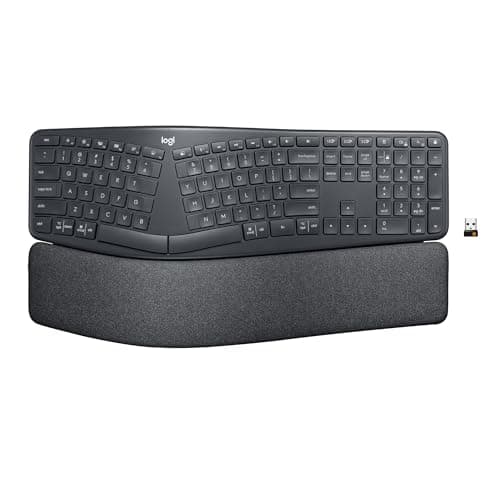
Buy the Logitech Ergo K860. Its curved, one-piece split lets your wrists straighten out without the steep relearning a fully separated keyboard demands, and the wrist rest and negative-tilt legs are genuinely well judged. If you want the deepest correction, the Kinesis Freestyle2 splits into two halves you set at shoulder width; the Logitech Wave Keys is the compact, budget-friendly middle ground.
Like the mice on this site, a keyboard is not a composite-wood or foam product, so there is no emissions certificate to weigh here. These are judged on wrist posture, typing feel and build — which is the honest way to rank a peripheral.
Split, curved, or truly split
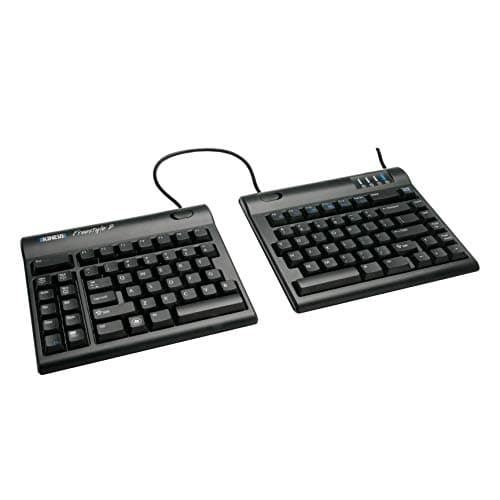
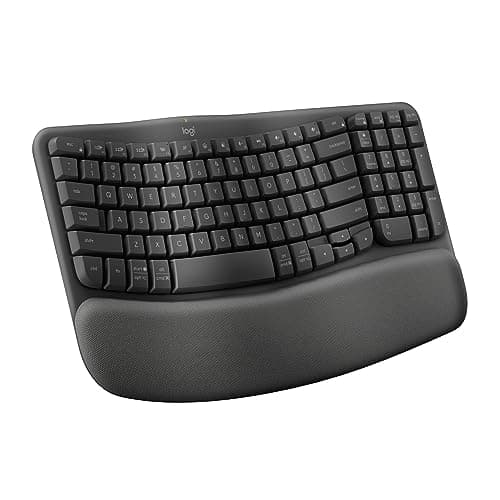
Three shapes solve the same problem to different degrees. A gently curved board like the Wave Keys waves the rows so your wrists bend outward a little less — a mild correction in a small footprint. A curved or split-zone one-piece board like the K860 or the HP 960 opens a gap in the middle and angles each half, so your forearms line up with your keys instead of converging. A true split like the Kinesis Freestyle2 or the budget Perixx PERIBOARD separates into pieces you can place shoulder-width apart, which opens the chest and neutralizes the wrist angle better than any fixed board. More separation means more relief and more relearning; pick the strongest one you will actually stick with.
Tenting is the upgrade people forget
Splitting the keyboard fixes the outward bend (ulnar deviation). Tenting — raising the middle so each half tilts like a shallow roof — fixes the palms-down twist, the same pronation a vertical mouse addresses. The K860 has a slight built-in tent; the Kinesis takes an optional tenting kit that lifts the relief closer to what a vertical ergonomic mouse does for the hand. If your forearms ache as much as your wrists, tenting is the feature to look for.
Be honest about the learning curve
The gentler the board, the faster you adapt. The Wave Keys feels normal in a day; the K860 and the HP 960 in two or three; a true split can cost a week of slower, more error-prone typing while your hands remap. That dip is temporary and expected — but if a deadline means you cannot afford a slow week, start with the K860 or Wave Keys rather than jumping straight to a Kinesis. Posture around the board matters too: our posture guide covers the elbow and wrist angles a split keyboard is trying to protect.
The keyboard is half of a neutral wrist
A split keyboard and a vertical mouse work as a pair, and neither can compensate for a chair that leaves your forearms unsupported. If your wrists are pressing into the desk edge, raising the chair and armrests so the forearm carries the hand is the other half of the fix.
The short answer
#ad · Live prices from the Amazon Product API, as of October 21, 2026. Where we have no verified live price, we show none — we would rather leave a gap than print a number that has rotted.
In detail
Most people wanting a gentler wrist angle
Curved split layoutIntegrated wrist restNegative-tilt legsBluetooth + dongle
Certification & materials
Not applicable — a keyboard isn't a composite-wood or foam product, so the emissions lens doesn't apply. Judged on wrist posture, typing feel and build.
The best mainstream ergonomic keyboard — a curved split layout and a real wrist rest, with no learning cliff.
- Ergonomics
- 8
- Typing feel
- 7
- Adjustability
- 7
- Build
- 8
- Value
- 7
Pros
- +The gentle split-and-curve reduces wrist deviation without the steep relearning a fully-split board demands
- +The wrist rest and negative-tilt legs are genuinely well designed
- +Multi-device Bluetooth for a clean desk
Cons
- −Big footprint — it needs desk depth
- −Membrane switches, not mechanical, so typing feel is soft
Don't buy this if…
…you want a fully-separable split you can set shoulder-width apart — this is a fixed one-piece curve, not two halves. Look at the Kinesis Freestyle2 for that.
Anyone whose shoulders and wrists need a real split
Fully separable halves9" or 20" splitOptional tenting kitSlim profile
Certification & materials
Not applicable — judged on posture, typing feel and build, not materials certification.
The truly-split option — two halves you place at shoulder width, the gold standard for serious wrist relief.
- Ergonomics
- 9
- Typing feel
- 7
- Adjustability
- 9
- Build
- 7
- Value
- 7
Pros
- +Two independent halves let you set your hands at shoulder width, which opens the chest and neutralizes wrist angle better than any one-piece board
- +Optional tenting accessory adds the vertical angle for deeper relief
- +The choice of clinicians and long-term RSI sufferers for a reason
Cons
- −No wrist rest or tenting in the box — those are add-ons
- −A split layout takes a week to re-acclimate to
Don't buy this if…
…you want it to work perfectly out of the box with no accessories or adjustment — the Freestyle2 rewards setup, and the K860 is the easier plug-and-play choice.
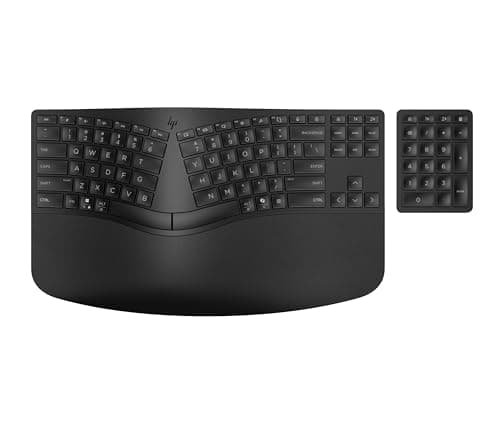
Anyone who mouses a lot and wants the numpad out of the way
Split-zone layoutSeparate numeric keypadNegative tiltFoam wrist rest
Certification & materials
Not a materials-certification product — judged on wrist posture, typing feel and build, the same as every other keyboard here. HP does make two materials claims on the listing worth recording because so few peripherals make any: the keyboard is "crafted with at least 60% post-consumer recycled materials" and the packaging is FSC certified. Both are manufacturer statements on the listing, not third-party emissions certificates, and we treat them as such.
The split-zone board with a numpad you can move — the layout that pulls your mouse hand back toward center, at a fair price.
- Ergonomics
- 7
- Typing feel
- 7
- Adjustability
- 7
- Build
- 8
- Value
- 8
Pros
- +The separate numeric keypad is the real ergonomic feature — lift it off the desk and your mouse sits closer to center, which shortens the reach that strains the shoulder
- +Split-zone keys plus negative tilt address both the outward wrist bend and the reach over the board, and the high-density foam rest is deep rather than token
- +Bluetooth Swift Pair or HP's dongle, with three paired devices on a switch key — and 20 programmable keys, which is unusual outside gaming boards
Cons
- −A split-ZONE layout is a gap in one fixed board, not a curve or a dome — less correction than the K860 and far less than a true split
- −Still runs on disposable cells: two AA in the keyboard and two CR2032 in the wireless numpad, so there is nothing to recharge but there is something to replace
Don't buy this if…
…you have real RSI or forearm pain. A fixed split zone is a moderate correction; go to the K860's curve or the Kinesis's true split, and accept the relearning week.
A smaller ergonomic keyboard on a budget
Wave key layoutCushioned palm restCompact footprintBluetooth + dongle
Certification & materials
Not applicable — judged on posture, typing feel and build, not materials certification.
The compact, affordable wave — the K860's comfort ideas in a smaller, cheaper body.
- Ergonomics
- 7
- Typing feel
- 7
- Adjustability
- 6
- Build
- 7
- Value
- 9
Pros
- +The wave-shaped rows ease wrist angle in a much smaller footprint than the K860
- +Soft integrated palm rest, and a genuinely low price for an ergonomic board
Cons
- −Not a true split — less relief than the K860's curve or a Kinesis
- −Membrane feel; nothing mechanical here
Don't buy this if…
…you want maximum wrist relief — the gentle wave is a mild correction, and a curved-split K860 or a real split does more.
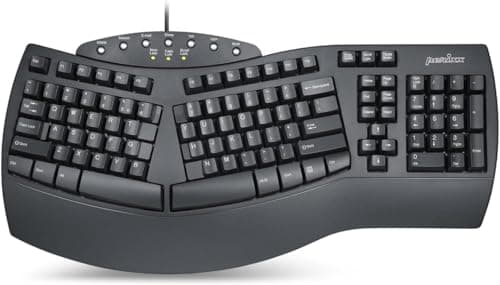
Trying a split layout cheaply
Split key layoutPalm restWired USBFull-size
Certification & materials
Not applicable — judged on posture, typing feel and build, not materials certification.
The budget split — a wired, no-nonsense ergonomic layout for a fraction of the brand-name price.
- Ergonomics
- 7
- Typing feel
- 6
- Adjustability
- 6
- Build
- 6
- Value
- 9
Pros
- +A real ergonomic split layout at a genuinely low price
- +Wired and simple — nothing to pair or charge
Cons
- −Build and key feel are what you'd expect at the price
- −Wired only, and the aesthetics are plain
Don't buy this if…
…you type all day for a living — spend up for a K860 or Kinesis that will hold up and feel better over years of use.
How to pick an ergonomic keyboard
Start with how much relief you need
Mild wrist ache: a curved board like the Wave Keys is enough. A history of RSI or real forearm pain: go straight to a true split with tenting, because a half-measure will not do enough and you will end up buying twice.
Split reduces deviation; tenting reduces pronation
They are two separate fixes. Deviation is the outward bend of the wrist; pronation is the palm-down twist of the forearm. A split addresses the first, tenting the second. The best boards let you do both.
Count the cost of the learning week
Every step toward a more separated layout costs adaptation time. If your job is deadline-driven, buy the gentlest board that solves your problem and step up later, rather than tanking a week of output.
Watch the footprint
Curved one-piece boards like the K860 are wide and need desk depth. A true split can actually take less room, because you place the halves where you want and can push the mouse in between. Measure before you buy.
Keep the numpad in mind
The HP 960 and the Kinesis let you move or drop the number pad, which pulls your mouse hand closer to center and shortens the reach that strains the shoulder. If you mouse a lot, a detached or absent numpad is a quiet ergonomic bonus.
Mechanical feel is not the point here
Most ergonomic boards use quiet membrane switches, and that is fine — the ergonomic win is the shape, not the switch. Do not let a preference for a clicky mechanical feel steer you away from the layout your wrists actually need.
How we picked
We compiled specs from manufacturer manuals, verified every certification claim in the certifying body's own registry (UL SPOT for GREENGUARD, BIFMA, CARB), did the cost-to-own math, and read the aggregated owner reviews, then scored each product against a published rubric. The scores are judgments from documented research — they are not measurements we took, because we do not have a lab and we are not going to pretend we do.
Questions
What is the best ergonomic keyboard?+
The Logitech Ergo K860 for most people — a curved split that straightens the wrists with only a couple of days of adjustment. For the deepest relief, the Kinesis Freestyle2 splits into two halves you set at shoulder width, and the Logitech Wave Keys is the compact, budget choice.
Do split keyboards really reduce wrist pain?+
They cut ulnar deviation — the outward bend a straight keyboard forces on your wrists — and, with tenting, the palm-down pronation of the forearm. Both are linked to strain, so a split is a sound change. It is not a cure by itself; combine it with posture, breaks and a neutral mouse.
What is keyboard tenting?+
Tenting raises the center of the keyboard so each half tilts down toward the edges, like a shallow roof. That angle rotates your palms slightly inward and eases forearm pronation — the same twist a vertical mouse targets. The K860 tents a little; the Kinesis takes an add-on tenting kit for more.
How long does it take to get used to an ergonomic keyboard?+
A gently curved board like the Wave Keys feels normal within a day. The K860 and the HP 960 take two or three days. A true split can cost about a week of slower typing while your hands remap. The dip is temporary and a normal part of switching.
Should I upgrade my keyboard or my mouse first?+
Start with whichever hurts more. If the ache is across the top of your wrists from typing, the keyboard comes first; if it is on the outside of the wrist from mousing, start there. Ideally you change both, since a split keyboard and a vertical mouse aim at the same neutral hand position.
What happened to the Microsoft Sculpt Ergonomic Keyboard?+
It is discontinued, and so is the licensed rebuild. Microsoft wound its accessories hardware down and the Sculpt was relaunched under licence as the Incase Sculpt Ergonomic Keyboard — Designed by Microsoft; that listing has now gone unavailable too. The Microsoft-branded units still on Amazon are scarcity-priced leftovers in the $400–570 range, which is four to five times what the board sold for, so we do not rank them. If you were here for the Sculpt's two real features — a split keyset with a palm rest, and a number pad you can lift off the desk — the HP 960 above keeps both for about a hundred dollars. What you cannot replace is the dome: no current board has the Sculpt's domed keyset, and if that specific shape is what worked for you, a true split like the Kinesis Freestyle2 is the closest in relief even though it gets there a different way.
Receipts
We do not run a testing lab, and we do not pretend to. We verify certifications in the certifying body's own registry, compile specs from manufacturer manuals, and cite health claims to recognized authorities — by name, with a link. Where we could not verify something, we say so on the page rather than quietly leaving it out. Read our full method.