Skip to content
Riser & Rail

06 — Guides

How to Adjust Your Office Chair

Most people adjust the armrests first and the seat height last, which is exactly backwards. There are five controls and they have to be set in one specific order.

By Stephen V.Updated How we research
#ad

We earn a commission when you buy through our Amazon links, at no extra cost to you. It never affects our rankings, and we say so when the cheaper — or the direct-only — product is the better buy. How this works.

Set the seat height first, from your elbows and not your feet. Then seat depth, then the backrest and lumbar, then the armrests, and set the tilt tension last. The order matters because each adjustment changes the correct value of the next one — set the armrests first and you will set them twice. If your feet leave the floor when the seat is at the right height, the answer is a footrest, not a lower seat. All five adjustments are free. Buy something only after you have run out of them.

Why the order is the whole trick

Your chair has one adjustment that is set by the desk and four that are set by your body. Seat height is the one set by the desk: your forearms have to reach the keyboard without your shoulders lifting. Everything else is then measured from where that puts you. Mayo Clinic's ergonomics guide and OSHA's computer-workstation eTool both describe the same dependency chain, and Cornell's seated guidelines put the same numbers on it.

Adjust in the wrong order and you chase your own tail: you lower the seat so your feet reach the floor, which puts the desk too high, so you raise the armrests to compensate, which lifts your shoulders, which is what you were trying to fix. The five steps below break that loop.

The five adjustments, in order

1. Seat height — from your elbows

Sit all the way back in the chair. Raise or lower the seat until your forearms sit roughly level with the desk, shoulders down, elbows at about 90 degrees. This is the only adjustment set by the furniture rather than by you, which is why it goes first.

2. Feet — and why you fix them with a footrest

Now look at your feet. If they are flat on the floor, carry on. If they are dangling, do not lower the seat: that re-breaks step one. Put a footrest under them. If your knees are sitting higher than your hips, go slightly higher on the seat instead — knees a little below hip level opens the hip angle, which is the mechanism behind our chairs for hip pain page.

3. Seat depth — the two-finger check

Two to three fingers between the front edge of the seat and the back of your knee. On a chair with a sliding pan, move the pan; on a chair with a fixed pan and a moving back, move the back. Too deep and the edge presses behind your knee so you slide forward and abandon the backrest entirely — which is the single most common reason people say their lumbar support "does not work". Steelcase publishes 15.5 to 17.75 inches of adjustment on the Series 1; many chairs publish no range because they have none.

4. Backrest and lumbar — find your curve

The most prominent part of the backrest or lumbar pad should land in the inward curve of your lower back, roughly at belt height. Raise the whole backrest if it adjusts; move the pad if it has one. Height first, then depth or firmness. If the chair has nothing adjustable back there, a lumbar cushion does the same job for about the price of a takeaway — that is the first pick below, and our lumbar support page covers the full range.

5. Armrests — then tilt tension

Drop the arms until your shoulders relax, then raise them just enough to carry your forearms without lifting them. If they bump the desk, go lower or take them off — a chair you cannot pull under the desk forces you to reach, and reaching is a shoulder problem. Finally, unlock the recline and set the tilt tension so you can lean back with light pressure. A chair locked upright holds you in exactly one posture, and one posture all day is the thing all of this is meant to prevent.

What to do when the chair runs out of adjustment

Three real limits, and what each of them actually needs. All three are cheap next to a new chair, and all three are genuinely the correct answer in their case rather than a consolation prize.

Symptom after step 5What it meansThe fix
Lower back unsupported, no adjustable lumbarThe backrest's curve does not land where yours isA lumbar cushion, positioned at belt height
Feet dangling at correct seat heightDesk is fixed too high for your statureA footrest, or a desk whose minimum height is lower
Pressure on the sit bones by hour fourSeat foam has compressed, or the pan is too deep to adjust outA dense contoured cushion that offloads rather than sinks
Chair sinks on its ownGas cylinder has failed — not an adjustment problemReplace the cylinder; see sinking chair
Still wrong after all of the aboveThe chair genuinely does not fit youA chair that publishes its dimensions — see best office chairs

Two adjustments almost nobody uses

Forward seat tilt. If your chair has it, a few degrees of forward tilt opens the hip angle and takes load off the lower back when you are leaning in to type. It is the most useful control on the chair and the least used.

Armrest width and pivot. On a 4D armrest, the arms move in and out and swivel, not just up and down. Pushing them outboard is what makes a chair usable if you sit cross-legged, and angling them inwards supports your forearms when you are mousing rather than typing.

Once the chair is set, the rest of the workstation follows from it: the monitor height is measured from your eyes in the seated position you just created, which is why we cover it separately in how high should your monitor be, and the desk height is set from your elbows in our height calculator. If you want the whole workstation in one pass, start at the self-assessment.

The short answer

Quick picks

#ProductBest forScorePrice
01
ComfiLife ComfiLife Memory Foam Lumbar Support Pillow
ComfiLife Memory Foam Lumbar Support Pillow

The default: the right amount of memory foam, an adjustable strap that actually holds, and a price that makes it a low-risk fix.

Most chairs that lack real lumbar support
7.4
$36.99Amazon
02
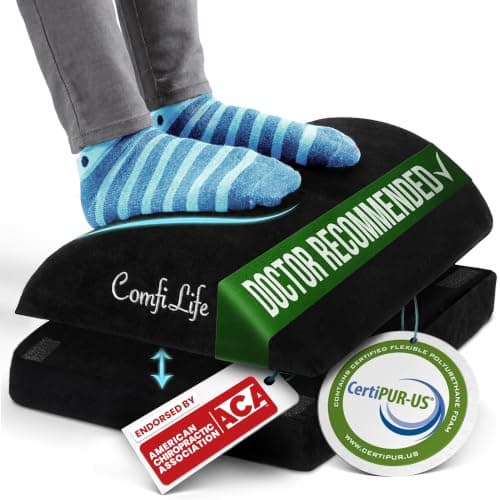
ComfiLife ComfiLife Adjustable Under-Desk Foot Rest
ComfiLife Adjustable Under-Desk Foot Rest

The cheapest fix for the most common desk problem: a chair set correctly for your arms leaves your feet dangling.

Shorter sitters and desks that cannot go lower
7.4
$34.19Amazon
03
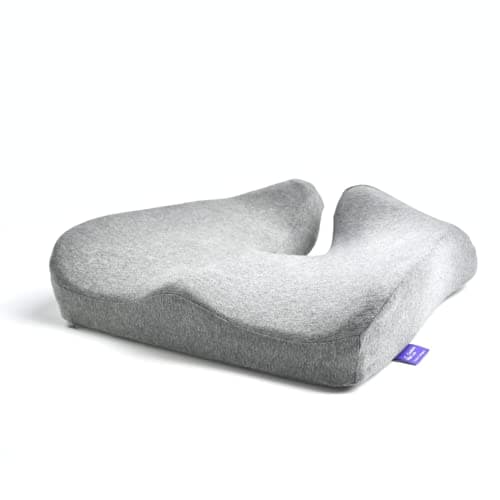
Cushion Lab Cushion Lab Patented Pressure Relief Seat Cushion
Cushion Lab Patented Pressure Relief Seat Cushion

The one that keeps its shape: a dense, contoured foam that is still supporting you at hour six.

All-day sitting where cheap cushions bottom out
7.8
$74.99Amazon

#ad · Live prices from the Amazon Product API, as of October 22, 2026. Where we have no verified live price, we show none — we would rather leave a gap than print a number that has rotted.

In detail

The picks, in full

01
ComfiLife ComfiLife Memory Foam Lumbar Support Pillow

Most chairs that lack real lumbar support

ComfiLife Memory Foam Lumbar Support Pillow

Memory foam coreAdjustable strapMesh coverFits most office chairs

Certification & materials

No CertiPUR-US or emissions certification is published for this cushion. Memory foam is a polyurethane product and new foam can carry an odor for the first days — unwrap it and let it air out before use.

7.4/10

The default: the right amount of memory foam, an adjustable strap that actually holds, and a price that makes it a low-risk fix.

Lumbar support
8
Fit & retention
8
Materials & certs
5
Build
7
Value
9

Pros

  • The curve is deep enough to actually restore a lumbar arch, not just pad the chair back
  • The two-strap system stops it sliding down every time you stand, which is where cheap cushions fail
  • Cheap enough to test the idea before spending on a new chair

Cons

  • No foam certification published
  • A cushion cannot fix a chair whose back is the wrong height for you

Don't buy this if…

…your chair has no back worth strapping to. A cushion works with a chair, not instead of one.

$36.99View on Amazon

Price as of October 22, 2026. Prices change — Amazon's is the one that counts.

#ad · we may earn a commission from this link to ComfiLife Memory Foam Lumbar Support Pillow

02
ComfiLife ComfiLife Adjustable Under-Desk Foot Rest

Shorter sitters and desks that cannot go lower

ComfiLife Adjustable Under-Desk Foot Rest

Memory foamAdjustable heightNon-slip baseWashable cover

Certification & materials

No foam certification published. Polyurethane memory foam — air it out of the packaging before use.

7.4/10

The cheapest fix for the most common desk problem: a chair set correctly for your arms leaves your feet dangling.

Posture benefit
8
Adjustability
7
Materials & certs
5
Build
8
Value
9

Pros

  • Restores the 90-degree knee angle that a too-high desk takes away, which is where lower-back fatigue starts
  • Also fixes the side effect of a seat cushion, which raises you and strands your feet

Cons

  • No foam certification published
  • It has to be repositioned when you push the chair back

Don't buy this if…

…your feet already rest flat. A footrest you do not need just moves your knees into a worse angle.

$34.19View on Amazon

$59.9543% off

Price as of October 22, 2026. Prices change — Amazon's is the one that counts.

#ad · we may earn a commission from this link to ComfiLife Adjustable Under-Desk Foot Rest

03
Cushion Lab Cushion Lab Patented Pressure Relief Seat Cushion

All-day sitting where cheap cushions bottom out

Cushion Lab Patented Pressure Relief Seat Cushion

Contoured high-density foamPatented profileNon-slip baseWashable cover

Certification & materials

Polyurethane foam with a fabric cover. Cushion Lab publishes no CertiPUR-US or GREENGUARD certificate that we could verify, so we are treating the foam as undocumented. Give it a few days out of the wrap before daily use.

7.8/10

The one that keeps its shape: a dense, contoured foam that is still supporting you at hour six.

Pressure relief
9
Durability
9
Materials & certs
6
Fit on a chair
8
Value
7

Pros

  • Density is the whole game with seat cushions and this one does not compress into a pancake
  • The contour actually offloads the sit bones rather than just adding height
  • Cover comes off and washes, which matters more than people expect

Cons

  • Roughly double the price of the mainstream memory-foam cushions
  • Firm — people expecting plush often send it back in week one

Don't buy this if…

…you want softness. This supports; it does not sink, and that is a deliberate design choice you may not want.

$74.99View on Amazon

Price as of October 22, 2026. Prices change — Amazon's is the one that counts.

#ad · we may earn a commission from this link to Cushion Lab Patented Pressure Relief Seat Cushion

Buy in this order, and only after the free fixes

1. A lumbar cushion, if the backrest cannot be moved

The cheapest meaningful upgrade to a chair that otherwise fits. Position matters more than thickness — belt height, not shoulder blades.

2. A footrest, if the desk is fixed and too high

An adjustable one, because the right height depends on the seat height you set in step one. This is also the fix for a desk that cannot go low enough.

3. A dense seat cushion, if the foam has gone

Dense and contoured, not soft and thick. A soft cushion lets the pelvis roll back, which undoes the lumbar support you just set.

4. A new chair, if two of the five adjustments do not exist

At that point you are buying accessories to simulate a chair. Look for published seat height and seat depth ranges — and, for this site's readers, a published emissions certificate.
How we picked

We do not run a testing lab

We compiled specs from manufacturer manuals, verified every certification claim in the certifying body's own registry (UL SPOT for GREENGUARD, BIFMA, CARB), did the cost-to-own math, and read the aggregated owner reviews, then scored each product against a published rubric. The scores are judgments from documented research — they are not measurements we took, because we do not have a lab and we are not going to pretend we do.

Questions

Frequently asked

What order should I adjust my office chair in?
Seat height first (from your elbows, not your feet), then your feet with a footrest if needed, then seat depth, then the backrest and lumbar, then the armrests, and tilt tension last. Each step changes the correct value of the next one, which is why the order is not optional.
How do I know if my office chair is at the right height?
Sitting all the way back, your forearms should be roughly level with the desk with your shoulders relaxed and elbows near 90 degrees. Your feet should be flat — on the floor or on a footrest — and your knees level with or slightly below your hips.
How do I adjust seat depth on an office chair?
Find the seat-slide lever under the front right of the seat on most chairs, or move the backrest forward on chairs that adjust that way instead. Set it so two to three fingers fit between the front edge of the seat and the back of your knee.
Should I lock my office chair upright?
No, as a rule. Set the tilt tension so you can lean back with light pressure and come forward without effort. A locked-upright chair holds one posture all day, and changing posture is the thing the ergonomics guidance actually asks for.
Where should office chair armrests sit?
Just high enough to carry your forearms without lifting your shoulders, and low enough to clear the desk edge so you can pull the chair in. If the arms stop you getting close to the desk, drop them or remove them — reaching is worse than having no armrests.

Keep reading

Receipts

Sources

We do not run a testing lab, and we do not pretend to. We verify certifications in the certifying body's own registry, compile specs from manufacturer manuals, and cite health claims to recognized authorities — by name, with a link. Where we could not verify something, we say so on the page rather than quietly leaving it out. Read our full method.