Skip to content
Riser & Rail

04 — Accessories

The Best Ergonomic Keyboards Under $100

A hundred dollars buys a real correction to the angle your wrists sit at. What it does not buy is the thing most people think they are paying for.

By Stephen V.Updated How we research
#ad

We earn a commission when you buy through our Amazon links, at no extra cost to you. It never affects our rankings, and we say so when the cheaper — or the direct-only — product is the better buy. How this works.

Under a hundred dollars, buy the Logitech Wave Keys. It is the shape most people will still be using in six months — a one-piece wave with a built-in palm rest, three-device switching and a company behind it that publishes a warranty — and it costs a little over half the band ceiling. If you want the deepest correction the band can give, the Kinesis Freestyle2 is the only keyboard here that genuinely separates into two modules you place at your own shoulder width, and it sits just inside $100. On a Mac, buy the Macally: a true two-zone split with a native macOS layout, which is the one thing no Windows-layout keyboard can give you. The best wired option is the Perixx PERIBOARD-512B, the only board in the band that publishes a keystroke rating. The budget pick is the Nulea, which is split and wireless for roughly a third of the ceiling. Seven keyboards in our registry carried a live price under $100 at the last price check, so this band is not short of options. Every price on this page is read from the Amazon Creators API and stamped with the date it was read.

One thing has changed about this band recently and it is the reason this page exists. The keyboard that every roundup on the internet, including our own main keyboard ranking, names as the default ergonomic choice — the Logitech Ergo K860 — is no longer a sub-$100 keyboard on its own live listing. That matters because it means the usual answer to "best ergonomic keyboard under $100" is now wrong, and the real answer is a different keyboard rather than the same one at a different price.

What the band actually buys, and in what order

Three shapes get sold as "ergonomic" and they are not equivalent. Ranking them honestly is most of the work on this page.

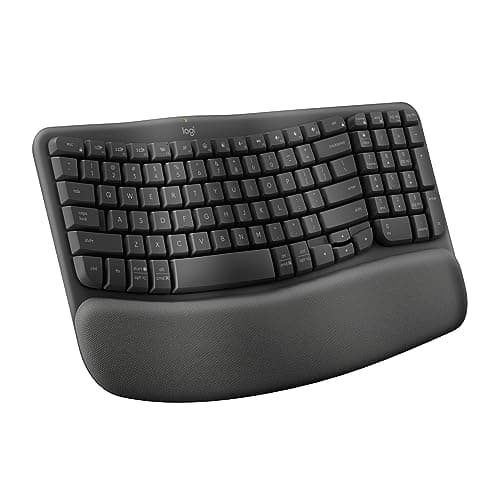
A waved or curved one-piece board lifts and rolls the key rows so your wrists bend outward a little less than on a flat board. It is the mildest of the three corrections and by far the easiest to live with, because the layout is the layout you already type on. The Wave Keys is this.

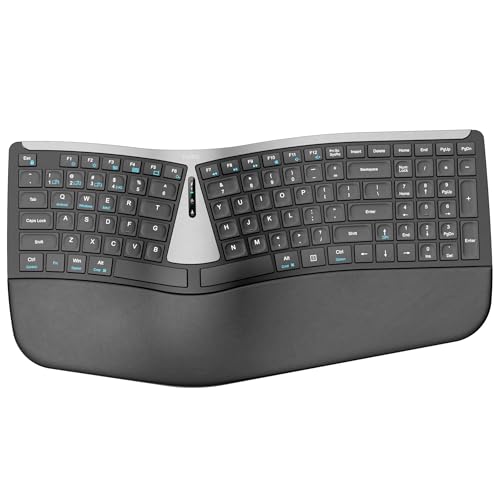
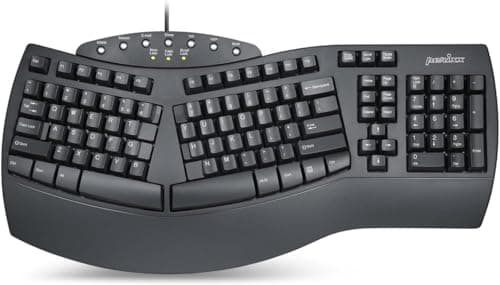
A split-zone one-piece board opens a gap down the middle and angles each half, so your forearms line up with the keys instead of converging toward the center. More correction, same footprint, a few days of adjustment. The Perixx is this, and so is the out-of-band K860.

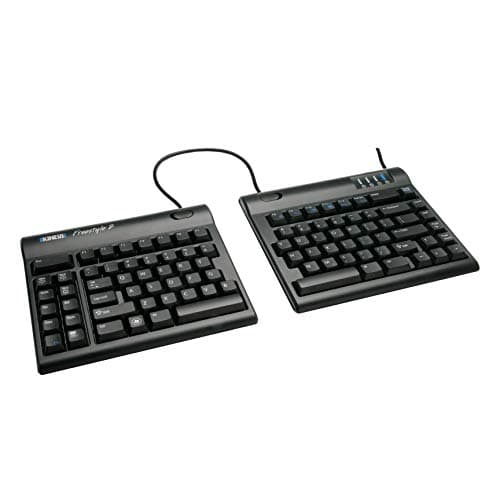
A true split is two separate modules you place at your own shoulder width. This is the only shape that fixes the third problem — not wrist angle but shoulder position, the inward rotation that comes from putting both hands within the width of one keyboard. It is the biggest correction available and the one with the real relearning cost. In this band, only the Kinesis Freestyle2 and the Macally do it.

So the ranking criterion is not "how ergonomic is it" in the abstract. It is: how much correction does this shape buy, multiplied by the likelihood you will still be using it in six months. That second term is why the mildest shape leads the page.

What a hundred dollars does not buy

Three honest limits, stated here rather than left as a surprise.

It does not buy tenting. Tenting — raising the inner edges of the two halves so your palms face each other rather than the desk — is the adjustment that addresses forearm rotation, and it is the single biggest thing missing from this entire band. The Kinesis is the closest: its halves rotate and separate, but the tenting accessory that lifts them is a separate purchase that would put the total over the band ceiling. Nothing else here tents at all. If forearm rotation is your specific complaint, the honest answer is that this band cannot solve it and a vertical mouse plus a flat split is the better use of the money — see mice for wrist pain.

It does not buy mechanical switches. Every keyboard in this band is membrane or scissor-switch. That is not automatically a downgrade — the Kinesis uses a deliberately low-activation-force membrane switch specifically to reduce finger load, which is a defensible ergonomic choice rather than a cost cut — but if you are coming from a mechanical board, expect the typing feel to be the thing you notice first and dislike most.

It does not buy a medical outcome.This is the part most of the category gets wrong. NIH's carpal tunnel material is clear that the evidence for keyboard design as a treatment for carpal tunnel syndrome is weak, and NIOSH's musculoskeletal research frames upper-limb problems as a function of posture, force, repetition and duration together — not of one device. A split keyboard changes posture, which is one of those four. It does nothing about the other three. If you have numbness, night pain or weakness, the keyboard is not the intervention; see a clinician. What a better keyboard genuinely does is remove a sustained awkward angle from eight hours a day, and that is worth having on its own terms.

Who each pick is for

The Wave Keys is for the person who has never used an ergonomic keyboard. The wave is a gentle correction, the palm rest is part of the board rather than an accessory, and Easy-Switch moves it between three devices. Crucially it is a normal layout with a normal number pad, so there is no week of mistyping. It is also the only keyboard in this band from a maker with a published warranty process and replacement parts, which is worth more at the five-year mark than any spec on the box.

The Kinesis Freestyle2 is for the person whose shoulders hurt. Its two modules separate up to nine inches on the 9-inch model, with a detachable pivot tether that sets the splay angle. That is the only correction in this band that addresses shoulder width rather than wrist angle, and it is the reason this keyboard has been in professional ergonomics recommendations for over a decade. It is wired, Windows-layout, has an embedded ten-key rather than a separate one, and it sits at the very top of the band — all of which are the price of the one thing nothing else here does.

The Perixx is for the wired desk. It is the only keyboard in the band that publishes a durability figure (up to 20 million keystrokes) and a key-travel figure (4.2 mm), which for a $50 keyboard is unusually specific. The stepped, curved rows and long travel give it a typing feel closer to an old mechanical board than anything else here. Perixx also says plainly in its own listing that the shape takes one to two weeks to adapt to, which is the kind of disclosure that makes the rest of a listing easier to believe.

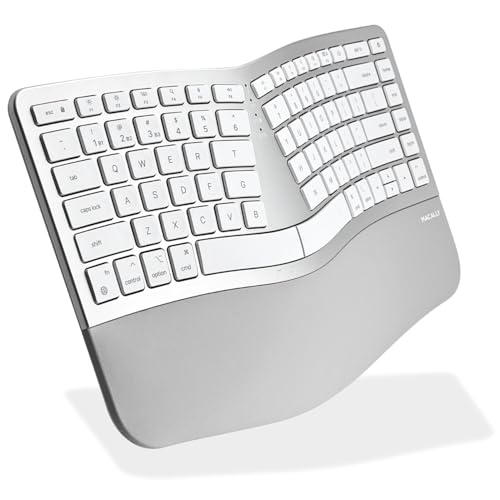
The Macally is for Mac users, and only for Mac users. A true two-zone split in an 86-key body with fifteen macOS shortcut keys, Bluetooth for three devices and a wired USB-C mode that works at the login screen — which is the detail wireless Mac keyboards routinely get wrong. The compromises are real: no number pad, and the split angle is fixed. On Windows it is the wrong keyboard.

The Nulea is the budget pick. Split and wireless at roughly a third of the band ceiling, with a stated 200-hour battery, USB-C charging and scissor switches rather than rubber domes. It is the right keyboard for finding out whether a split layout helps you at all before committing real money. It is also the only pick here whose listing states no warranty term, publishes no dimensions and gives no switch travel figure — so buy it as an experiment, not as a ten-year keyboard.

The two keyboards in the band that we did not rank

A band page that quietly drops the members that do not suit its argument is doing the reader a disservice, so here they are.

The HP 960 sits just under the band ceiling and is a genuinely capable board: a split-zone one-piece shape, twenty programmable keys, a detached numeric keypad and an extra-large foam wrist rest. It is not ranked here for one reason — the Wave Keys gives a broadly similar correction for well under its price, and when two keyboards do the same job the cheaper one wins on a band page by definition. It is ranked properly on our main keyboard page, where price bands do not decide the order.

The Arteck split is the cheapest backlit split board we found live, with seven backlight colors, three brightness levels, a six-foot cable and a stated 24-month warranty. If a lit keyboard in a dim room is the requirement, it is the only answer in this band. It is not in the five because its listing publishes nothing about the object itself — no switch type, no dimensions, no weight, no key travel — and on a page whose whole method is reading what makers publish, a listing that publishes only its own idea cannot be ranked above boards that publish numbers.

Spend the last twenty dollars on the mouse instead

If your budget is a hundred dollars for the whole input problem rather than a hundred for the keyboard, this is the most useful sentence on the page: a sixty-dollar keyboard plus a thirty-dollar vertical mouse or trackball will do more for your wrists than a hundred-dollar keyboard and the mouse you already own. The reason is mechanical. A keyboard fixes a sustained posture; a mouse fixes a posture and a repetition, because the hand that clicks and scrolls all day is doing far more small movements than the hand that types. The ergonomic mouse ranking has three options under forty dollars, and a wrist rest costs less again. That order of spending is the single most common thing people get backwards.

One more pairing worth naming, because it is the cheapest real fix in this whole category: if your keyboard sits on a desk that is too high, no keyboard shape will save your wrists. The keyboard needs to be at or just below elbow height with the wrists straight, which on most desks means either lowering the desk or hanging the keyboard below it. Our keyboard tray rankingcovers the second route, and OSHA's workstation guidance is the free version of the measurement.

A second filter cuts across this band in a way price does not. Wireless ergonomic keyboardsdrops the wired boards above entirely and re-ranks the rest on radios, device switching and battery type — which moves the winner, because the most corrective boards in this band are the ones with a cable.

The short answer

Quick picks

#ProductBest forScorePrice
01
Logitech Logitech Wave Keys Ergonomic Keyboard
Logitech Wave Keys Ergonomic Keyboard

The compact, affordable wave — the K860's comfort ideas in a smaller, cheaper body.

A smaller ergonomic keyboard on a budget
7.2
$54.99Amazon
02
Kinesis Kinesis Freestyle2 Split Keyboard
Kinesis Freestyle2 Split Keyboard

The truly-split option — two halves you place at shoulder width, the gold standard for serious wrist relief.

Anyone whose shoulders and wrists need a real split
7.8
$94.00Amazon
03
Perixx Perixx PERIBOARD-512 Split Keyboard
Perixx PERIBOARD-512 Split Keyboard

The budget split — a wired, no-nonsense ergonomic layout for a fraction of the brand-name price.

Trying a split layout cheaply
6.8
$49.99Amazon
04
Macally Macally Ergonomic Keyboard for Mac (split, Bluetooth + USB-C)
Macally Ergonomic Keyboard for Mac (split, Bluetooth + USB-C)

A true two-zone split with a Mac layout, in a compact 86-key body, for well under a hundred dollars. If you are on a Mac this is the one that does not make you relearn your modifier keys.

A Mac, iPad or iPhone user who wants a split keyboard without a Windows layout
7.6
$69.99Amazon
05
Nulea Nulea Ergonomic Split Wireless Keyboard with Cushioned Wrist Rest
Nulea Ergonomic Split Wireless Keyboard with Cushioned Wrist Rest

The cheapest wireless split keyboard in this registry by a wide margin, and the only sub-$40 board here that is both split and cordless. It is the budget pick, and the compromises are in the parts nobody photographs.

A first ergonomic keyboard, or a second one for a laptop bag
7.0
$32.29Amazon

#ad · Live prices from the Amazon Product API, as of November 23, 2026. Where we have no verified live price, we show none — we would rather leave a gap than print a number that has rotted.

In detail

The picks, in full

01
Logitech Logitech Wave Keys Ergonomic Keyboard

A smaller ergonomic keyboard on a budget

Logitech Wave Keys Ergonomic Keyboard

Wave key layoutCushioned palm restCompact footprintBluetooth + dongle

Certification & materials

Not applicable — judged on posture, typing feel and build, not materials certification.

7.2/10

The compact, affordable wave — the K860's comfort ideas in a smaller, cheaper body.

Ergonomics
7
Typing feel
7
Adjustability
6
Build
7
Value
9

Pros

  • The wave-shaped rows ease wrist angle in a much smaller footprint than the K860
  • Soft integrated palm rest, and a genuinely low price for an ergonomic board

Cons

  • Not a true split — less relief than the K860's curve or a Kinesis
  • Membrane feel; nothing mechanical here

Don't buy this if…

…you want maximum wrist relief — the gentle wave is a mild correction, and a curved-split K860 or a real split does more.

$54.99View on Amazon

$69.9921% off

Price as of November 23, 2026. Prices change — Amazon's is the one that counts.

#ad · we may earn a commission from this link to Logitech Wave Keys Ergonomic Keyboard

02
Kinesis Kinesis Freestyle2 Split Keyboard

Anyone whose shoulders and wrists need a real split

Kinesis Freestyle2 Split Keyboard

Fully separable halves9" or 20" splitOptional tenting kitSlim profile

Certification & materials

Not applicable — judged on posture, typing feel and build, not materials certification.

7.8/10

The truly-split option — two halves you place at shoulder width, the gold standard for serious wrist relief.

Ergonomics
9
Typing feel
7
Adjustability
9
Build
7
Value
7

Pros

  • Two independent halves let you set your hands at shoulder width, which opens the chest and neutralizes wrist angle better than any one-piece board
  • Optional tenting accessory adds the vertical angle for deeper relief
  • The choice of clinicians and long-term RSI sufferers for a reason

Cons

  • No wrist rest or tenting in the box — those are add-ons
  • A split layout takes a week to re-acclimate to

Don't buy this if…

…you want it to work perfectly out of the box with no accessories or adjustment — the Freestyle2 rewards setup, and the K860 is the easier plug-and-play choice.

$94.00View on Amazon

$100.486% off

Price as of November 23, 2026. Prices change — Amazon's is the one that counts.

#ad · we may earn a commission from this link to Kinesis Freestyle2 Split Keyboard

03
Perixx Perixx PERIBOARD-512 Split Keyboard

Trying a split layout cheaply

Perixx PERIBOARD-512 Split Keyboard

Split key layoutPalm restWired USBFull-size

Certification & materials

Not applicable — judged on posture, typing feel and build, not materials certification.

6.8/10

The budget split — a wired, no-nonsense ergonomic layout for a fraction of the brand-name price.

Ergonomics
7
Typing feel
6
Adjustability
6
Build
6
Value
9

Pros

  • A real ergonomic split layout at a genuinely low price
  • Wired and simple — nothing to pair or charge

Cons

  • Build and key feel are what you'd expect at the price
  • Wired only, and the aesthetics are plain

Don't buy this if…

…you type all day for a living — spend up for a K860 or Kinesis that will hold up and feel better over years of use.

$49.99View on Amazon

Price as of November 23, 2026. Prices change — Amazon's is the one that counts.

#ad · we may earn a commission from this link to Perixx PERIBOARD-512 Split Keyboard

04
Macally Macally Ergonomic Keyboard for Mac (split, Bluetooth + USB-C)

A Mac, iPad or iPhone user who wants a split keyboard without a Windows layout

Macally Ergonomic Keyboard for Mac (split, Bluetooth + USB-C)

True 2-zone split, 86-key compact layoutBluetooth + USB-C or USB-A wired dual mode3-device switching with dedicated keys15 macOS shortcut keys; scissor switches

Certification & materials

Not a certification category — no emissions or durability standard applies to a keyboard, and none is claimed. What matters instead is stated: a 500 mAh rechargeable cell that Macally says charges in about two hours and runs one to two months, and a wired mode that works at the login screen. That last detail is the one most wireless Mac keyboards get wrong, and it is a real spec rather than a badge.

7.6/10

A true two-zone split with a Mac layout, in a compact 86-key body, for well under a hundred dollars. If you are on a Mac this is the one that does not make you relearn your modifier keys.

Posture correction
8
Build quality
7
Typing feel
7
Compatibility
7
Value
9

Pros

  • A genuine split with two separated key zones, not a one-piece wave that calls itself ergonomic
  • Mac-native layout and 15 macOS shortcuts including Mission Control and Spotlight, so nothing is remapped
  • Wired USB-C or USB-A mode works at login and while charging — wireless-only Mac keyboards strand you at the password screen
  • Three-device switching from dedicated keys, so a Mac, iPad and iPhone share one keyboard
  • Cushioned palm rest included rather than sold as an accessory

Cons

  • 86 keys means no dedicated numeric pad, which is a real loss if you work in spreadsheets
  • The split angle is fixed — there is no tenting or separation adjustment like the Kinesis offers
  • Mac-first layout is a drawback if the keyboard will ever be shared with a Windows machine
  • Scissor switches are quiet and shallow, which suits laptop typists and disappoints anyone coming from a mechanical board

Don't buy this if…

…you need a number pad or you want to change the split angle. The Kinesis Freestyle2 is the keyboard that lets you set the separation; this one has one shape.

$69.99View on Amazon

Price as of November 23, 2026. Prices change — Amazon's is the one that counts.

#ad · we may earn a commission from this link to Macally Ergonomic Keyboard for Mac (split, Bluetooth + USB-C)

05
Nulea Nulea Ergonomic Split Wireless Keyboard with Cushioned Wrist Rest

A first ergonomic keyboard, or a second one for a laptop bag

Nulea Ergonomic Split Wireless Keyboard with Cushioned Wrist Rest

Split layout with cushioned palm restBluetooth + 2.4 GHz dual modeStated 200-hour battery; USB-C chargingScissor-switch keys

Certification & materials

No certification category applies and none is claimed. The listing's one quantified durability-adjacent figure is the 200-hour battery life, which is a runtime claim rather than a tested standard. Nulea states no warranty term in its feature bullets, which is the gap worth knowing at this price.

7.0/10

The cheapest wireless split keyboard in this registry by a wide margin, and the only sub-$40 board here that is both split and cordless. It is the budget pick, and the compromises are in the parts nobody photographs.

Posture correction
7
Build quality
5
Typing feel
6
Compatibility
8
Value
9

Pros

  • Split layout and wireless at a price where you normally choose one
  • Dual-mode radio: Bluetooth for a tablet, 2.4 GHz dongle for a desktop that has to work at the login screen
  • Rechargeable over USB-C with a stated 200-hour runtime, so no AA habit
  • Scissor switches rather than rubber domes, which is the better of the two cheap switch types for travel consistency
  • Palm rest is part of the board, not an extra

Cons

  • No warranty term stated anywhere in the listing copy
  • No published dimensions, weight or key-travel figure — the listing describes the idea and not the object
  • Split-but-attached, so the separation is fixed and modest
  • At this price the plastics and the keycap legends are where the money was saved; expect it to feel like a $32 keyboard

Don't buy this if…

…the keyboard is the tool you earn a living with eight hours a day. Spend up to the Logitech or the Kinesis — this is the right keyboard for finding out whether a split layout helps you at all.

$32.29View on Amazon

$45.9930% off

Price as of November 23, 2026. Prices change — Amazon's is the one that counts.

#ad · we may earn a commission from this link to Nulea Ergonomic Split Wireless Keyboard with Cushioned Wrist Rest

How to pick a sub-$100 ergonomic keyboard

1. Decide which of the three problems you have

Wrists bent outward at the knuckles is a wrist angle problem and any shape here helps. Shoulders rolled forward and elbows tucked in is a width problem and only a true split fixes it. Palms pressed flat to the desk with the forearms rotated is a rotation problem and nothing in this band fixes it. Naming the problem first removes about half the options immediately.

2. Check whether you need the number pad before you look at anything else

True splits and compact boards drop it or embed it. If you work in spreadsheets, a keyboard without a ten-key will be returned within a week no matter how good the ergonomics are. The Wave Keys and the Perixx keep a full layout; the Kinesis embeds it; the Macally does without.

3. Match the connection to the desk, not to the fashion

A sit-stand desk that actually moves wants wireless, or a cable routed for both heights. A desktop that has to work at a BIOS prompt or a login screen wants wired, or wireless with a 2.4 GHz dongle rather than Bluetooth alone. This single question eliminates more wrong purchases than any ergonomic spec.

4. Read the switch claim, and treat silence as an answer

Two boards here publish something about their switches — the Kinesis names a low-activation-force membrane, the Perixx gives 4.2 mm of travel and a 20-million-keystroke rating. The rest say nothing. Silence is not proof of a bad switch, but it does mean the only way you will find out is by typing on it, so buy those from a seller with a free return.

5. Budget for the wrist rest, or buy it built in

A split keyboard with no palm support often makes things briefly worse, because the new hand position has nothing under it. Three of the five picks here include a cushioned rest in the price. If yours does not, add one — it is the cheapest item in this entire category and it is the difference between a correction you keep and one you abandon in week two.

6. Give any new shape two full weeks before you judge it

Perixx puts this in its own listing and it is the honest number. Typing speed drops first and comfort improves second, which means every ergonomic keyboard feels like a mistake on day three. Decide at day fourteen, not day three — and if it still feels wrong at day fourteen, that is real information and the keyboard should go back.
Side by side

Compare the five on the factors that decide it

The five ranked picks on the four things that decide a keyboard in this band. 'Not published' appears more than once, and it is a real answer.

ChairLumbarAdjustmentsCertificationRated forPrice
Waved one-piece rows — the mildest of the three corrections, and the easiest to keepIntegrated palm rest; Easy-Switch across 3 devices; Bluetooth and Logi Bolt; full layout with number padNo certification category applies to a keyboard. Logitech is the only maker in this band with a published warranty process and spare-parts channel2.16 lb, 14.8 x 8.6 in; Windows, macOS, Chrome, Linux$54.99Check price on Amazon
True split: two modules that rotate and separate up to 9 in on this model — the only width correction in the bandDetachable pivot tether sets splay; low-activation-force membrane switches; embedded 10-key; wiredNo certification category applies. Kinesis publishes a named switch design intent (low activation force, tactile) rather than a badge2 lb, 15.94 x 9.25 in; plug-and-play on Windows, Linux and Chrome; tenting kit sold separately$94.00Check price on Amazon
One-piece split zones with stepped, curved rows; wrist rest attachedNone beyond the fixed shape — no tenting, no separation, no backlight; wired USBNo certification category applies. The only durability figure published in this band: up to 20 million keystrokes, with 4.2 mm key travel2.28 lb, 18.92 x 9.2 in; Perixx states a 1-2 week adaptation period in its own listing$49.99Check price on Amazon
True 2-zone split in a compact 86-key body; cushioned palm rest includedFixed split angle; Bluetooth 3-device switching plus USB-C or USB-A wired mode that works at loginNo certification category applies. Published instead: a 500 mAh cell, roughly 2 h to charge, 1-2 months per chargemacOS, iPadOS and iOS with 15 native shortcut keys; no number pad; wrong keyboard on Windows$69.99Check price on Amazon
Split-but-attached layout with a cushioned palm rest; fixed, modest separationDual-mode Bluetooth and 2.4 GHz; USB-C recharge; scissor switchesNo certification category applies, and no warranty term, dimensions or key-travel figure is published either. The one quantified claim is a 200-hour batteryWindows, macOS and multi-device; the cheapest split-and-wireless board we found live$32.29Check price on Amazon

#ad · we may earn a commission · Live prices from the Amazon Product API, as of November 23, 2026. Where we have no verified live price we show none.

How we picked

We do not run a testing lab

We compiled specs from manufacturer manuals, verified every certification claim in the certifying body's own registry (UL SPOT for GREENGUARD, BIFMA, CARB), did the cost-to-own math, and read the aggregated owner reviews, then scored each product against a published rubric. The scores are judgments from documented research — they are not measurements we took, because we do not have a lab and we are not going to pretend we do.

Questions

Frequently asked

What is the best ergonomic keyboard under $100?
The Logitech Wave Keys, for most people. It is a waved one-piece board with an integrated palm rest and three-device switching, it keeps a normal full layout so there is nothing to relearn, and it costs a little over half the band ceiling. If you want the biggest correction rather than the easiest one, the Kinesis Freestyle2 is the only keyboard in the band that separates into two modules you place at your own shoulder width. On a Mac, the Macally is the only true split here with a native macOS layout.
Can you get a true split keyboard for under $100?
Yes — two of them. The Kinesis Freestyle2 separates into two modules up to nine inches apart on the model we price, and the Macally is a two-zone split with a Mac layout. Both sit inside the band. What you cannot get under $100 is tenting: raising the inner edges so your palms face each other. The Kinesis tenting accessory is a separate purchase that would take the total over the ceiling, and nothing else in the band tents at all.
Will an ergonomic keyboard fix my carpal tunnel?
No, and it is worth being direct about it. NIH's material on carpal tunnel syndrome describes the evidence for keyboard design as a treatment as weak, and NIOSH frames upper-limb disorders as a product of posture, force, repetition and duration together. A split or waved keyboard changes one of those four. If you have numbness, night pain or weakness in the hand, that is a clinical question and a keyboard is not the answer. What a better keyboard genuinely does is take a sustained awkward wrist angle out of your working day, which is worth doing on its own merits.
Is a cheap split keyboard better than an expensive curved one?
Only if you keep using it. A true split is the bigger correction on paper because it addresses shoulder width as well as wrist angle, but it also has the steepest relearning cost — typing speed drops for one to two weeks. A waved or split-zone one-piece board is a smaller correction you will almost certainly still be using in six months. The right answer is the strongest shape you will actually stick with, which for most people is not the strongest shape available.
Keyboard or mouse first, if I only have $100 total?
Split the money. A sixty-dollar keyboard plus a thirty-dollar vertical mouse or trackball does more than a hundred-dollar keyboard and the mouse you already own, because the mousing hand performs far more small repeated movements than the typing hands do. Our ergonomic mouse page has three picks under forty dollars, and mice for wrist pain covers which shape suits which complaint.
Does the keyboard height matter more than the keyboard shape?
Often, yes. If the board sits above elbow height your wrists extend upward all day and no layout rescues that. The target is the keyboard at or just below elbow height with the wrists straight and the forearms roughly parallel to the floor, which is what OSHA's workstation guidance describes. On a fixed desk that usually means hanging the keyboard below the surface — see keyboard trays— and on a sit-stand desk it means setting the standing height from your elbows rather than from the desk's preset.

Keep reading

Receipts

Sources

We do not run a testing lab, and we do not pretend to. We verify certifications in the certifying body's own registry, compile specs from manufacturer manuals, and cite health claims to recognized authorities — by name, with a link. Where we could not verify something, we say so on the page rather than quietly leaving it out. Read our full method.